
How to Make a Wedding Website, Page by Page
By Weddingkart TeamLast updated
Last updated:
A wedding website needs six pages: Home, Our Story, Schedule, Travel and Stay, RSVP, and Registry. Everything else is optional and most of it is clutter. The work is not building the site, which takes an afternoon on any platform, but deciding what goes on each page and what to leave off.
This guide is platform-agnostic. If you are still choosing between builders, start with our comparison of free wedding websites with RSVP and come back here once you have picked one.
Before you build: three decisions
Make these first. Changing any of them later means redoing work.
1. The URL
You have two options: a free subdomain like platform.com/alexandjordan, or a custom domain like alexandjordan.com for roughly $15 to $30 a year.
Pick the custom domain only if the address is going on printed stationery, where a long subdomain looks wrong and gets mistyped. If you are sending the link by text, email or a QR code, nobody types it and the subdomain is fine.
Whichever you choose, use both first names and avoid the year. alexandjordan.com survives a date change. alexjordan2027.com does not.
2. Privacy
Three levels, and the right answer depends on your guest list, not your preference.
- Public. Anyone with the link sees everything. Fine for most weddings.
- Password protected. One shared password for all guests. Use this if the site carries home addresses, hotel booking codes, or anything you would not want a stranger reading. The cost is that every guest has one more thing to lose.
- Guest-list gated. Guests enter their name to see the site. Strongest privacy, most friction, and it breaks for anyone whose name you spelled differently than they do.
Password protection is the right default if your site lists accommodation details or a private venue address. Public is fine otherwise.
3. How RSVPs will actually work
Decide this before you build, because it determines what the RSVP page needs to collect and it is the thing most couples get wrong.
Answer three questions: Are you collecting meal choices? Are any guests invited to some events but not others? Are you allowing plus-ones, and are they named or open?
If the answer to the second question is yes, check that your platform genuinely supports separate guest lists per event rather than a checkbox. The difference matters enormously and only shows up when you are 200 responses in.
The six pages
Home
The page guests land on. It answers three things in the first screen: who, when, where.
What goes on it: both names, the date, the city, and one photo. A single sentence of welcome. A visible link to RSVP.
What to write:
Alex & Jordan June 14, 2027 · Charleston, South Carolina We're so glad you're here. Everything you need is below, and please RSVP by May 1.
That is enough. The home page is a signpost, not an essay.
Common mistake: burying the date. Guests come to this page specifically to check the date and the RSVP deadline. Both should be visible without scrolling.
Our Story
The page guests read once, if at all, and the one couples spend the most time on. Budget your effort accordingly.
What goes on it: how you met, the proposal, and a few photos. Three to four short paragraphs.
What to write: specifics, not sentiment. "We met in the queue for a coffee cart outside the Boston Public Library in 2019 and Jordan took the last oat milk" is worth more than a paragraph about finding your soulmate. Guests remember details and skim feelings.
Keep it under 400 words. If you want a timeline format, three to five dated moments works better than continuous prose.
Optional additions: a wedding party page, or a short paragraph on each person. Only worth it if the party is small enough that each entry can be specific. Eight generic bios are worse than none.
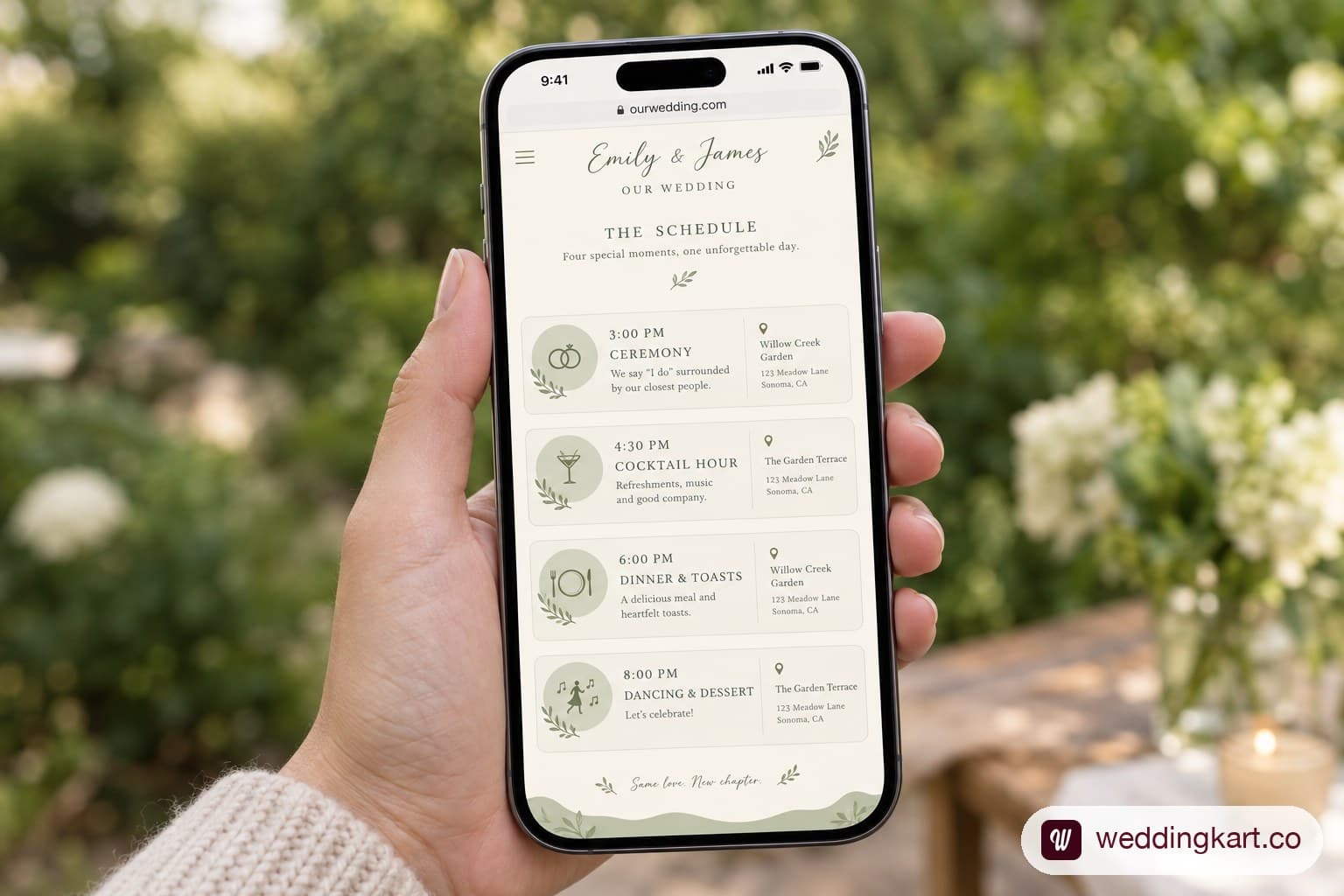
Schedule
The page guests actually use, and the one worth the most care.
What goes on it: every event they are invited to, with date, start time, location name, full address, and dress code. One line per event, in chronological order.
| Event | When | Where | Dress |
|---|---|---|---|
| Welcome drinks | Fri 13 June, 7pm | The Ordinary, 544 King St | Smart casual |
| Ceremony | Sat 14 June, 4pm | Legare Waring House | Garden formal |
| Reception | Sat 14 June, 6pm | Same venue, Oak Allee | Garden formal |
| Farewell brunch | Sun 15 June, 10am | Hotel Bennett | Casual |
What to write for dress code: a named code plus one example. "Garden formal: suits and midi dresses, and the ceremony is on grass so avoid stiletto heels." The second half is the part guests need and almost nobody includes.
Critical rule: if some guests are invited to some events only, do not list every event publicly with a note saying who is invited. Either gate the schedule per guest, or list only the shared events and communicate the others privately. A publicly visible welcome dinner that half your list is not invited to causes more hurt feelings than any other wedding website mistake.
Travel and Stay
The page that saves you the most messages, and the one most couples under-build.
What goes on it:
- Nearest airports, with driving time to the venue. Name two if the second is meaningfully cheaper.
- Hotel room blocks, with the hotel name, the booking link or code, the nightly rate, and the date the block releases. That release date is the single most important thing on this page.
- A second accommodation option at a different price point, even if you have no block there.
- Getting around: whether guests need a car, whether there is a shuttle, and the shuttle times if there is.
- Parking at each venue.
Room blocks are the part that goes wrong. Guests assume the block is open indefinitely, book late, find it released, and pay more. Put the release date in bold, and say it again in your invitation. Our guide on how wedding hotel room blocks work covers how many rooms to contract and what happens if they go unbooked.
RSVP
The page with the most engineering behind it and the least visible design.
What it must collect:
- Guest name, matched to your list
- Attending yes or no
- Per event, if the wedding is more than one event
- Meal choice, if your caterer needs one
- Dietary requirements, as free text, not a dropdown
- Plus-one name, if permitted
- Anything logistical you need: arrival date, whether they need shuttle seats, song request
What to set: an RSVP deadline three to four weeks before the wedding, not two. Your caterer needs a final count roughly two weeks out, and the gap between those two dates is the time you will spend chasing non-responders. Give yourself two weeks of chase time. Our guide on when to send wedding invitations has the full timeline.
Make dietary requirements free text. A dropdown with vegetarian, vegan and gluten-free will not capture the guest with a severe nut allergy, and that is the one that matters.
Registry
The page with the most etiquette anxiety and the least complexity.
What goes on it: links to wherever you are registered. That is all.
What to write: one short line of framing. "Your presence is the gift, but if you'd like to mark the day, we're registered here." Then the links.
What not to do: mention the registry on the invitation itself, which is still considered poor form in the US. The website is the correct place for it, which is a large part of why wedding websites exist.
If you are collecting cash contributions, say what for. "Honeymoon fund" is fine. "Honeymoon fund: we're saving for a week in Kyoto" gets more contributions because it is specific.
What to leave off
Every additional page dilutes the ones that matter. These are the common additions that cost more than they add.
- A long FAQ that duplicates the other pages. Six questions maximum, all of them things not answered elsewhere: whether children are invited, whether the ceremony is outdoors, parking, and what to do about gifts if they cannot attend.
- A guestbook or message wall. It will get four messages, three of them from the same cousin.
- A countdown timer. Adds nothing and dates the site instantly.
- A photo gallery of more than about twelve images. Guests scroll two screens and leave. Save the volume for after the wedding.
- Dress code debates. State the code, give one example, stop. A paragraph justifying black tie reads as defensive.
- Registry begging. One line, then links. Anything more is the thing guests mention to each other.
- Anything you will not maintain. A "latest updates" section that has not changed in five months looks worse than no section.
Getting RSVPs once the site is live
A wedding website is a publishing problem until it goes live and a chasing problem afterwards. Most couples are unprepared for the second half.
The pattern is consistent: a burst of responses in the first week, near silence for a month, then a slow trickle as the deadline approaches, and a final block of maybe a quarter of your list who never respond at all without a direct personal message.
Three things make the difference:
- Send the link more than once. The invitation, a reminder at the midpoint, and a final one a week before the deadline.
- Switch channels for the chase. Guests who ignored two emails will answer a text. The channel matters more than the wording.
- Chase households, not individuals. One message to the couple, not two.
This is where a wedding website stops being enough for larger lists. Once you are chasing more than about sixty non-responders, doing it by hand across email, text and phone becomes unmanageable, and the platform gives you a list rather than a tool. WeddingKart's RSVP tracking handles the chase itself: it knows who has not replied, per event, and reaches them on the channel they actually use rather than the one you sent the first email from. For a 120-guest single-day wedding you will not need it. For a 400-guest multi-day one you will.

Launch checklist
Run this before you send the link to anyone.
| Check | Why it matters |
|---|---|
| Open the site on a phone | Most guests will never see it on a desktop |
| Test the RSVP form as a guest | Submit a fake response and check it arrives |
| Export your test RSVP to CSV | Confirms the data structure works before real responses land |
| Check every address is complete | Venue names without street addresses break map apps |
| Confirm the room block release date is correct | The single most costly error on the site |
| Verify the RSVP deadline matches your invitations | Mismatched dates generate the most guest questions |
| Ask one older relative to find the schedule | If they cannot, your navigation is wrong |
| Check all registry links resolve | Dead links read as carelessness |
| Set the privacy level | Do this before sharing, not after |
| Spellcheck names | Particularly the wedding party |
Frequently asked questions
How far in advance should I create my wedding website? Build it before you send save the dates, roughly eight to ten months out. Guests will look for it the moment they get the save the date, and an incomplete site is worse than a link that arrives later.
Do I need a wedding website if I'm sending paper invitations? Yes, for anything beyond a single small ceremony. Paper carries the invitation, the website carries the detail that changes: schedule updates, accommodation, directions and RSVPs.
What if guests don't use the website? A share will not, and that is normal. Plan a fallback for roughly 10 to 15 percent of your list, usually a phone call from whichever family member knows them best.
Should the website be password protected? Only if it carries accommodation booking codes, a private residential address, or anything you would not want publicly indexed. Otherwise the friction costs more than the privacy buys.
Can I change the URL after sending it out? Most platforms allow it but the old link usually breaks. Decide before the save the dates go out.
How long should I keep it live? At least three months after the wedding. Export your guest and RSVP data the week after the wedding regardless, since platforms archive free sites on their own schedule.