
WhatsApp invitation guide
Quick Answer
How do you send a wedding invitation on WhatsApp?
If you need to know how to send a wedding invitation on WhatsApp, start by choosing the right method for your guest count: personal messages, broadcast lists, or per-guest delivery through an approved business workflow. Prepare a clean guest list, personalize each invitation, ask for an event-level RSVP, and keep follow-up and guest details connected to the same record.
Last updated:
Last updated:
How to Send a WhatsApp Wedding Invitation to Every Guest
A WhatsApp wedding invitation is not only a card or message — it's the first operational touchpoint with each guest. When the invitation, reply, event attendance, travel details, and later updates live in separate chats and spreadsheets, families and planners spend the rest of the wedding reconciling information. This guide covers the sending options, the five-step process, and how to move from “invite sent” to a usable guest plan.
WhatsApp's own limits, before you design a card
These are native WhatsApp app limits — not Weddingkart's. They matter if you're designing an image or video invite to send yourself, from your own phone.
Image size
1080 × 1920px (9:16 vertical)
Export format
PNG or JPEG for images, PDF for multi-page
File size cap
Up to 16MB per image or document
Broadcast list cap
Up to 256 contacts who already have your number saved
If your invite has a lot of small text — a detailed schedule, a QR code, a map — export it as a PDF instead of an image. WhatsApp compresses images automatically, and fine text is usually the first thing to blur after a couple of forwards.
When to send each message
Indian weddings usually aren't a single event — Mehendi, Sangeet, the wedding itself, and the reception each draw a different mix of guests. Sending everything in one message on one day tends to get buried. A staggered timeline works better.
8–12 weeks before
Save-the-date
A short message with just the date and city, so guests can block their calendars and book travel if they’re coming from out of town.
6–8 weeks before
Formal invitation
The full invite — venue, timing for each function, dress code, and RSVP details. This is the one worth designing properly.
3–4 weeks before
Function-specific reminders
A short nudge for each event — Mehendi, Sangeet, wedding, reception — as its date approaches, especially useful for guests only attending one or two functions.
1 week before
Final RSVP reminder
A quick, friendly follow-up to anyone who hasn’t responded yet, with logistics — parking, entry point, a contact number for the day.
Choose the right way to send your WhatsApp wedding invitations
There is no single best method for every wedding. Choose based on the size of the list, the amount of personalisation required, the number of events, and how replies need to be tracked.
| Factor | Personal messages | Broadcast-style sending | Structured per-guest delivery |
|---|---|---|---|
| Best suited to | Small guest lists, close family | Simple one-way announcements | Larger or multi-event guest lists |
| Main advantage | Fully personal and familiar | Fast for a shared update | Message and guest record stay connected |
| Operational limitation | Repetitive to send, update, and track manually | Personalisation and reply tracking need separate work | List, message fields, and workflow need setup first |
| Personalised with guest name | |||
| One-tap RSVP per event |
Personal messages are the right choice for parents, siblings, elders, and guests who should hear from the family directly. The limitation appears when several family members send from different phones, or when the wedding has separate guest lists for Mehendi, Sangeet, the wedding ceremony, and the reception.
Broadcast-style sending can work for a common announcement or reminder. Even when delivery is simple, planners still need a reliable way to answer three questions: who received the message, who replied, and which events each person will attend.
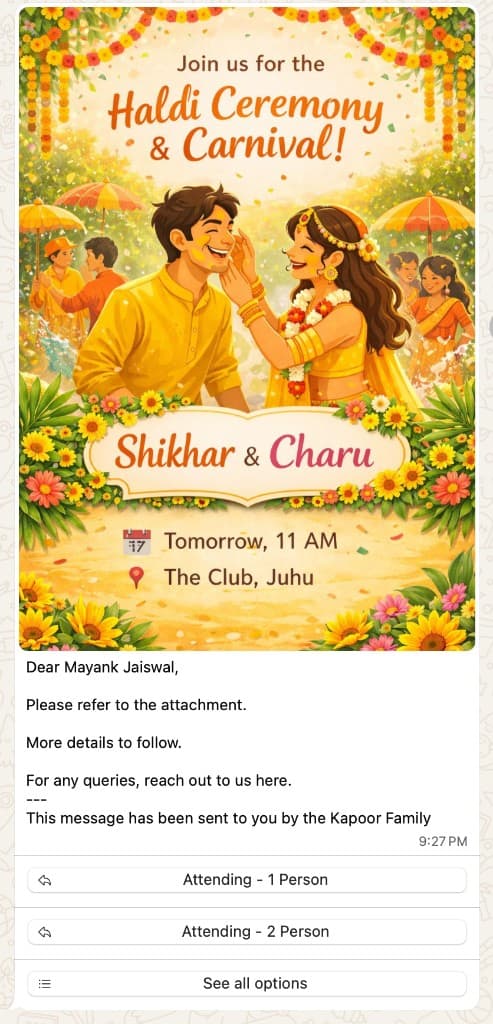
Structured per-guest delivery begins with one guest list and sends a personalised invitation to each guest. Weddingkart's hosted-sender workflow does not require you to set up a dedicated WhatsApp Business number — the useful difference isn't “bulk messaging,” it's the connection between the invitation and the rest of the guest record: event-level RSVP, pending follow-up, and travel or ID collection when needed.
How to send wedding invitations on WhatsApp in five steps
1. Clean the guest list before writing the message
Start with the people, not the card. Each guest record should have the correct name, phone number, household or family group, and the events relevant to that guest. For a multi-event wedding, don’t assume every guest is invited to every function — separating event access before the first message prevents confusing invitations and unreliable RSVP totals later.
2. Prepare one clear invitation and the fields that change
State who is getting married, the event(s), the date, the venue or city, and the action expected from the guest. Personalise with the guest’s name, family name, event, or language — Weddingkart supports Hindi, Hinglish, English, and Arabic, so guests read the invitation in whichever they’re most comfortable with.
3. Send close-family invitations personally
A structured workflow shouldn’t remove human judgment. Parents, siblings, elders, and other close relationships may still deserve a call or personal note before the wider list is contacted. Use automation for repetitive coordination, not for decisions that depend on family etiquette.
4. Send each guest the relevant invitation
For larger or multi-event lists, send from the prepared guest list rather than copying the same text across unrelated chats. Check the guest name, event access, language, and media before you launch the send.
5. Ask for an event-level RSVP and track what’s pending
A single "yes" is often not enough for an Indian multi-event wedding — one guest may attend the Sangeet and reception but not the daytime ceremony. Ask for the relevant event response and keep pending guests visible for follow-up.
What happens after the invitation?
The invitation is the start of guest operations, not the end. Once attendance is known, planners and families may need to collect travel or ID details, organise hotel rooms, share transfers, send event updates, and answer repeated guest questions.
Guest lists are unlimited; included messages vary by plan.
What should a WhatsApp wedding invitation include?
- The couple’s names
- The host or family name where relevant
- The ceremony or event name
- Date and time
- Venue or city
- A map or travel detail when useful
- The RSVP action and deadline
- A contact or concierge path for questions
Formal
Dear [Guest Name], we would be delighted to celebrate [Couple Names]’ wedding with you. Your invitation for [Event Name] on [Date] at [Venue] is attached. Please let us know whether you will attend by [RSVP Date].
Casual
[Guest Name], we’re getting married! 🎉 Come celebrate [Event Name] with us on [Date] at [Venue] — can’t wait to see you there. Let us know if you’re in by [RSVP Date].
Hindi / Hinglish
[Guest Name] जी, बड़े हर्ष के साथ हम आपको [Couple Names] के [Event Name] में आमंत्रित करते हैं। 📅 [Date] 📍 [Venue] कृपया [RSVP Date] तक अपनी उपस्थिति की पुष्टि करें।
Use the full WhatsApp wedding invitation message templates library for event-specific, relationship-specific, and language-specific examples.
See the Weddingkart invitation workflow
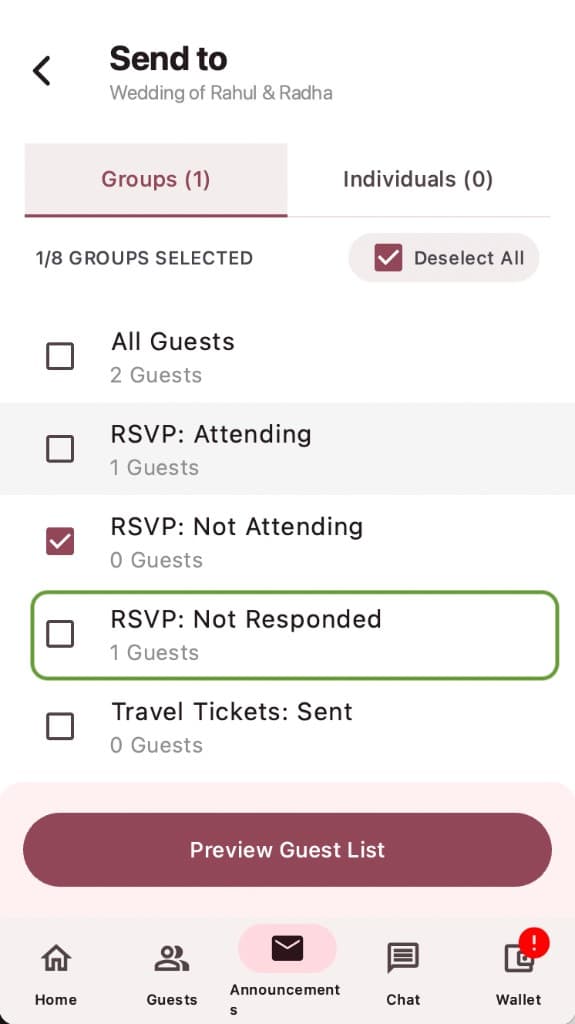
Weddingkart is a WhatsApp-native wedding guest-management platform for professional event managers and DIY couples in India and the UAE. A workflow can connect the approved guest list, personalised WhatsApp invitations, multi-event RSVP, pending follow-up, travel and ID collection when required, and concierge communication — guests continue through WhatsApp without downloading another app.

See how Weddingkart manages invitations and replies
One WhatsApp workflow for the invitation, the RSVP, and everything that follows.
Frequently asked questions
Can I send a wedding invitation to every guest on WhatsApp?+
Yes. The right method depends on the size and complexity of the guest list. Personal messages may be sufficient for a small wedding. A structured per-guest workflow is more useful when invitations need personalisation, event-level replies, and coordinated follow-up.
Do I need a dedicated WhatsApp Business number to use Weddingkart’s hosted sender?+
No. Weddingkart’s hosted-sender workflow does not require you to set up a dedicated WhatsApp Business number.
Should I use a WhatsApp group for wedding invitations?+
A group can be useful for shared discussion, but it doesn’t replace a guest list or a private invitation. Send important invitations and RSVP requests to the relevant guest or household, especially when different people are invited to different events.
Can guests RSVP separately for Mehendi, Sangeet, the wedding, and the reception?+
Yes. Weddingkart supports multi-event RSVP, so attendance can be collected for the events relevant to each guest rather than treating the wedding as one yes-or-no response.
Can I send invitations in Hindi, Hinglish, English, or Arabic?+
Yes. Weddingkart supports Hindi, Hinglish, English, and Arabic. Use the language each guest is most comfortable reading.
What should I do after a guest confirms attendance?+
Keep the confirmation attached to the guest record. For destination or multi-day weddings, the next steps may include travel details, ID collection, hotel or room information, transfers, event updates, and concierge questions.
How many guests can I add to Weddingkart?+
Weddingkart guest lists are unlimited. Included messages vary by plan, so check the current pricing page for the latest plan details.
Related resources
Reviewed by the Weddingkart product team. Search demand and page-performance data reviewed 23 July 2026. Product and plan details should be checked against the current pricing and feature pages before relying on them.
By Mayank JaiswalLast updated