
Indian Wedding Guest List Excel Cleaner
Your wedding guest list has 800 names, half of them say "Chacha ji" or "Driver bhaiya", phone numbers are all over the place, and there are probably 50 duplicates. Upload it here - we'll fix all of that in seconds.
Quick Answer
How to clean a wedding guest list Excel file?
Upload your guest list Excel or CSV to instantly clean up names like "Chacha ji" and "Driver bhaiya", normalise Indian phone numbers to +91 format, and flag duplicates. AI-powered name detection catches relationship words, professions, and placeholder entries that slip into every Indian wedding guest list.
Last updated:
What problems do Indian wedding guest lists typically have?
If you've ever opened a family wedding Excel sheet, you know the chaos. Everyone adds guests their own way, nobody follows a format, and by the time you're ready to send invites, the list is a mess. Here's what we see in almost every guest list:

Relationship words instead of names
"Sharma ji ke chacha", "Bhabhi", "Mama ji", "Aunty" - everyone knows who they mean, but your WhatsApp broadcast doesn't.
Professions used as names
"Driver", "Electrician", "Pandit ji", "Carpenter" - helpful labels, terrible guest names.
Placeholder and dummy entries
"Test", "XYZ", "Guest", "2nd floor wale", "Padosi" - leftover entries nobody cleaned up.
Phone number chaos
Some have country codes, some don't. Some have spaces and dashes, some are missing entirely. Same number listed under different names.
Random objects and descriptions
"Sofa Set", "Ground Floor", "Delhi Wale" - somehow these end up in the name column too.
ALL CAPS and inconsistent casing
"RAJESH KUMAR" next to "priya sharma" next to "aMiT jAiN" - looks terrible on printed cards and invites.
Sound familiar? This tool catches all of it. Here's what it looks like:
See it in action
A real-world guest list before and after cleaning - no upload needed, just scroll.
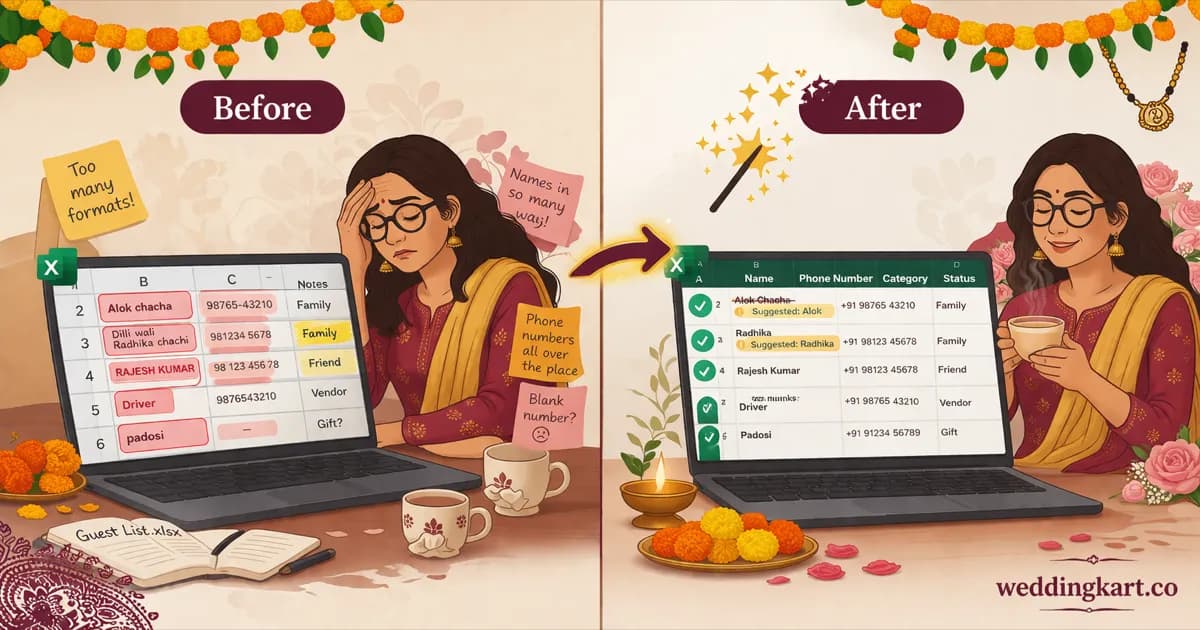
| Name | Phone |
|---|---|
| Alok chacha | 9876543210 |
| Dilli wali Radhika chachi | 98765-43-211 |
| Ramesh pandit ji | 91 98765 43212 |
| RAJESH KUMAR | 9876543210 |
| Priya Sharma | +919876543213 |
| padosi | xyz123 |
| amit jain | 9876543214 |
| Name | Phone | Status |
|---|---|---|
| Alok Chacha⚠ Relationship word detectedSuggested: Alok | +919876543210 | |
| Dilli Wali Radhika Chachi⚠ Place + relationship word detectedSuggested: Radhika | +919876543211 | |
| Ramesh Pandit Ji⚠ Profession detectedSuggested: Ramesh | +919876543212 | |
| Rajesh Kumar⚠ Duplicate phone - same as row 1 | +919876543210 | |
| Priya Sharma | +919876543213 | |
| Padosi⚠ Placeholder - not a name | Invalid number | |
| Amit Jain | +919876543214 |
That's 5 out of 7 rows with problems - and this is a small list. Imagine 800+ rows.
Upload your Excel or CSVSmart Name Cleaning
The biggest problem with Indian wedding guest lists isn't phone numbers - it's the names. This is where our tool really shines.
- →Detects relationship words - bhaiya, didi, mama, chacha, aunty, papa, bhabhi, uncle, and dozens more. When someone adds "Sharma uncle" instead of the actual name, we flag it.
- →Flags professions and occupations - Driver, Electrician, Pandit, Carpenter. These are roles, not guest names.
- →Catches placeholder entries - Guest, Test, Sample, XYZ, "2nd floor wale", "Padosi". Entries everyone meant to fix later but never did.
- →Spots objects, places, and descriptions - "Sofa Set", "Ground Floor", "Delhi Wale". Not names, but they end up in the name column surprisingly often.
- →Fixes incorrect casing automatically - ALL CAPS and all lowercase names are corrected to proper Title Case.
- →Flags names with numbers or special characters - "Rajesh123" or "Amit @work" get caught before they end up on an invite.
- →AI-powered suggestions - for every flagged name, the tool suggests a corrected version where possible, so you're not just told what's wrong - you get a fix.
Phone Number Cleaning
Every guest list has phone numbers in ten different formats. We normalise them all so your WhatsApp broadcasts and invitation tools actually work.
- →Indian numbers normalised to +91 - any 10-digit number without a country code is automatically formatted as +91XXXXXXXXXX, ready for WhatsApp or any messaging tool.
- →International numbers handled - numbers with 11–15 digits are parsed with their country code. NRI guests and overseas family covered.
- →Missing numbers flagged - guests with no valid phone number are highlighted so you can follow up before invites go out.
- →Duplicate phone detection - if the same number appears under "Rajesh" and "Rajesh Kumar", we catch it. No more double-invites to the same person.
- →Multiple numbers per row - some guests have 2–3 numbers listed in one cell. The tool keeps up to 3 and normalises each one.
Works With Any Excel Format
No need to rearrange your spreadsheet into a specific template. Just upload whatever you have.
- →Auto-detects name and phone columns - even in messy, unstructured spreadsheets where nothing is labelled properly. You can adjust the mapping if it guesses wrong.
- →Supports .xlsx, .xls, and .csv - whatever format your family shared the list in, it works.
- →Handles messy columns gracefully - unnamed columns, date columns, merged cells, non-text data types. The tool doesn't break on real-world spreadsheets.
Your Data Stays Private
Your file is uploaded securely to Weddingkart servers for cleaning - including AI-powered name detection, phone normalisation, and duplicate checks. We do not store your file or guest data after processing. The cleaned report is returned to your browser and the upload is deleted immediately.
Frequently Asked Questions
How do I clean my wedding guest list Excel file?
Upload your guest list (.xlsx, .xls, or .csv) using the tool above. It auto-detects your name and phone columns, fixes casing, flags problematic names like "Chacha ji" or "Driver bhaiya", normalises Indian phone numbers to +91 format, and flags duplicates. Download the cleaned CSV when you're done - ready to import into Weddingkart or any wedding management tool.
How are Indian phone numbers detected and fixed?
Any 10-digit number without a country code is treated as Indian and normalised to +91 E.164 format (e.g., 9876543210 becomes +919876543210). Numbers with 11–15 digits or a leading + are parsed as international. The tool also flags guests with missing or invalid numbers and catches duplicate numbers listed under different names.
How do I remove duplicate guests from my wedding list?
The tool automatically detects duplicate phone numbers across your entire guest list. For example, if the same number appears under "Rajesh" in one row and "Rajesh Kumar" in another, the duplicate is flagged in the issues report so you can merge or remove the extra entry. This is especially common when multiple family members add guests independently.
What kind of name problems does the tool detect?
The tool catches relationship words used as names (bhaiya, didi, mama, chacha, aunty, uncle), professions entered as names (Driver, Electrician, Pandit, Carpenter), placeholder entries (Guest, Test, XYZ, "Padosi"), objects or descriptions in the name field ("Sofa Set", "Ground Floor", "Delhi Wale"), ALL CAPS or inconsistent casing, and names with numbers or special characters. Where possible, it suggests a corrected version.
Do I need a specific template or format?
No. Upload whatever Excel or CSV format you already have. The tool auto-detects name and phone columns even in messy, unstructured spreadsheets. It handles unnamed columns, date columns, and non-text data types gracefully. You can adjust the column mapping before cleaning if the auto-detection needs a tweak.
Is my guest list data sent to your servers?
Your file is uploaded securely to Weddingkart servers for cleaning. We do not store your file or guest data after processing - the cleaned report is returned to your browser and the upload is deleted immediately.
Is there a free Indian wedding guest list template?
You don't need one. The whole point of this tool is that it works with whatever format you already have - no rigid template required. Just upload your existing guest list Excel or CSV, and the tool handles the rest. If you're starting from scratch, any spreadsheet with a name column and phone column will do.
How do I send WhatsApp invites from a guest list Excel file?
First, clean your guest list using this tool to fix names and normalise phone numbers. Then import the cleaned Excel into Weddingkart. From there, you can send personalised WhatsApp invitations, save-the-dates, RSVP requests, and event updates to all your guests in minutes - no manual messaging required.
Next step
Clean list ready? Move it into the Weddingkart guest list app.
Import your cleaned Excel into the Weddingkart guest list app to send WhatsApp invitations with one-tap RSVP buttons, track delivery per guest, and collect travel tickets and ID cards - all without leaving your existing spreadsheet workflow.
See how the guest list app works →By Weddingkart TeamLast updated
Was this tool helpful?
Share