
New · Works in ChatGPT and Claude
Use Weddingkart in ChatGPT and Claude
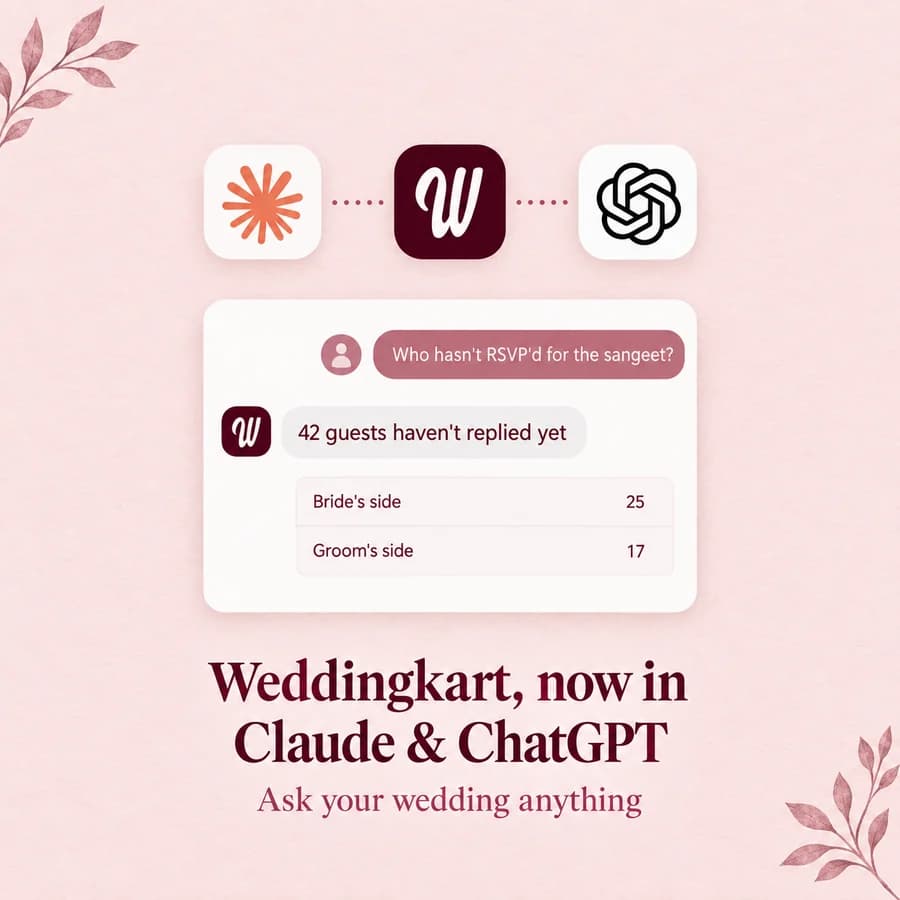
Connect Weddingkart once, sign in with your phone number, and ask about your guests, RSVPs, events and travel in plain English. It reads; it never sends.
Last updated:
Connector URL
https://mcp.weddingkart.co/mcpKeep the /mcp at the end. It is required.
Quick Answer
Can I use Weddingkart in ChatGPT or Claude?
Yes. Weddingkart has an MCP connector at https://mcp.weddingkart.co/mcp. Add it once in ChatGPT (Plugins → Add → Create custom MCP server) or Claude (Customize → Connectors → Add custom connector), sign in with the phone number you use in Weddingkart and an OTP, and click Allow. Then ask about your guests, RSVPs, events and travel in plain English.
It is read-only: it shows only what your role can see in the Weddingkart app, and it cannot message guests, change data or spend credits.
Last updated:
What can you ask Weddingkart in ChatGPT or Claude?
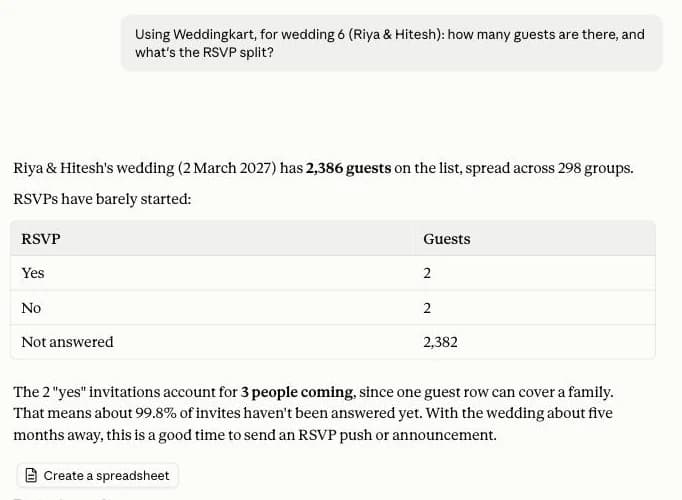
The kind of thing you would normally scroll a guest list for, or ring the coordinator about at 11pm. Type it the way you would say it.
What it can look up
Your weddings
Every wedding you’re on, and your role in each.
Guest counts and RSVPs
Totals and the yes / no / pending split.
Guest lists, filtered
By RSVP, group, name, who has a travel ticket, who has an ID card.
Groups
Each group and how many people are in it.
Events
Every function and who is invited to each one.
RSVP history
Who changed their answer, when, and how: the WhatsApp bot, the app, or a voice call.
Travel
Arrivals and departures by date, and by airport or railway station.
How-to help
Answers from Weddingkart’s approved help, plus current prices for that wedding.
How to set it up (about two minutes)
You need a Weddingkart account on at least one wedding, and the phone number you use to log in to Weddingkart.
Read-only access. You can only query your weddings; you cannot edit anything, so it’s safe. No messages are sent to guests, nothing is changed and no credits are spent.
How to connect Weddingkart to ChatGPT
Tested on ChatGPT Plus. Screenshots taken in chatgpt.com on 2 Oct 2026.
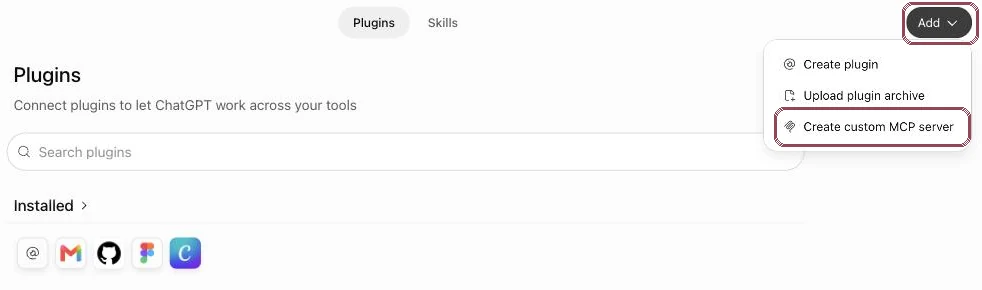
- 1In ChatGPT, open Plugins in the left sidebar. Click Add (top right), then Create custom MCP server. Don’t see it? Turn on Developer mode in Settings → Plugins first.
- 2Name it Weddingkart, paste the URL
https://mcp.weddingkart.co/mcpkeep OAuth as the authentication, tick I understand and want to continue and click Create as a plugin.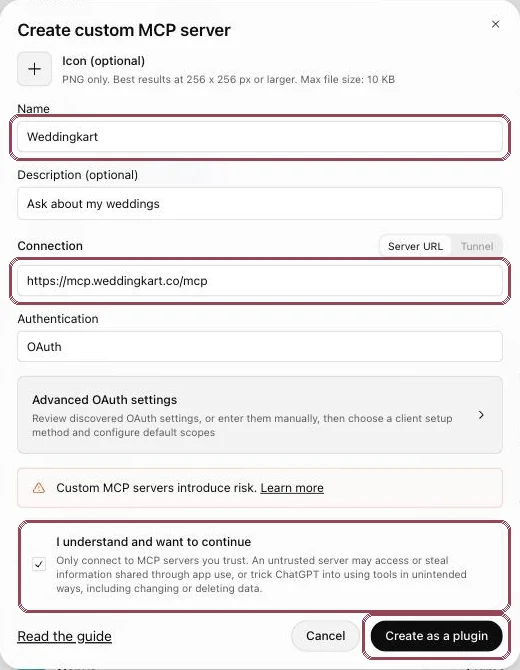
- 3The Weddingkart sign-in window opens. Enter your mobile number (+91 is preselected) and click Send OTP.
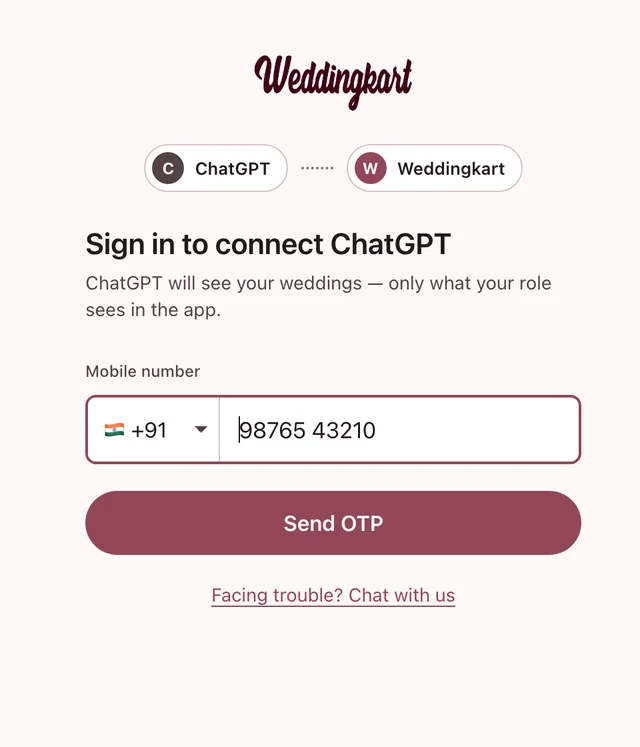
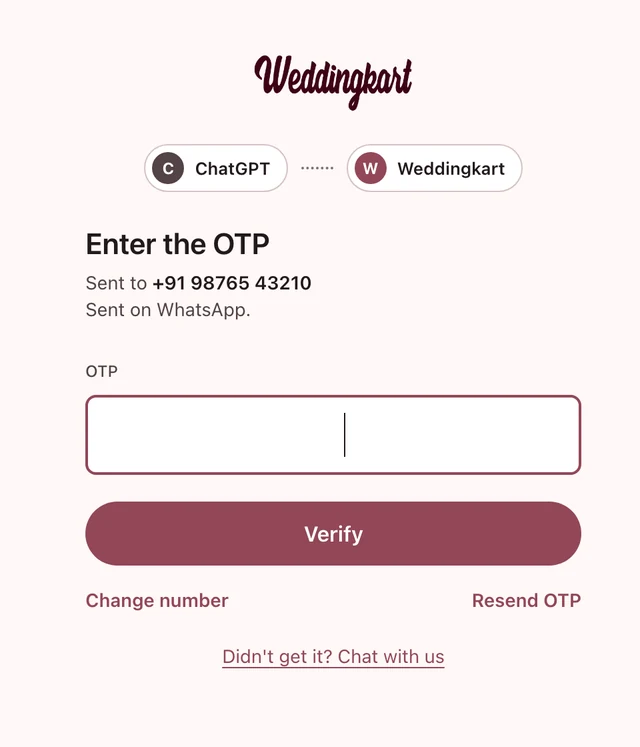
- 4Type the OTP from WhatsApp or SMS and click Verify. Use Change number or Resend OTP if needed.
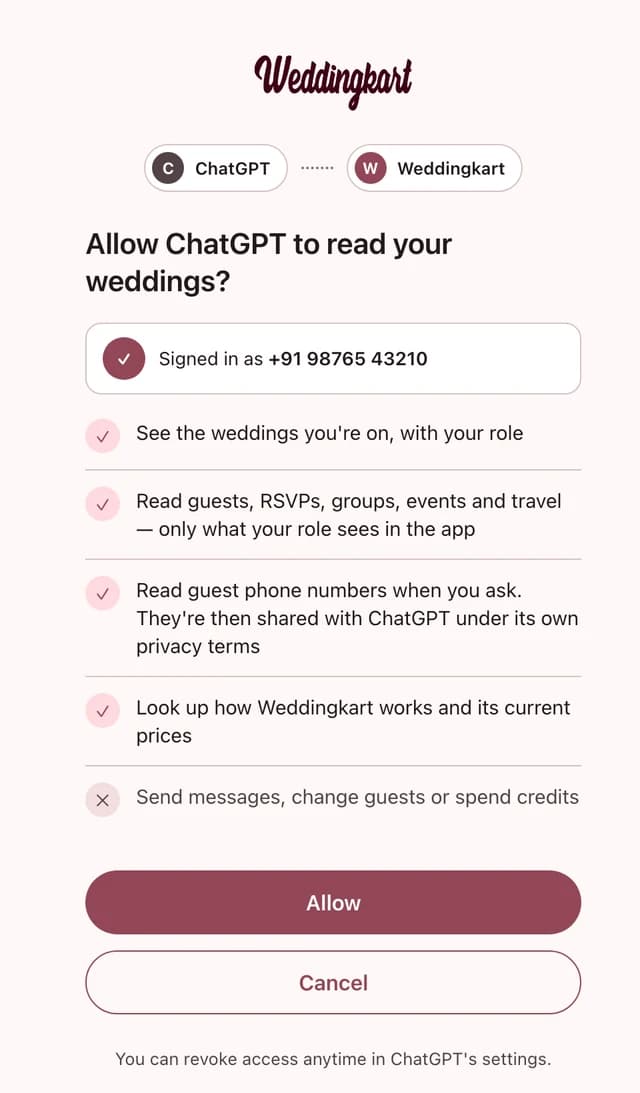
- 5Check what ChatGPT will be able to read and click Allow.
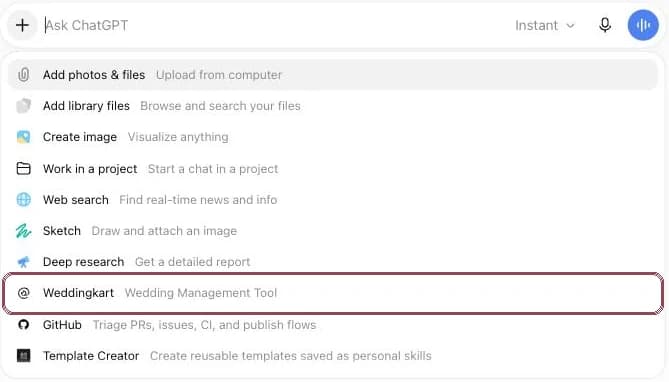
- 6In a new chat, click + and pick Weddingkart.
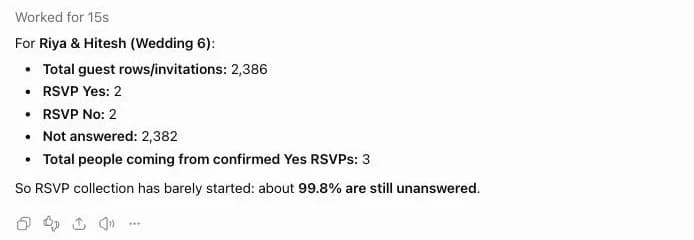
- 7Ask your question. ChatGPT answers from your live wedding data.
How to connect Weddingkart to Claude
Works on paid Claude plans. The Free plan allows one custom connector.
- 1In Claude, open Customize → Connectors. Click + Add, then Add custom connector.
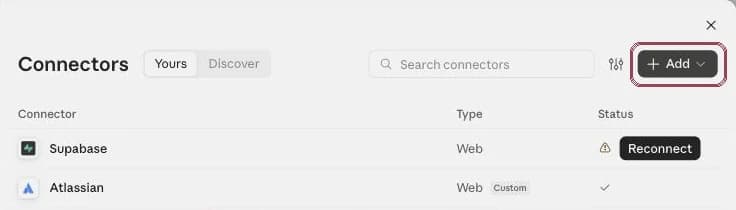
- 2Name it Weddingkart, paste the URL
https://mcp.weddingkart.co/mcpand click Continue.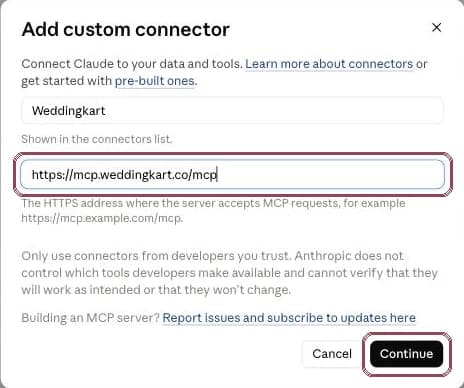
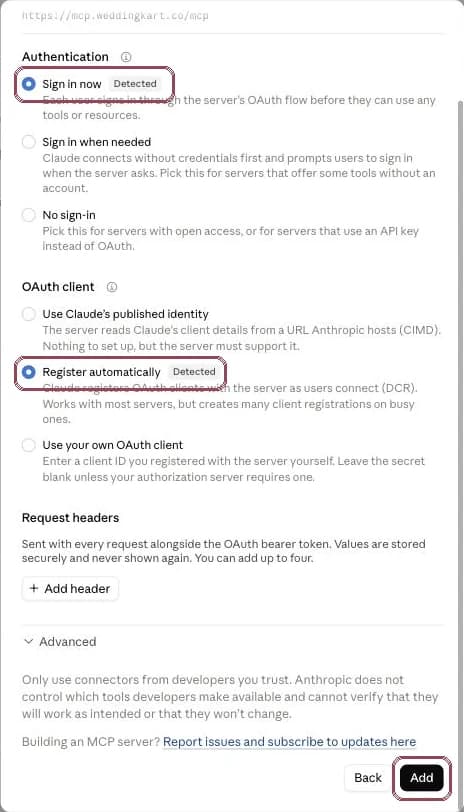
- 3Claude detects the sign-in settings by itself (Sign in now and Register automatically). Leave them as they are and click Add.
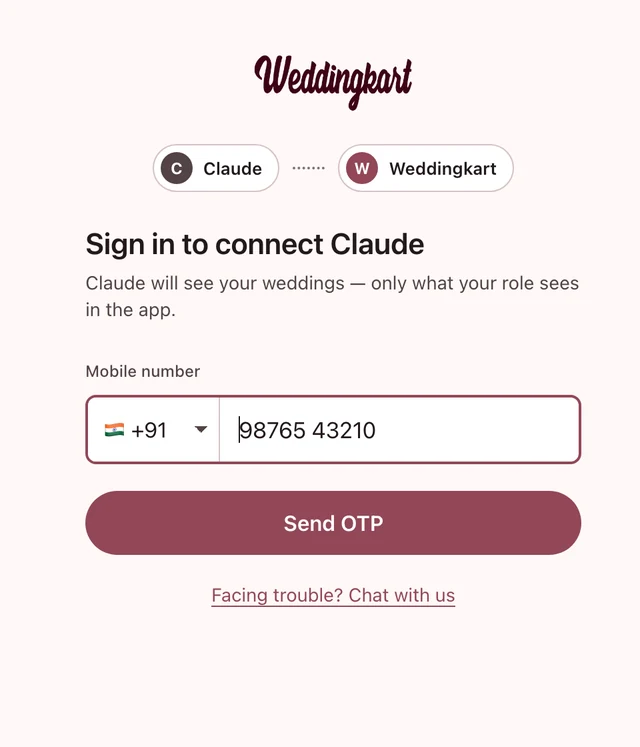
- 4A Weddingkart sign-in window opens. Enter the mobile number you use in Weddingkart (+91 is preselected; pick another flag if you are outside India) and click Send OTP. If the window doesn’t open, click Connect next to Weddingkart.
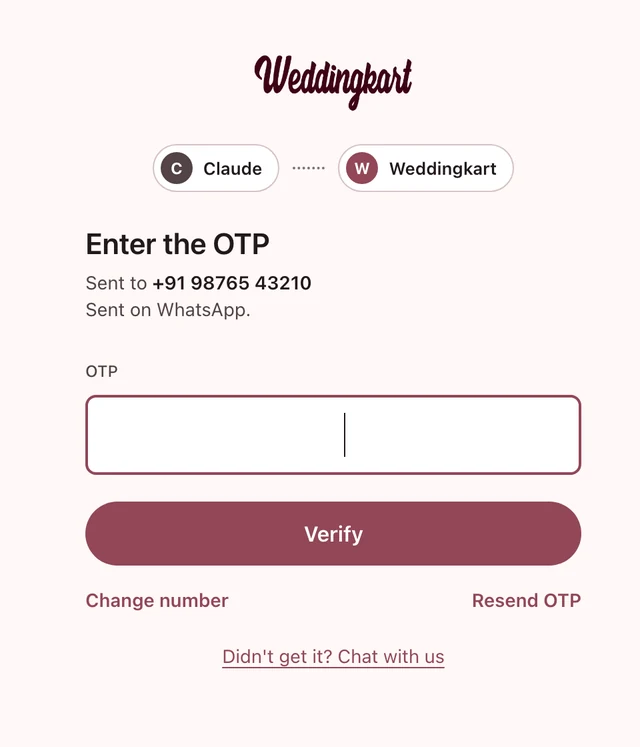
- 5Type the OTP you got on WhatsApp or SMS and click Verify. Typed the wrong number? Click Change number. No OTP? Click Resend OTP.
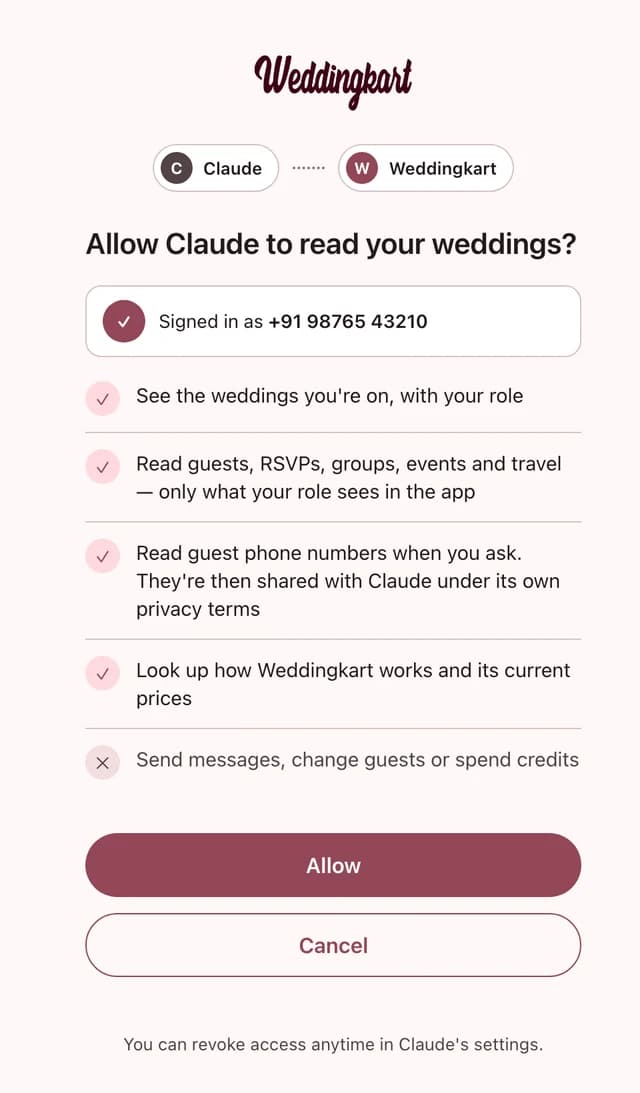
- 6Check what Claude will be able to read and click Allow. You are back in Claude, connected.
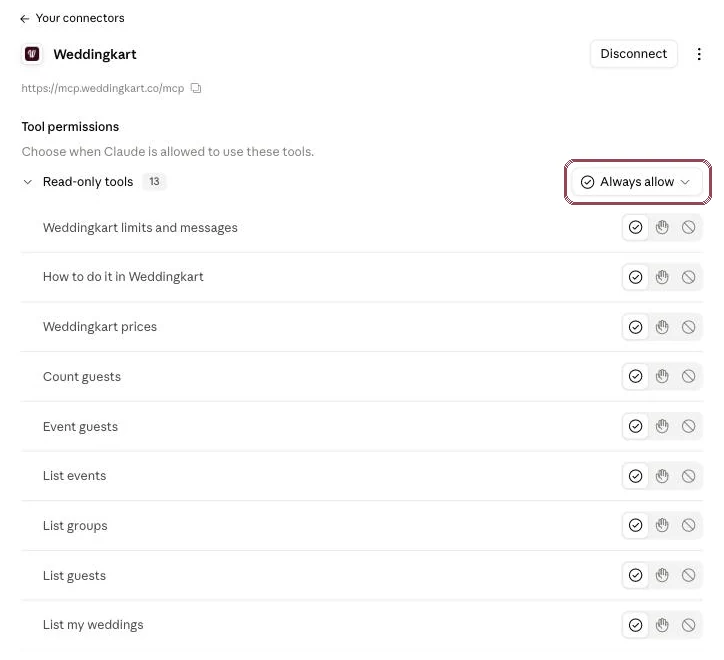
- 7Optional: in the connector’s page, set the tools to Always allow so Claude doesn’t ask before every lookup. Every Weddingkart tool is read-only.
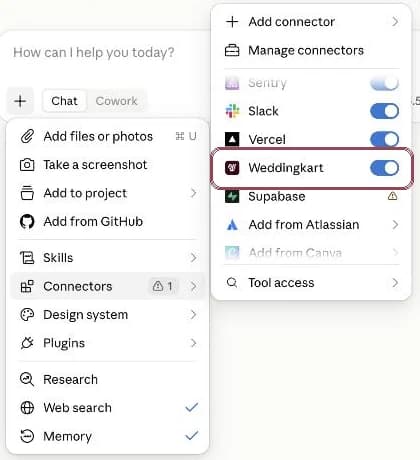
- 8In a chat, click + → Connectors and make sure Weddingkart is switched on.
- 9Ask away. Start with “list my weddings”, then ask about guests, RSVPs, events or travel.
Stuck on a step? Message us on WhatsApp and we’ll set it up with you.
Chat on WhatsAppIs it safe? Read-only and secure
We kept it read-only on purpose. A chat window is a great place to ask “who’s missing?” and the wrong place to fire a WhatsApp at 400 guests because an assistant misread one line. Sending stays in the Weddingkart app, where you see the preview and the guest count before anything goes out.
It cannot
- Send WhatsApp messages or announcements
- Add, edit or delete guests
- Spend credits
- Make payments
It only shows what your role (admin, member or view-only) can see in the Weddingkart app. Guests, and people not on a wedding team, get nothing.
How it is protected
- Sign-in uses OAuth 2.1 with PKCE, with your phone number and an OTP. No password to leak.
- Tokens are stored hashed, expire (access after 1 hour, refresh after 30 days) and can be revoked at any time.
- Every request is logged: who asked, which wedding, which tool.
- Each connection has daily data limits.
- It reads through a read-only database login, so it cannot change anything even by mistake.
- Guest phone numbers are only returned when you explicitly ask for them.
To disconnect: remove the Weddingkart connector in Claude (Customize → Connectors) or ChatGPT (Settings → Plugins → Weddingkart → Uninstall). To revoke every connection on your account at once, email contact@weddingkart.co. Answers are processed by the assistant you chose, under its own privacy terms. See our privacy policy for the details.
Frequently asked questions
What is the Weddingkart MCP connector?
It is a read-only link between your Weddingkart account and an AI assistant such as ChatGPT or Claude. It uses MCP (Model Context Protocol), the standard way AI assistants connect to outside apps. You paste one URL into the assistant, sign in with your phone number and an OTP, and the assistant can then look up your weddings for you.
How do I connect Weddingkart to ChatGPT?
In ChatGPT, open Plugins in the left sidebar, click Add, then Create custom MCP server. Name it Weddingkart, paste https://mcp.weddingkart.co/mcp, keep OAuth, tick I understand and click Create as a plugin. Sign in with your phone number and OTP and click Allow. In a chat, click + and pick Weddingkart.
How do I connect Weddingkart to Claude?
In Claude, open Customize → Connectors, click Add, then Add custom connector. Name it Weddingkart, paste https://mcp.weddingkart.co/mcp, click Continue and then Add. Sign in with your phone number and OTP and click Allow. In a chat, switch Weddingkart on under + → Connectors.
What can I ask Weddingkart in ChatGPT or Claude?
Anything you would look up in the guest list: who hasn’t RSVP’d for an event, how many guests are coming from each side, who arrives on a date and at which airport or station, who changed their RSVP this week, which groups are invited to an event, and how to do something in the Weddingkart app.
Is it safe to connect Weddingkart to Claude or ChatGPT?
The connector is read-only and signs you in with your phone number and an OTP over OAuth 2.1 with PKCE. Tokens are hashed, expire and can be revoked, every request is logged, and each connection has daily data limits. Whatever it returns goes to the AI assistant you chose and is handled under that assistant’s own privacy terms.
Can it send WhatsApp messages to my guests?
No. The connector cannot send WhatsApp messages or announcements, add, edit or delete guests, spend credits, or make payments. It can only read. To send anything, use the Weddingkart app.
Who can see what?
You see exactly what your role (admin, member or view-only) can see in the Weddingkart app, for the weddings you are on. Guests, and anyone who is not on a wedding’s team, get nothing.
Will it share my guests’ phone numbers?
Only if you explicitly ask for them. When you do, they are shared with the AI assistant you chose, under that assistant’s own privacy terms.
Does it cost extra?
The connector is included with Weddingkart. Your Claude or ChatGPT subscription is separate and billed by that provider.
Which Claude and ChatGPT plans does it work on?
In Claude, custom connectors work on paid plans, and the Free plan allows one custom connector. In ChatGPT, we have tested it on ChatGPT Plus. If you don’t see Create custom MCP server under Plugins → Add, turn on Developer mode in Settings → Plugins; if that is missing too, your plan or workspace admin doesn’t allow custom connectors.
How do I disconnect?
Remove or disconnect the Weddingkart connector in Claude (Customize → Connectors) or ChatGPT (Settings → Plugins → Weddingkart → Uninstall). To revoke every connection on your account at once, contact Weddingkart support at contact@weddingkart.co.
Why does the URL need /mcp at the end?
The connector lives at https://mcp.weddingkart.co/mcp. Without /mcp at the end, Claude or ChatGPT will not find it and the setup will fail.
Not on Weddingkart yet?
The connector reads your Weddingkart wedding, so start there. Import your guest list, send invitations on WhatsApp, then come back and ask.
By Mayank JaiswalLast updated