
Last updated:
All PostsWhatsApp Channels for Weddings: Should You Use One for Live Updates?
WhatsApp Channels have grown into a genuinely large feature — Meta reports over 500 million monthly users globally — but almost nobody has written about using one specifically for a wedding. Here's what a Channel actually is, when it's genuinely useful for a wedding, and where it can't replace a group or a proper RSVP tool.
What a WhatsApp Channel is (and how it differs from a group)
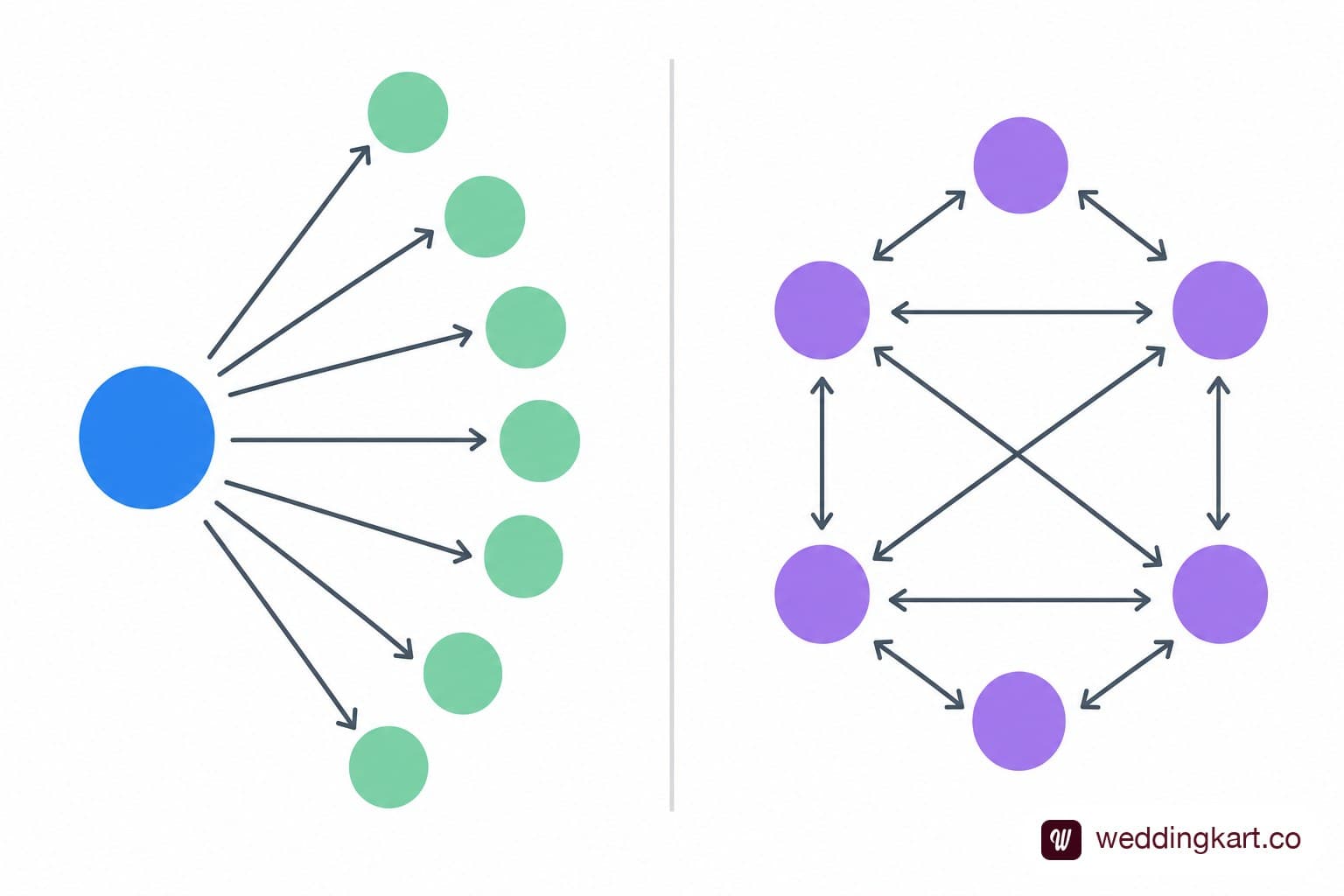
A Channel is a one-way broadcast tool, closer to a social media following than a chat. The person or account running the Channel posts updates — text, photos, videos, polls — and everyone who's followed the Channel sees them in a feed. Followers can't reply in the Channel itself, and followers can't see who else is following. That's the core difference from a group: a group is a two-way conversation among everyone added to it; a Channel is one-to-many broadcasting with no group chatter, no reply threads, and no visibility between followers.
The case for using a Channel: one-way, broadcast-only, no group chaos
For wedding-day updates specifically, this structure is genuinely well suited. Posting "Baraat leaving the venue at 6pm, please be seated by 5:45" to a Channel reaches everyone who's following instantly, without triggering fifty "got it!" replies cluttering the feed the way it would in a group. It's also lower-commitment for guests to follow than to be added to a group — no phone number gets shared with other guests, and there's no ongoing notification noise from other people's messages.
A Channel works well for: save-the-date announcements, countdown posts in the weeks before the wedding, real-time day-of updates (schedule changes, weather-related venue shifts), and a post-wedding photo drop once professional photos are ready — see our comparison of tools for collecting wedding guest photos in India for that last piece.
The case against: guests still need a group or 1:1 for RSVPs
The honest limitation is the same thing that makes a Channel appealing — it's one-way. There's no built-in way for a guest to respond, confirm attendance, or ask a question through the Channel itself. If you're using a Channel for wedding updates, you still need a separate mechanism — a group, individual WhatsApp messages, or a dedicated RSVP tool — to actually collect confirmations and answer guest questions. A Channel is a complement to two-way communication, not a replacement for it.
How to set one up for your wedding in 10 minutes
- Open WhatsApp, tap the Updates tab, and select Create Channel.
- Give it a clear, findable name — "[Couple Name] Wedding Updates" works better than something cute that guests can't search for.
- Add a profile photo (an engagement photo or save-the-date graphic) and a short description stating what the Channel is for.
- Share the Channel's invite link directly with guests via your invitation message, or generate a QR code for physical invites.
- Post your first update — a save-the-date or welcome message — to confirm it's working before the wedding season gets busy.
Best practices: what to actually post
A Channel that only posts once is forgettable; one that posts constantly with nothing new feels spammy. A simple content rhythm works well:
- Save-the-date phase: one announcement post, then occasional countdown updates (30 days, 7 days, 1 day out).
- Week-of: schedule reminders, weather notes, parking or transport instructions.
- Day-of: real-time updates — ceremony starting, any timing shifts, where to find the reception entrance.
- Post-wedding: a thank-you message and a link to the photo/video gallery once it's ready.
Where WeddingKart fits alongside a Channel
A Channel is genuinely great for the one-way, broadcast side of wedding updates — but it doesn't solve the question every host actually needs answered: who's coming, and to which events? WeddingKart handles that two-way side directly — RSVP tracking, scheduled announcements for reminders, and per-event attendance tracking via multi-event support — so a Channel can stay focused on what it's good at (announcements and day-of updates) while the actual guest-management work happens through a system built for it. For destination weddings specifically, see our destination wedding guest management page. See How It Works
The takeaway
A WhatsApp Channel is a good, low-friction way to broadcast wedding updates to a wide audience without cluttering a group chat — but it's a complement to your invitation and RSVP process, not a substitute for it. Use it for what it's built for (one-way announcements), and pair it with a real two-way system for anything that needs a response.
💌 Let a Channel handle one-way announcements, and let WeddingKart handle the two-way work — RSVP tracking, scheduled reminders, and per-event attendance, all in one place.
See How It Works →By Mayank JaiswalLast updated
Was this article helpful?
Share