
Quick Answer
How do you send Gujarati wedding invitations via WhatsApp to 500+ guests?
Send a personalised WhatsApp message to each guest with the event name, date and day, time, venue with a Google Maps link, dress code, an RSVP request, and a host contact number. For 500+ guests, do not send from your personal number — it risks a WhatsApp ban and gives you no delivery or RSVP tracking. Use a platform built on the official WhatsApp Business API (like Weddingkart) to merge each guest's name, route the right event invite, and track replies.
Last updated:
57%
of Indian couples use WhatsApp as their primary invitation channel
6
ready-to-use templates in English & Gujarati
₹15k–₹50k+
cost of a printed Kankotri for 500 guests
500+
guests reachable in minutes via WhatsApp
Last updated:
All PostsGujarati Wedding Invitation Messages for WhatsApp: Send to 500+ Guests
What to include, six ready-to-use templates in English and Gujarati, and how to personalise and send at scale without risking your personal number
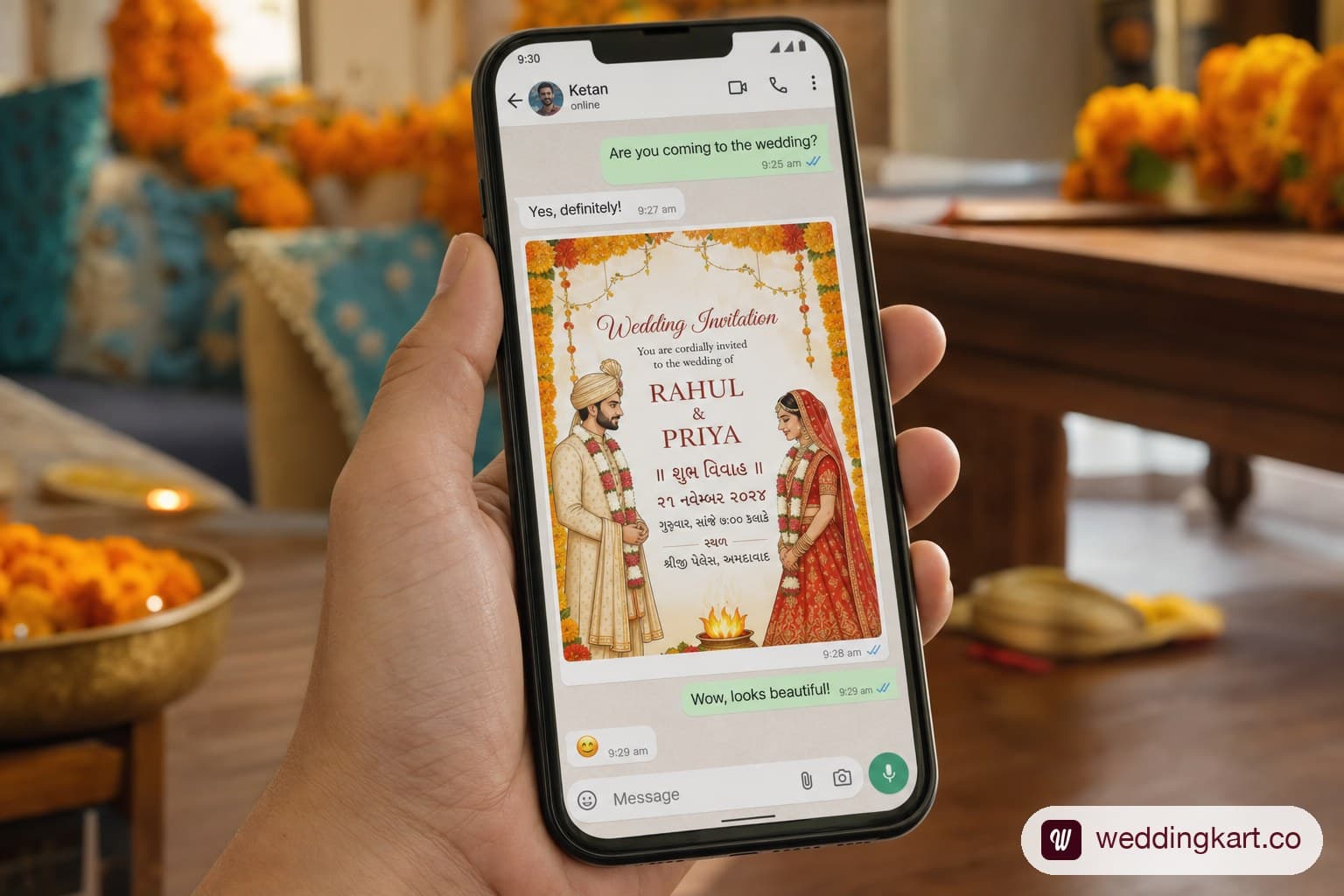
In India, WhatsApp has become the default channel for wedding invitations — particularly for the working-age generation of hosts who are planning weddings in 2026. A 2024 survey found that 57% of Indian couples now use WhatsApp as their primary invitation channel, supplementing or entirely replacing printed cards for non-family guests.
For a Gujarati wedding in Ahmedabad with 500+ guests across multiple events, WhatsApp is not just convenient — it is practically the only channel that works at scale. But sending 500 personalised WhatsApp messages is not the same as forwarding a JPEG to a group chat. Done wrong, it leads to generic, impersonal messages, an annoyed guest list, and the very real risk of getting your personal number permanently banned by WhatsApp.
This guide covers everything: what to include in your invitation, six ready-to-use templates in English and Gujarati, the dangers of bulk sending from personal numbers, and the right way to send personalised messages to 500+ people without any of those risks.
Why WhatsApp Has Replaced Printed Cards for Indian Weddings
The shift from Kankotri to WhatsApp invitations has been driven by a convergence of practical reasons:
- Instant delivery. A WhatsApp message reaches 500 guests in minutes. Printed and couriered Kankotris take weeks to design, print, and distribute — and many never arrive.
- Clickable venue links. A Google Maps pin in a WhatsApp message means guests never get lost. A printed address gives you no such luxury.
- RSVP collection. WhatsApp allows you to request replies directly in the message, enabling RSVP tracking without a separate form or phone call.
- Cost. A printed Kankotri for 500 guests costs ₹15,000–₹50,000+ including design, printing, and courier. WhatsApp is effectively free (or very low cost via a business API).
- Eco-conscious sentiment. Increasingly, couples prefer not to print 500 cards. Digital invitations align with modern values.
That said, for close family and elders, a physical Kankotri remains the expected and correct form. The best practice in 2026 is hybrid: physical Kankotri for immediate family and elders, WhatsApp invitation for everyone else.
What to Include in a WhatsApp Wedding Invitation
Event Details to Mention
Every WhatsApp wedding invitation must include:
- Event name (Garba Night / Main Wedding / Reception — be specific)
- Date and day (Sunday, 15 February 2026 — include the day of the week)
- Time (both start time and approximate end time — guests plan travel around this)
- Venue name and full address
- Google Maps link — paste the direct pin, not just the venue name
- Dress code — especially critical for Garba night (chaniya choli expected) and Reception
- RSVP request — ask guests to confirm with a specific reply instruction
- Host contact number — for any last-minute queries
Attaching a Kankotri PDF or Video Invite
Many Ahmedabad families now attach a designed digital Kankotri as a PDF or a short video invite (30–90 seconds) to their WhatsApp message. If you are doing this, keep the message text brief — the design carries the visual impact — and use the message text for practical details (time, maps link, RSVP instruction).
Avoid sending files larger than 5 MB. Large files often fail to download on slower connections, and many guests will never see your invitation if it does not load.
Gujarati Wedding WhatsApp Invitation Message Templates
Here are six ready-to-use templates. Personalise by replacing [Name] with the guest's name and filling in the event-specific details.
Formal Templates (English)
Template 1 — Main Wedding
Dear [Name],
With great joy and the blessings of the almighty, we invite you and your family to the wedding of our beloved [Bride’s Name] & [Groom’s Name].
📅 Date: [Day, Date, Month 2026]
🕐 Time: [Time] onwards
📍 Venue: [Venue Name], [Address]
🗺 Google Maps: [paste link]
👗 Dress Code: Traditional / Ethnic
We look forward to celebrating this auspicious occasion with your presence. Kindly confirm your attendance by replying ‘Yes’ to this message.
With warm regards,
[Family Name]
Template 2 — Garba Night
Dear [Name],
You are warmly invited to join us for Garba Night on the occasion of the wedding of [Bride] & [Groom].
💃 Event: Garba Night
📅 Date: [Day, Date, Month 2026]
🕖 Time: 7:30 PM onwards (dancing begins at 9 PM)
📍 Venue: [Venue Name], [Address]
🗺 Maps: [paste link]
👗 Dress Code: Traditional Chaniya Choli / Kediyu
Please confirm your attendance by replying to this message. We cannot wait to dance with you.
Jay Shree Krishna,
[Family Name]
Formal Templates (Gujarati)
Template 3 — Main Wedding (Gujarati Script)
પ્રિય [નામ],
ઈશ્વરના આશીર્વાદ અને સૌના સ્નેહ સાથે, અમે આપને અને આપના પરિવારને [કન્યાનું નામ] અને [વરરાજાનું નામ]ના શુભ લગ્ન પ્રસંગે આમંત્રણ આપવાનો સૌભાગ્ય પ્રાપ્ત કરીએ છીએ.
📅 તારીખ: [તારીખ, મહિનો 2026]
🕐 સમય: [સવારે/સાંજે] [સમય] થી
📍 સ્થળ: [સ્થળ], [સરનામું]
🗺 Google Maps: [link]
આપની ઉપસ્થિતિ આ ઉત્સવને ચાર ચાંદ લગાવી દેશે. કૃપા કરીને ‘હા’ ઉત્તર આપીને ઉપસ્થિત રહેવાની ખાતરી આપો.
જય શ્રી કૃષ્ણ
[પરિવારનું નામ]
Casual / Close Family Templates
Template 4 — Casual (Close Friends)
Hey [Name]! 🌸
The big day is almost here! You are one of the people we absolutely must have with us at [Bride] & [Groom]’s wedding. Do not dare skip this one. 😄
📅 [Day], [Date Month 2026]
🕐 [Time]
📍 [Venue], [Address]
🗺 [Maps link]
👗 [Dress Code]
Reply ‘In!’ to confirm so we can save your seat. See you there!
❤️ [Your Name]
Template 5 — Reception Invite
Dear [Name],
We are delighted to invite you to the Reception ceremony of [Bride] & [Groom].
🎉 Event: Wedding Reception
📅 [Day, Date Month 2026]
🕖 [Time] – [End Time approx.]
📍 [Venue Name], [Address]
🗺 [Maps link]
👗 Formal / Festive Attire
Dinner will be served from [time]. Please confirm your attendance — we would love to see you there.
Warmly,
[Family Name]
Template 6 — Save the Date
Dear [Name],
We have some wonderful news — [Bride] & [Groom] are getting married! 🎊
Save the date: [Month & Year 2026] in Ahmedabad.
Formal invitations are coming your way soon. In the meantime, we just wanted to make sure you block your calendar.
With love,
[Family Name]
The Problem With Sending Invitations Manually

Contrast 'Dear Guest' with 'Dear Rameshbhai'. The personalisation difference is obvious — and it matters enormously in a culture where relationships and respect are the foundation of every invitation.
The problem: for 500+ guests, manually typing each guest's name into a separate WhatsApp message is completely unviable. It would take 8–10 hours of continuous copy-pasting — and you would still be sending from your personal number, which creates a second major problem.
The Danger of Using Your Personal Number for Bulk Sending
Sending bulk messages from your personal WhatsApp number is one of the most common mistakes made by Indian wedding hosts and event managers. The risks are real and serious:
- Temporary or permanent number ban. WhatsApp's systems detect bulk sending from personal numbers as potential spam. If enough recipients report your message or if the volume triggers a flag, WhatsApp can temporarily restrict or permanently ban your personal number. You would lose your entire contact history and communication history.
- No delivery tracking. Your personal WhatsApp gives you no way to know which of your 500 messages were actually delivered, read, or failed. You are sending blind.
- No RSVP tracking. Replies come back to your personal inbox — a chaos of hundreds of messages mixed with your everyday communications.
- No personalisation at scale. Personal WhatsApp has no merge-field or variable substitution capability.
For a full breakdown of these risks, read: The Dangers of Using Personal Numbers for Bulk WhatsApp Messages in Indian Weddings.
How to Send Personalised Invitations to 500+ Guests
The correct approach uses WhatsApp Business API — which is what professional wedding communication platforms like Weddingkart are built on. Here is how the workflow works:
- Upload your guest list (Excel or manual entry) with names, numbers, and event assignments
- Create your message template with personalisation variables (e.g., 'Dear {{first_name}}')
- The platform merges each guest's name into their individual message automatically
- Messages are sent via a dedicated business number — not your personal phone
- Delivery, read receipts, and RSVP replies are tracked per guest in a dashboard
- Non-responders are automatically identified for follow-up
How Weddingkart Handles WhatsApp Invitations
Weddingkart is designed specifically for Indian multi-event weddings. For WhatsApp invitations, it handles:
- Personalised name merge — every guest receives 'Dear [Their Name]', not 'Dear Guest'
- Relationship-specific Tahuko — the platform can include the appropriate respectful greeting based on the guest's relationship tag
- Per-event invitation routing — Garba Night guests get a Garba invitation; Wedding guests get the Wedding invitation. No cross-contamination.
- Business number sending — your personal number is never at risk
- Real-time delivery tracking — see which messages were delivered, read, and replied to
- RSVP collection built-in — guests can confirm with one tap; headcounts are tracked automatically
See also: Creative Save the Date WhatsApp Messages (Templates) and 15 WhatsApp Wedding Invitation Templates for 2026 for more template options.
💌 Send personalised Gujarati wedding invitations to every guest
Weddingkart lets you send personalised Gujarati wedding invitations to every guest via WhatsApp — with their name, the right event details, and even the correct relationship-specific Tahuko. No personal number risk. No manual effort.
See How It Works →Frequently Asked Questions
How do I invite guests for a wedding on WhatsApp?
Send each guest a personalised message with the event name, date and day, time, venue with a Google Maps link, dress code, and an RSVP instruction. For a handful of guests, typing this manually works. For 500+ guests across multiple Gujarati wedding events, sending from a personal number risks a WhatsApp ban and gives you no delivery or RSVP tracking — use a WhatsApp Business API platform instead.
How do you write a good wedding invitation message?
A good wedding invitation message is specific, not generic: name the exact event (Garba Night, not just "the wedding"), state the date with the day of the week, give a start time and approximate end time, paste a direct Google Maps link rather than a written address, mention the dress code, and end with a clear RSVP instruction. Personalising the greeting — "Dear Rameshbhai" rather than "Dear Guest" — matters more in Indian weddings than in most Western ones.
What should a Gujarati wedding WhatsApp invitation message include in Gujarati?
A Gujarati-script invitation typically opens with "પ્રિય [નામ]" (Dear [Name]), states the date and time, the venue and a Google Maps link, and closes with a blessing such as "જય શ્રી કૃષ્ણ" (Jay Shree Krishna) and the family name. See Template 3 above for the full formal Gujarati wording used for the main wedding ceremony.
Is it okay to send a wedding invitation only over WhatsApp, with no printed card?
For most of the guest list, yes — 57% of Indian couples now use WhatsApp as their primary invitation channel. The exception is close family and elders, where a physical Kankotri remains the expected, respectful form. Most Ahmedabad families in 2026 do both: a printed Kankotri for immediate family, WhatsApp for everyone else.
By Mayank JaiswalLast updated
Was this article helpful?
Share