
Quick Answer
Should you send a digital wedding invitation, build a wedding website, or both?
A digital card and a wedding website solve different problems, and most NRI couples need both. The card is the emotional moment sent over WhatsApp that makes a relative stop scrolling. The website is the logistics hub guests return to for the schedule, hotel block, and RSVP form. Send the card first as the emotional touchpoint, then link to the website for everything the card can't hold, and use WhatsApp reply buttons — not the website form — to actually collect RSVPs.
Last updated:
0
RSVPs a standalone digital card collects on its own
₹500-3,000
Typical yearly cost of a wedding website
3x
More RSVP responses via WhatsApp buttons vs. forms
3
Stages of the hybrid card + website + WhatsApp sequence
Last updated:
All PostsOnline Wedding Invitations vs. Wedding Websites: What Works Best for NRI Weddings?
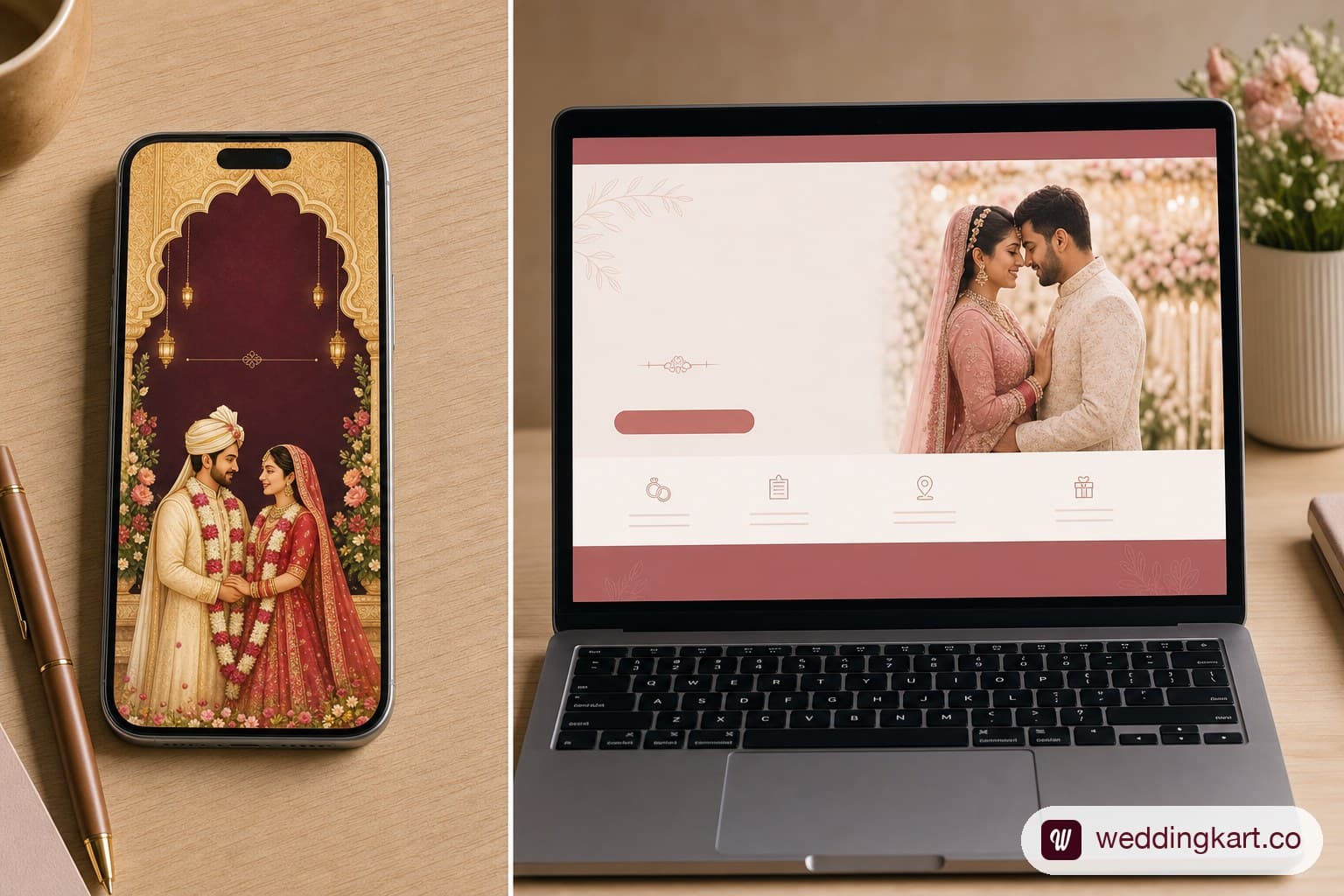
One couple sends a gorgeous animated Kankotri over WhatsApp — gold foil text, a shehnai soundtrack, their names in swirling script. Another couple builds a full wedding website with a schedule, hotel booking links, a registry, and an RSVP form. Both are doing the invitation right. They're just solving two different problems, and most NRI couples eventually need both.
A digital card and a wedding website are not competing formats — they do different jobs. The card is the emotional moment: the thing that lands in a relative's WhatsApp thread and makes them stop scrolling. The website is the logistics hub: the place a guest returns to three times before the wedding to check the hotel address, the dress code, and whether they need a visa letter. This guide breaks down what each format actually offers, where the real Indian-wedding-specific gaps are, and the hybrid approach that works best when your guest list spans the US, UK, UAE and India.
Consider a fairly typical NRI guest list: the groom's grandparents in Surat who have never opened a link on WhatsApp in their life, a cousin in New Jersey who wants to know the hotel block before booking flights, and a college friend in London who has never been to India and needs to know, gently, that jeans are not the move. A single format cannot serve all three well. The grandparents need a card they can look at without clicking anything. The cousin needs a page she can bookmark and revisit. The friend needs both a card that sets expectations and a little more context than a card alone can carry. That is the practical reason this comparison matters more for NRI weddings than for a single-city Indian wedding, where most guests already know the drill.
The Two Main Digital Options for NRI Wedding Invitations
Strip away the branding and every NRI couple planning online is choosing between two building blocks, often using both:
- Online wedding invitation (digital card): a single designed visual — static image, PDF, or short animated video — sent directly through WhatsApp or email. It is the digital equivalent of the printed Kankotri.
- Wedding website: a standalone webpage (or small multi-page site) with a unique link, holding the schedule, venue details, RSVP form, travel information, and often a registry — everything a card cannot hold without becoming a wall of text.
Online Wedding Invitations (Digital Cards): What They Are
Types: Static PDF Card, Animated Video Invite, WhatsApp Card
- Static card (JPEG/PDF): a single designed image with all the core details — the fastest to make, the easiest to forward, and the safest bet for older relatives who may not click an unfamiliar link.
- Animated video invite (MP4/GIF): a short, often 15–30 second video with music, name reveals, and motion graphics. These get shared and rewatched far more than a static card, but take longer to design and are heavier to send over slow connections.
- WhatsApp-native card: a card designed specifically to preview well inside a WhatsApp thread — correct aspect ratio, readable text at thumbnail size, and a caption carrying the key details as text (so the information survives even if the image fails to load on a weak connection).
Best Platforms for Digital Indian Wedding Cards
For DIY design, Canva remains the most accessible option — thousands of editable Indian wedding invitation templates, at no cost for the basic tier, with enough customisation to swap colours, fonts, and names without any design background. Couples who want their card to match their exact wedding branding (hashtag, colour palette, monogram) often commission a freelance designer found through Instagram, which typically costs a fraction of a printed card run and turns around in a few days rather than weeks. WeddingKart's own generators are built specifically for this — free, Indian-wedding-specific templates for save-the-dates, full invitations, and per-event cards (Mehndi, Sangeet, Reception) that are pre-sized and pre-formatted for WhatsApp sharing, so the preview thumbnail actually looks right in a chat instead of getting awkwardly cropped.
Whichever route you choose, test the card the way your guests will actually see it: open it inside WhatsApp on a phone, not just on your laptop screen. Text that reads perfectly in a design tool can shrink to illegible at WhatsApp's thumbnail size, which is the single most common quality mistake couples make with digital cards.
See also: Wedding Invitation Generator
See also: WhatsApp Wedding Invitation Templates
Pros and Cons
- Pros: beautiful and personal, free or low-cost, forwards instantly through WhatsApp, sets the visual tone for the whole wedding, works even offline once downloaded.
- Cons: no built-in RSVP — you still need a separate way to collect responses; cannot be updated once sent (a venue change means re-sending a whole new card); holds very little logistics information before it becomes cluttered; easy for a guest to lose inside a busy WhatsApp thread weeks later.
Wedding Websites: What They Offer
What to Include on a Wedding Website for NRI Guests
A wedding website earns its place specifically because it can hold what a card cannot. For an NRI-heavy guest list, the most valuable sections are the ones that reduce the questions you'd otherwise field individually over WhatsApp:
- A day-by-day schedule with venue address and dress code for each event
- An embedded map for every venue
- A dedicated travel page: nearest airport, visa-on-arrival or e-visa guidance, suggested SIM card and currency tips for first-time visitors to India
- Hotel and accommodation details, including your negotiated room block and booking deadline
- An RSVP form, ideally per event rather than one blanket yes/no
- A registry or shagun/gift guidance section, since Western registry customs do not map cleanly onto Indian gifting norms
- A simple FAQ answering the questions every overseas guest asks: what to wear, whether kids are welcome, whether the ceremony is vegetarian
Best Wedding Website Platforms for Indian Weddings
This is where the choice actually gets interesting, because the two categories of platform solve for different weddings. Global platforms — Joy (WithJoy), Zola, and The Knot — offer polished, free, template-driven sites with strong RSVP tools and hundreds of design templates, and some now support tracking multiple events within one page. They are excellent for a single-day Western wedding. For a multi-event Indian wedding, though, they tend to fall short in ways that are easy to underestimate until you're mid-setup: no regional Indian language options, registry integrations built around Western gift customs rather than shagun or cash gifting, and even where multi-event tracking exists, it is designed around one reception, not four to eight ceremonies spread across a week.
A newer set of India-focused wedding website and planning tools has emerged specifically to close that gap — built around multi-event pages, per-function RSVP, and WhatsApp-native sharing rather than email links. If you go this route, check three things before committing: does it support separate RSVPs per event, does the RSVP link preview cleanly inside WhatsApp, and can non-technical relatives actually find and use it without a login.
Cost is rarely the deciding factor either way — most website builders, global or India-focused, offer a usable free tier, with paid plans (roughly ₹500 to ₹3,000 a year, or a one-time design fee if you hire a freelancer or agency) mainly buying you a custom domain, more storage for photos, or removal of the platform's own branding. The real decision criteria should be whether the platform understands that your wedding is four events over five days, not one ceremony on one afternoon.
See also: Best Wedding RSVP Websites (Free & Paid)
Pros and Cons
- Pros: one link holds everything; can be updated any time a detail changes; built-in RSVP means responses land in one place instead of scattered WhatsApp replies; ideal for NRI guests who need travel and hotel logistics in writing, not just a verbal mention on a call.
- Cons: requires guests to actively click through and visit, which is a bigger ask than a card that lands directly in their chat; global platforms in particular can feel visually generic against the warmth of a designed Indian invitation; heavier pages can be slow to load on patchy Gulf or rural-India connections; a guest still has to remember the link exists days or weeks later.
Comparison Table: Digital Card vs. Wedding Website
| Digital Card | Wedding Website | |
|---|---|---|
| Cost | Free–₹5,000 (DIY to designer) | Free–₹3,000/yr (or more for custom build) |
| Personalisation | High — matches your exact branding | Medium–High, depends on platform |
| RSVP built-in | No — needs a separate method | Usually yes, though rarely per-event on global platforms |
| Logistics info capacity | Very low | High — travel, hotel, FAQ, registry |
| Guest experience | Immediate, emotional, no click required | Requires a click-through, but a lasting reference |
| Best for | The invitation moment | Everything after the invitation moment |
Where WhatsApp Fits in the Mix
Neither format works in isolation for an NRI wedding — WhatsApp is the delivery pipe for both. You are not choosing between 'WhatsApp' and 'a website'; you are choosing what you send over WhatsApp: a self-contained card, a link to a website, or — in the hybrid approach most NRI couples land on — both, in sequence. For the mechanics of writing, formatting, and sending those messages across countries and time zones, see our full guide to sending WhatsApp wedding invitations for NRI families.
The Hybrid Approach: Card + Website + WhatsApp (Recommended for NRI Weddings)
The sequence that works best for a globally scattered guest list looks like this: send a beautifully designed digital card over WhatsApp as the first, emotional touchpoint — this is the moment that gets forwarded to family group chats and gets people excited. Include a short link or QR code on the card pointing to your wedding website. The website then carries everything the card could not: the full multi-day schedule, hotel block, travel guidance for first-time visitors to India, and the actual RSVP form. From there, use a dedicated WhatsApp tool for bulk, personalised follow-ups — reminders to non-responders, updated venue pins, and day-of logistics — rather than trying to manage 500 individual chat threads by hand.
In practice this usually plays out in three stages. First, the save-the-date goes out nine to twelve months before the wedding, as a simple card with the date range and a note that travel is required — no website needed yet, since venue and full schedule are often still unconfirmed. Second, once the venue and events are locked, the full invitation card goes out with a link to the now-live wedding website, which carries the complete schedule, hotel information, and RSVP form. Third, in the final two to three months, WhatsApp becomes the primary channel again — for RSVP reminders, travel confirmations, and any last-minute changes — because by this point guests want quick answers, not another link to click.
💌 Whichever format you use for your invitation, WeddingKart ties it together — send your digital card via personalised WhatsApp messages to your full guest list, collect RSVPs per event, and track who is attending which function, all from one dashboard.
See How WeddingKart Works →RSVP Collection: Which Format Makes It Easiest?
This is ultimately the question that decides the debate, because collecting a real headcount is the whole point of sending an invitation in the first place. A standalone digital card collects zero RSVPs on its own — you are relying on guests to reply in the same thread, which gets lost fast at scale. A wedding website's built-in form is a real improvement, but it still asks a guest to leave the app they're already in and fill out a form, which measurably lowers response rates compared to replying in-chat.
WhatsApp reply buttons — a one-tap Yes/No/Maybe inside the same message — consistently outperform both. No link, no form, no app switch: just a tap.
See also: RSVP by WhatsApp: Why One-Tap Buttons Get 3x More Responses Than Forms
The practical takeaway for most NRI couples: use the website to inform, and use WhatsApp to actually collect the RSVP. Trying to make one format do both jobs is where most guest lists start to fall apart.
There is also a segmentation angle worth planning for upfront. Your India-based guests are near-universally reachable and comfortable on WhatsApp, so a reply-button RSVP works well for that segment with almost no explanation needed. Overseas guests split further: younger NRI relatives and friends are just as WhatsApp-native as their India-based cousins, but older overseas relatives — and non-Indian colleagues or friends attending their first Indian wedding — sometimes respond better to a simple, familiar web form they can fill out at their own pace. Building both paths into your plan, rather than forcing every guest through one channel, is what actually gets you a complete and accurate headcount by your deadline.
💌 WeddingKart combines a shareable digital invitation with one-tap WhatsApp RSVP collection per event, so your card, your details, and your headcount all live in the same system instead of three disconnected tools.
Try WeddingKart Free →By Mayank JaiswalLast updated
Was this article helpful?
Share