
Quick Answer
What does WhatsApp business verification do?
Business verification is Meta confirming your business is a real, registered legal entity. Its most immediate effect is on reach: an unverified business portfolio is capped at 250 recipients per 24 hours, and completing verification makes it eligible to scale to 2,000. It works by matching documents you submit - a registration certificate, tax document or utility bill - against the exact legal name and address on your portfolio. It is separate from two things people conflate it with: the display name shown to recipients, and the badge people call the green tick, which Meta shows as a blue checkmark, grants at its own discretion, and which most businesses never receive.
Last updated:
WhatsApp Business Verification Guide
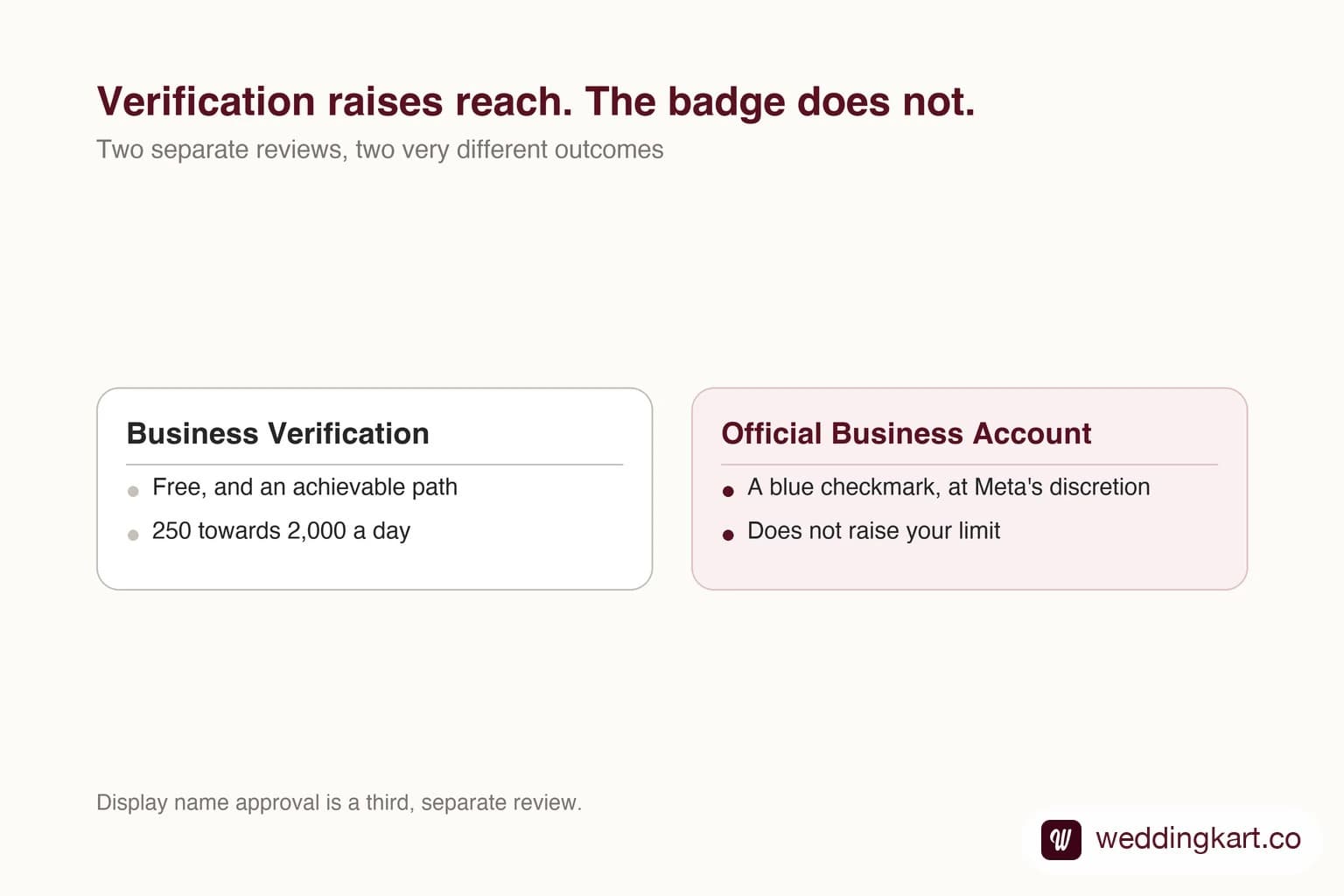
“Verified” is doing three completely different jobs in WhatsApp conversations, and people routinely chase the wrong one. Someone wants the green tick, does the work for business verification, gets neither the tick nor the outcome they wanted, and concludes the process is broken.
It is not broken. There are simply three separate things, with three separate reviews and three very different levels of availability.
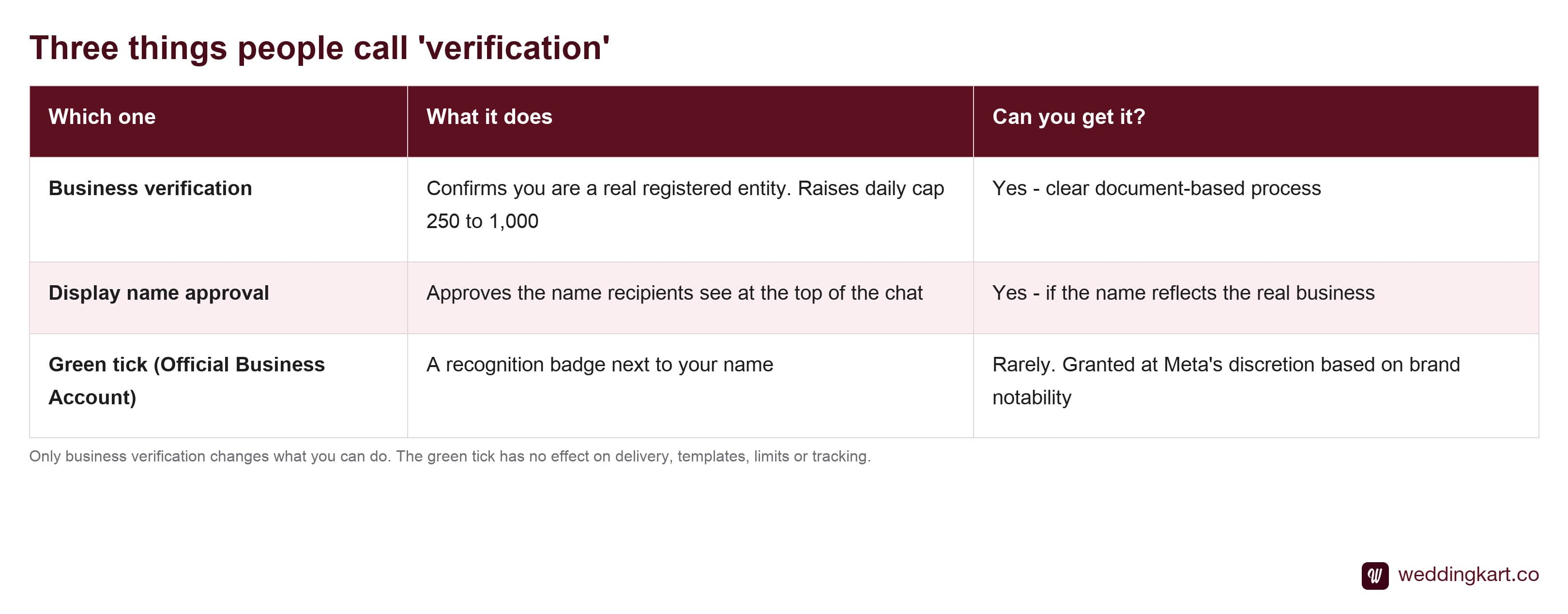
Only the first one changes how many people you can reach. Business verification is the one worth prioritising, and it is the one with a clear, achievable path.
What business verification actually buys
One thing, mostly, and it is a big one: your messaging limit goes from 250 to 2,000 recipients per rolling 24 hours, once your portfolio becomes eligible to scale.
That is an 8× increase in reach for a paperwork exercise, and it is the cheapest capacity you will ever buy on this platform. Every subsequent tier has to be earned through sustained usage at good quality; this one just requires submitting the right document correctly.
Why submissions get rejected
Almost always the same reason, and it is unglamorous: the name or address on the document does not exactly match the business portfolio.
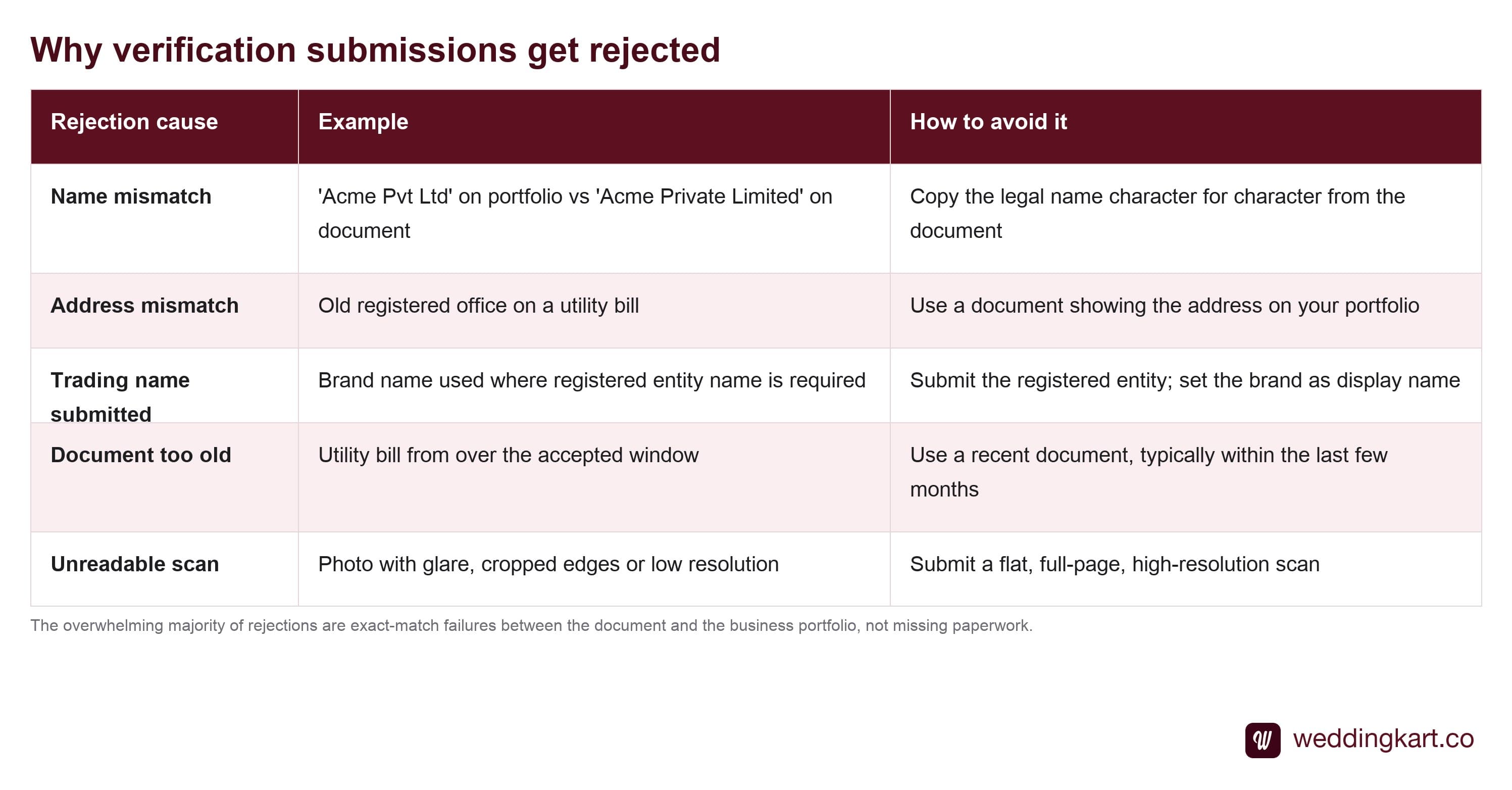
Your details are checked against the registry record, and small differences matter. “Pvt Ltd” against “Private Limited”, a missing suffix, an old office address on a utility bill, a trading name where the registered name belongs — each is enough. Before you submit, open your portfolio settings next to your document and read them against each other line by line. That five minutes saves days.
The display name trap
Display name is what recipients see at the top of the chat, and it goes through its own review with its own logic. Meta is asking whether this name honestly represents the business someone will think they are messaging.
Names that fail: generic category words, anything containing an offer or a slogan, and names with no connection to the registered entity. Names that pass easily: your registered business name, or a trading name you can evidence is genuinely in public use.
This matters more than it sounds for anyone connecting their own number. The whole point of bringing your own number is that recipients recognise the sender — and the display name is the part they actually read.
About the green tick
Worth being blunt, because a lot of effort gets wasted here. What everyone calls the green tick is Official Business Account status, and Meta actually shows it as a blue checkmark. It is not a tier you reach by doing things properly — Meta grants it based on how notable the brand is, from press presence and public recognition, and it grants it sparingly.
You can request it — in WhatsApp Manager, open the phone number’s profile and submit a request for Official Business Account status, once you have passed Business Verification, had the number registered 30 days, switched on two-factor authentication and had your display name approved. What no document set and no vendor can do is produce the decision. Any provider who promises it as a deliverable is selling something they do not control.
The good news is that nothing about your messaging is worse without it. Delivery, templates, buttons, tracking and limits are all identical. It is a recognition marker, not a capability, and building a plan around getting one is building on something you cannot influence.
Tools referenced in this post
Try Weddingkart for your wedding
Guest lists, WhatsApp invites, RSVPs, countdowns and more - the AI layer for Indian weddings.
Related reading
Frequently Asked Questions
Is business verification required to use the WhatsApp Business API?
Not to send your first message - an unverified portfolio can still connect a number and message up to 250 unique people in a rolling 24 hours. It becomes required the moment you want meaningful reach, because that 250 cap does not move until verification completes, at which point you become eligible to scale to 2,000. For anything with real volume, treat verification as a prerequisite rather than an optimisation.
What documents does Meta accept for business verification?
Meta accepts documents that independently evidence your business name and address - typically a certificate of incorporation or registration, a tax registration document, a business bank statement, or a recent utility bill in the business name. What matters far more than which document you pick is that the legal name and address on it match what is entered on your Meta business portfolio character for character. Most rejections are a mismatch, not a missing document.
Why does my display name keep getting rejected?
Display name review is separate from business verification and is judged on whether the name genuinely reflects the business people will think they are messaging. Generic descriptive names, names containing offers or slogans, and names with no relationship to your registered entity get rejected. A name that matches your registered business or a well-established trading name passes most easily.
How do I get the green tick on WhatsApp?
You request it, and then it is out of your hands - which is worth knowing before you spend effort on it. Official Business Account status, the badge Meta shows as a blue checkmark, is requested in WhatsApp Manager once you have passed Business Verification, had the number registered 30 days, switched on two-factor authentication and had your display name approved. Past those gates Meta decides at its discretion, on how notable and widely recognised the brand is - press coverage, public prominence, that kind of signal. It is not a reward for completing verification. Plenty of well-run, fully verified businesses never receive it, and nothing about your messaging is degraded without it.
How long does WhatsApp business verification take?
Often a couple of days, sometimes considerably longer if documents need resubmitting. The variance is almost entirely down to whether your first submission matched cleanly. Because it gates the jump from 250 towards 2,000 recipients, start it well before any deadline that depends on volume - it is the slowest thing in the onboarding chain and the one you can begin earliest.
Was this article helpful?
Share
By Weddingkart TeamLast updated