
Quick Answer
How does the WhatsApp Business API work?
The WhatsApp Business API is not an app you log into. Meta gives you a WhatsApp Business Account (a WABA) that owns one or more phone numbers, and you send messages by calling Meta's Cloud API over HTTPS. You cannot send free-form text to someone who has not messaged you first - that outreach must use a message template Meta has reviewed and approved in advance. When a person messages you, a 24-hour window opens in which you can reply freely. Meta charges per message delivered, reports every delivery back to you over webhooks, and scores your number's quality - which caps how many people you are allowed to message per day.
Last updated:
How the WhatsApp Business API Works
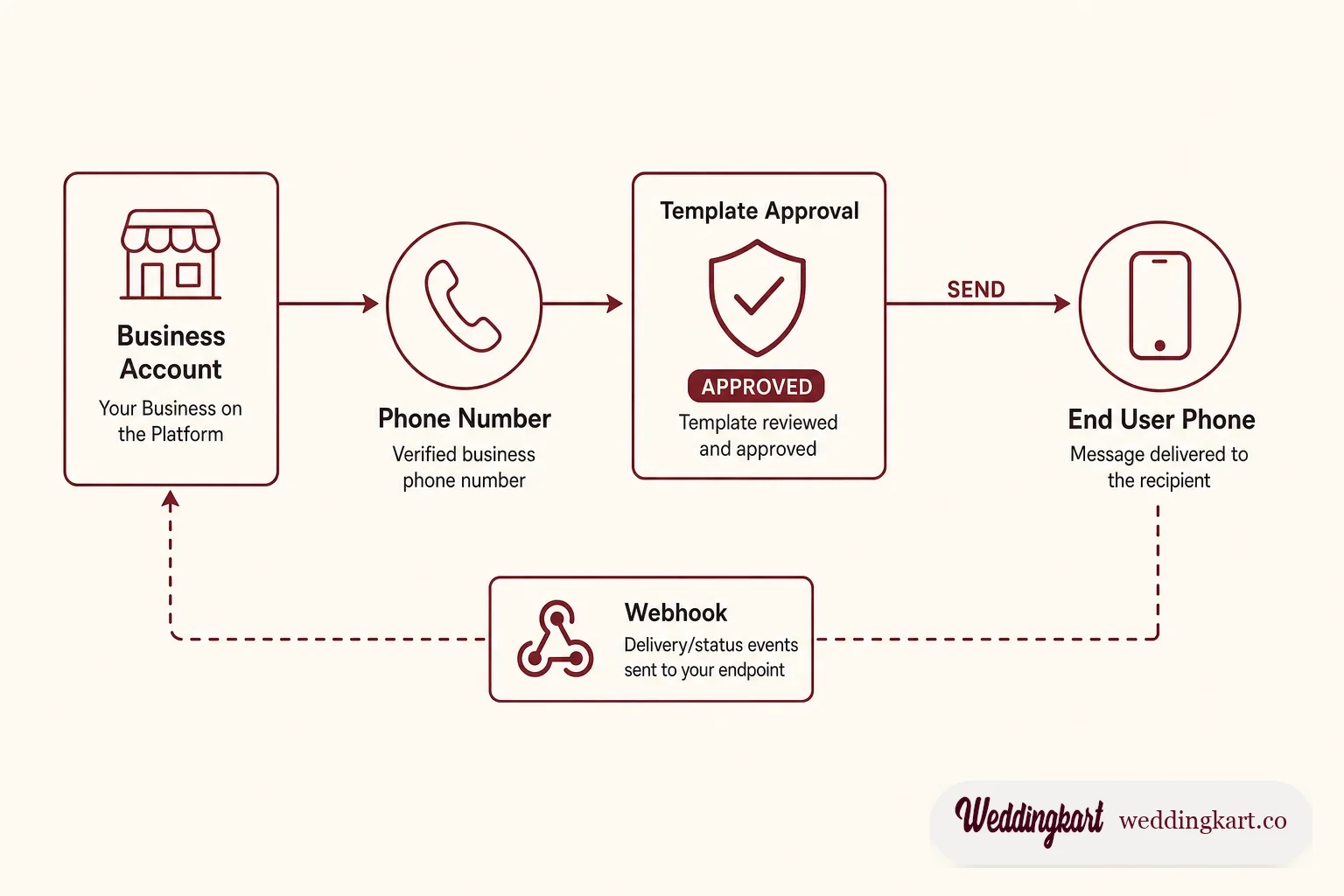
Almost every explainer about the WhatsApp Business API describes what it is for. Very few describe what it is. So people arrive expecting a bigger version of the green app on their phone, and are baffled when there is nothing to log into, when their first message is rejected by a reviewer, and when the number they have used for eight years suddenly cannot be used at all.
Here is the honest version. The WhatsApp Business Platform is a set of HTTPS endpoints, a review queue, a billing meter and a reputation score. Understand those four things and everything else - the errors, the costs, the mysterious delivery failures - stops being mysterious.
You do not get an account. You get an account that owns numbers.
The hierarchy trips up nearly everyone on day one, and it matters because permissions, billing and bans all attach at different levels of it.
At the top is a Meta Business Portfolio - the same business entity that owns your Facebook Page and ad account. Inside it sits a WhatsApp Business Account, near universally shortened to WABA. The WABA is the unit that owns your message templates, your billing relationship and your compliance record. Underneath the WABA sit one or more phone numbers. Each number carries its own display name, its own quality rating, while the daily sending limit is shared across every number in the portfolio.
The consequence people discover late: a number is not portable in the casual sense. Moving a number between WABAs is a deliberate migration, not a setting. And a WABA’s billing currency is fixed at creation - which, for anyone selling in India, has become a genuine deadline rather than trivia. We cover that in the pricing guide.
Two ways in: Meta directly, or through a provider
You can talk to Meta’s Cloud API yourself. You register an app, get an access token, and POST JSON to graph.facebook.com. Meta charges you nothing for the platform - only for messages delivered.
Or you go through a Business Solution Provider - a company Meta has approved to resell the platform with a friendlier surface on top. You get dashboards, a team inbox, campaign scheduling, and someone to call. You pay a markup per message or a monthly fee, and you accept that a layer of someone else’s software now sits between you and Meta.
The choice is less about engineering capacity than about who you want holding the number when something goes wrong at 11pm. Our own read on the tradeoff is in Cloud API vs On-Premises, along with why the third option - the old self-hosted On-Premises API - is no longer an option worth planning around.
The rule that shapes everything: you cannot speak first
This is the single most important thing about the platform, and it is the thing brochures bury.
If a person has not messaged you in the last 24 hours, you may not send them free text. Not a greeting, not a one-line update, not a “quick question”. Your only route to their inbox is a message template: a fixed body of text, with numbered placeholders for the bits that vary, that Meta has reviewed and approved in advance.
So a message that reads “Hi Priya Sharma, the Sangeet starts at 7:30 PM at Crystal Hall” is not composed at send time. It was approved weeks earlier as “Hi {{1}}, the {{2}} starts at {{3}} at {{4}}”, and you are filling in the blanks.
Every template gets a category, and the category is not cosmetic - it sets the price and the tolerance:
- Marketing - promotions, offers, re-engagement, anything persuasive. The most expensive category and the one Meta polices hardest.
- Utility - a message tied to a specific transaction or event the person already has with you. Order shipped. Booking confirmed. Ceremony moved.
- Authentication - one-time passcodes and verification. Nothing else, ever.
- Service - not a template category at all, but a billing one: your free-form replies inside an open window.
Getting the category wrong is the most common and most expensive mistake on the platform, partly because Meta will silently reclassify you rather than reject you. We have watched a single exclamation mark move a template from utility to marketing - and once Meta marks it marketing, that is permanent. The full mechanics, including behaviour we have only ever seen documented in our own logs, are in why Meta rejects WhatsApp message templates.
The 24-hour window
The moment a person sends you a message, a customer service window opens for 24 hours. Inside it, the template rule is suspended: you can reply in free text, send images, ask questions, have an actual conversation. Every inbound message from them resets the clock to a fresh 24 hours.
When it closes, you are back to templates. This is why a support conversation that goes quiet overnight cannot simply be picked up in the morning with “sorry for the delay” - that message will fail unless it goes out as an approved template.
The window is also why every serious WhatsApp product has a concept of “window closing soon”. If a guest asked a question at 9pm and nobody answered by 8pm the next day, the cheap free reply becomes an expensive template, or nothing at all.
What it costs
Until mid-2025, Meta billed per 24-hour conversation. That model is gone. Since 1 July 2025, Meta charges per message delivered, at a rate set by the recipient’s country rather than yours. Send to a UK number and you pay UK rates even if you are billed in rupees.
Two changes land after that which most published guides have not caught up with. From 1 August 2026 Meta began charging per token for Meta Business Agent replies. And from 1 October 2026 the free ride inside the 24-hour window changes: each number gets 1,000 free service messages a month with no roll-over, and beyond that Meta charges per message for service messages, as it does for utility templates sent inside an open window. In Meta’s own words, it will “charge on a per-message basis for service messages, consistent with how Meta charges for template messages.”
If your economics assume that replying to customers is free, they are about to stop being true. The numbers, the India-specific rate picture, and the currency deadline nobody is talking about are in WhatsApp API pricing, explained.
Your number has a credit score
Meta scores every phone number on a quality rating - green, yellow, red - derived from how recipients react. Blocks and “report” taps push it down. Reads and replies hold it up.
That rating drives your messaging limit: the number of unique people you may start conversations with in a rolling 24 hours. A brand-new portfolio starts at 250. Behave and it steps to 2,000, then 10,000, then 100,000, then unlimited. Misbehave and Meta walks it back down. Since October 2025 the limit sits on the business portfolio and is shared by every number in it.
It is worth sitting with what that means for anything burst-shaped. A wedding is the pathological case: the number is cold, it has no sending history at all, and the first thing anyone wants to do is message 500 people in one evening. That is a tier problem before it is a software problem, and no amount of good template copy fixes it. We wrote up the practical version of this in how to send wedding announcements at scale.
Webhooks: how you find out what happened
Sending is only half the platform. The API is asynchronous - a successful POST means Meta accepted your message for delivery, nothing more. Everything you actually care about arrives later, as an HTTP callback to an endpoint you host.
Webhooks carry two kinds of payload: inbound messages from people, and status updates on messages you sent - sent, delivered, read, failed. This is where delivery tracking comes from, and where most integrations quietly break, because the payload shape is nested, deliveries are not guaranteed to arrive in order, and Meta will retry a callback your server was merely slow to acknowledge.
One field observation worth more than any documentation: a status webhook that never arrives is not automatically a bug. If a recipient has never opened WhatsApp on a new phone, or has read receipts off, you may simply never learn what happened. Systems that treat “no read receipt” as failure generate a lot of false alarms. The payload structure, the signature check and the retry semantics are in how WhatsApp webhooks actually work.
When it fails, it fails with a number
The platform is unusually good at telling you exactly what went wrong, and unusually bad at telling you in words. You get a numeric code.
131026 means undeliverable - most often the number simply is not on WhatsApp. 131047 means you tried to reply outside the 24-hour window. 132001 means the template does not exist under that name and language. 131042 means your business account has no working payment method, and it is the single most common reason a freshly-onboarded account looks perfectly configured and still sends nothing.
We keep a decoded reference of the codes that actually fire in production, with the fix for each, in WhatsApp API error codes, decoded.
Coexistence: the recent change that fixes the worst objection
Historically, connecting a number to the API was a one-way door. The number left the WhatsApp Business app, took its chat history with it, and the owner lost the ability to just pick up their phone and reply. For a small business whose number is printed on their signage, that was disqualifying.
Coexistence removes that tradeoff: the same number can run in the WhatsApp Business app and on the API at once, with messages visible in both. It is newer and less well documented than the rest of the platform, and it has real limits worth knowing before you build on it - see WhatsApp Coexistence, explained.
The shortest useful summary
The WhatsApp Business Platform is not a messaging tool with rules bolted on. The rules are the product. Meta is renting you access to an inbox people actually read, and the price of that access is that you message people on Meta’s terms: approved wording for first contact, a 24-hour window for real conversation, per-message billing, and a reputation score that shrinks your reach the moment recipients get annoyed.
Every failure mode on this platform traces back to one of those four. Once you can name which one you are hitting, the fix is usually obvious.
We build on this platform every day, at the specific and unforgiving scale of Indian weddings - hundreds of guests, a handful of days, no second chance to get a message right. The deep-dives linked above are what we learned doing it. If you want to see the platform working rather than read about it, take a look at how Weddingkart sends announcements.
Tools referenced in this post
Try Weddingkart for your wedding
Guest lists, WhatsApp invites, RSVPs, countdowns and more - the AI layer for Indian weddings.
Call our AI assistant, any time: +91 92409 54071
Related reading
Frequently Asked Questions
What is the difference between the WhatsApp Business app and the WhatsApp Business API?
The WhatsApp Business app is a free phone app for a single small business - one person, one phone, manual replies. The WhatsApp Business API (formally the WhatsApp Business Platform) has no interface at all. It is a set of HTTPS endpoints you or your software vendor call to send and receive messages programmatically, so a system can message thousands of people without a human tapping send. The app is a shopfront; the API is plumbing.
Do I need a developer to use the WhatsApp Business API?
To use it directly, yes - you need someone who can call an HTTPS API, host a webhook endpoint, and manage access tokens. Most businesses instead use a Business Solution Provider, which is a company Meta has approved to resell and wrap the platform. You get a normal web interface and they handle the API. The tradeoff is cost per message and how much control you keep over your own number.
Why can’t I just send any message I want through the API?
Because WhatsApp is a private inbox and Meta polices it hard. Any message you send to someone who has not messaged you in the last 24 hours must use a pre-approved template. Meta reviews the wording before you are allowed to send it, and classifies it as marketing, utility or authentication - which determines what it costs and how tolerant Meta is of complaints. Free-form outbound messaging to a cold contact is not a feature the platform has.
How many messages can I send per day on the WhatsApp Business API?
It depends on your number’s messaging limit, which Meta sets from your quality rating and your history. A brand new business portfolio is capped at 250 recipients in a rolling 24 hours, a limit shared by every number in it. Behave well and it steps up to 2,000, then 10,000, then 100,000, then unlimited. Get blocked or reported and Meta pushes you back down. The cap counts unique people you start conversations with, not total messages.
Is the WhatsApp Business API free?
Access to the Cloud API itself is free - Meta does not charge a platform fee, and hosting is on Meta’s infrastructure. You pay per message delivered, at rates set by the recipient’s country rather than yours. If you go through a Business Solution Provider they usually add their own markup or a monthly platform fee on top of Meta’s rate.
Was this article helpful?
Share
By Weddingkart TeamLast updated