
Quick Answer
What is WhatsApp Embedded Signup?
Embedded Signup is Meta's official flow for connecting a business's WhatsApp number to a software platform. It is an OAuth-style popup: the business logs in with the Meta account that owns their business portfolio, picks or creates a WhatsApp Business Account and phone number, verifies the number by code, and grants the platform permission to send on its behalf. The business keeps ownership of the account throughout - the platform is granted access, not handed the asset. Most failures happen not in the popup itself but in preconditions around it: a missing payment method, a restricted business portfolio, or an unverified business.
Last updated:
WhatsApp Embedded Signup, Explained
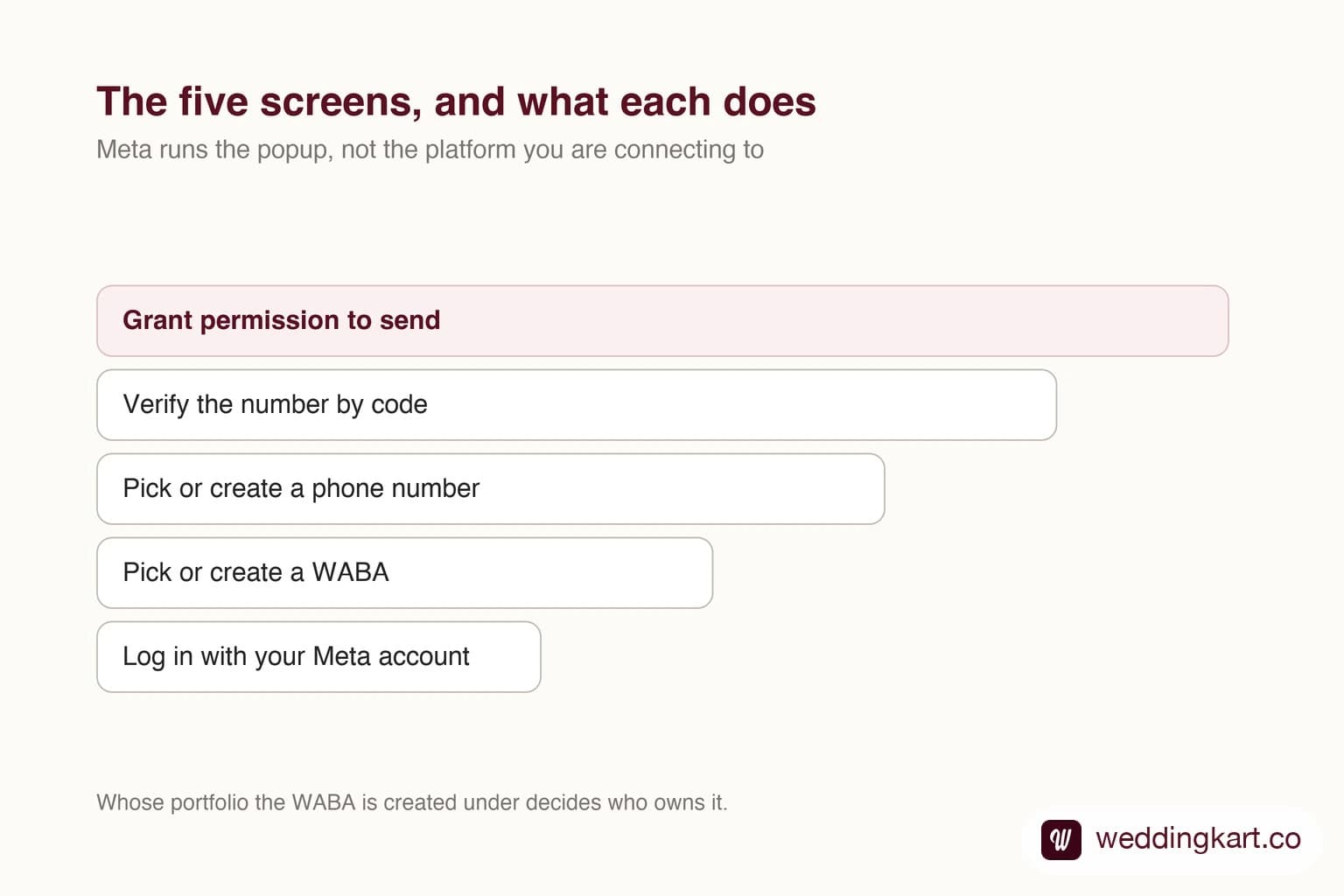
Embedded Signup is the small popup that stands between a business and actually using WhatsApp programmatically. It looks like a formality — five screens, a code, done — and it is where a surprising share of onboarding attempts quietly die.
The reason is that almost nothing that goes wrong goes wrong inside the popup. The popup is a thin front end over a set of preconditions nobody told you about.
What the flow is actually doing
Mechanically it is OAuth with extra steps. Meta runs it — not the platform you are connecting to — which is why it looks the same whichever vendor you use.
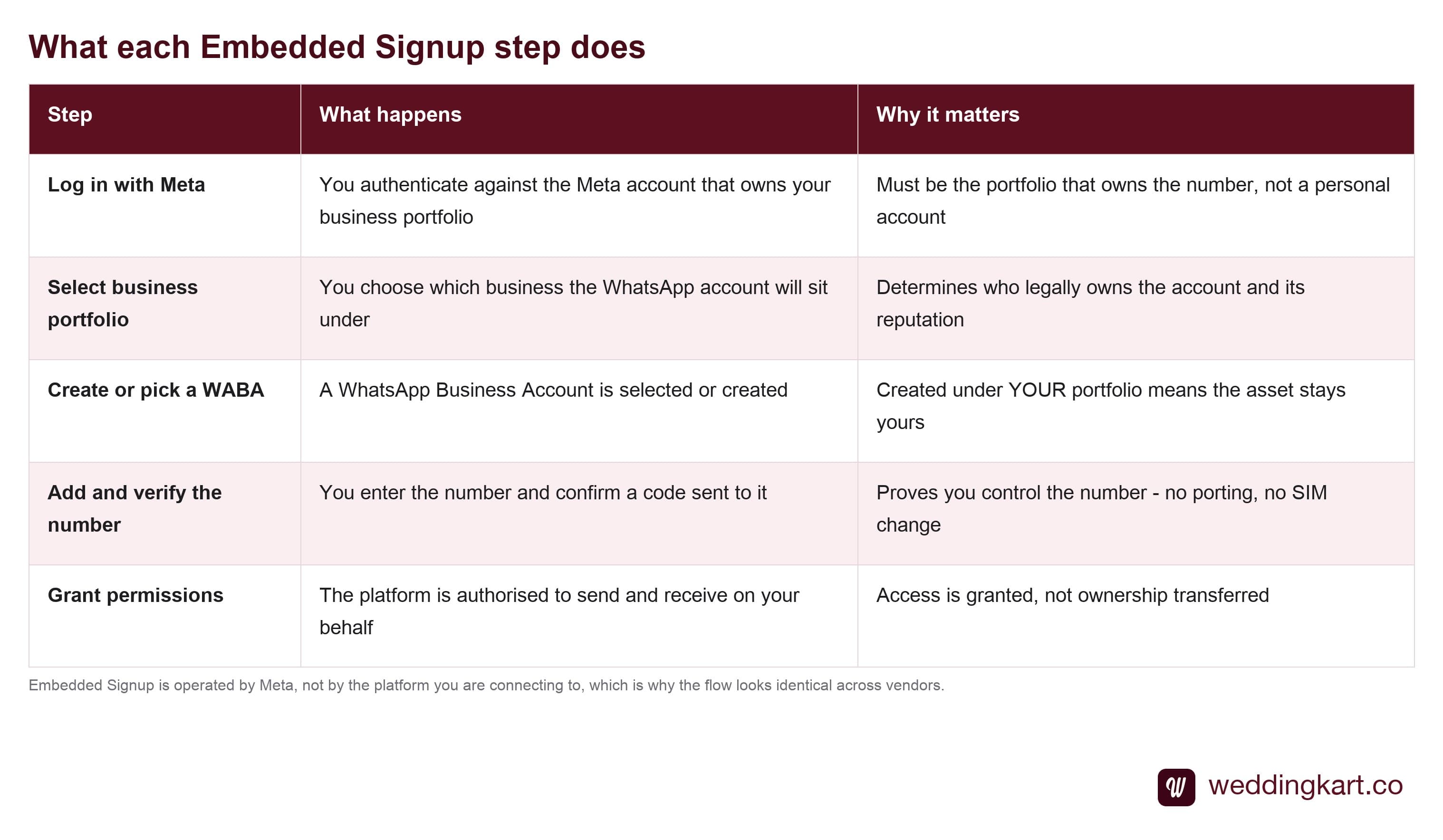
The step worth pausing on is the third. When the flow offers to create a WhatsApp Business Account, the portfolio it gets created under determines who owns the asset forever. Created under your portfolio, the number and its reputation are yours. Created under a vendor’s, they are not — and you will discover which happened at the least convenient moment, when you try to leave.
Ask any vendor this directly during onboarding. Both arrangements look identical while everything is working.
Where it actually breaks
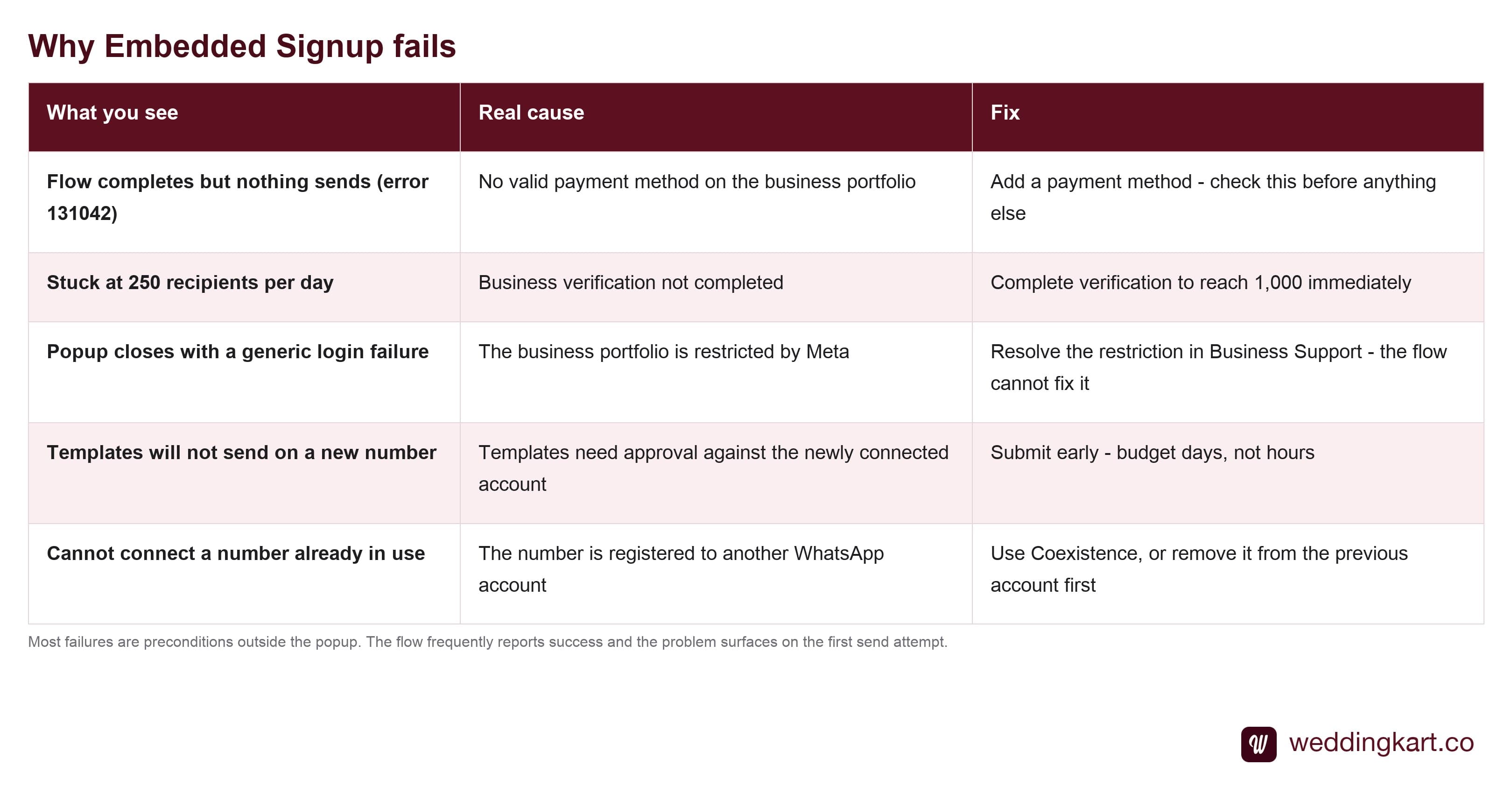
The first row deserves singling out because it is so consistently misdiagnosed. A business portfolio with no working payment method completes Embedded Signup perfectly. Every screen goes green. The number appears connected in the dashboard. And nothing sends, with error 131042 — a payment-method error that only surfaces on the first time.
If a freshly connected number will not send, check billing before you check anything else. It is the single highest-yield first guess on this platform.
What happens after the popup closes
Connection is not readiness, and the gap catches people out on timelines.
Free-form replies work immediately — anything inside an open 24-hour window is available from the moment the number connects. Templates are the constraint. Your first message to anyone who has not messaged you must be an approved template, and approval happens against the newly connected account. Budget days, and submit early.
This is why the honest advice for any event-driven business is to connect two to three weeks ahead. Not because the connection is slow, but because everything downstream of it is.
The Coexistence change
Historically the real cost of Embedded Signup was not technical, it was operational: connecting a number meant deleting the WhatsApp Business app account on it. Whoever ran that phone lost their inbox. For a business whose number is on their signage, that was reason enough to never connect.
Coexistence removed that trade. The same number can now run in the app and on the platform at once, with history preserved. If you evaluated connecting your main number before this existed and rejected it, the objection you rejected it for is probably gone.
Tools referenced in this post
Try Weddingkart for your wedding
Guest lists, WhatsApp invites, RSVPs, countdowns and more - the AI layer for Indian weddings.
Related reading
Frequently Asked Questions
Do I lose ownership of my WhatsApp number when I connect it to a platform?
No. Embedded Signup grants the platform permission to send and receive on your behalf; the WhatsApp Business Account stays registered to your business portfolio. This matters commercially - if you later leave the platform, the number, its templates and its sending reputation remain yours. It is worth confirming with any vendor that the account is created under your portfolio rather than theirs, because the two arrangements look identical during onboarding and very different on the way out.
Why does Embedded Signup fail at the last step?
Usually a precondition rather than the flow itself. The three most common: no valid payment method on the business portfolio, business verification not completed, or the portfolio being restricted by Meta for an unrelated reason. The popup often completes and reports success, and the failure only surfaces later when the first message does not send - which is why the error appears to come from the platform rather than from Meta.
Do I need to port my phone number?
No, and this is the most persistent misconception about connecting to the platform. There is no porting, no SIM change and no separate device. You are registering an existing number with Meta’s messaging platform and proving you control it via a verification code. The number keeps its carrier and its ownership.
Can I connect a number that is already on the WhatsApp Business app?
Yes - and until recently the answer was effectively no, which is why so many businesses avoided connecting the number their customers actually knew. Meta’s Coexistence lets the same number run in the WhatsApp Business app and on the platform simultaneously, keeping chat history and letting your team keep replying by hand. Before Coexistence, connecting meant deleting the app account on that number.
How long does the whole connection take?
The popup itself is minutes. What takes real time is everything around it: business verification can take days, and message templates need Meta approval on the newly connected number before you can send your first outbound message to anyone. Plan the connection two to three weeks before a time-sensitive send, not the week of it.
Was this article helpful?
Share
By Weddingkart TeamLast updated