
Quick Answer
How many WhatsApp messages can a business send per day?
Two separate ceilings apply. Your messaging limit caps how many unique people you can start conversations with in a rolling 24 hours: an unverified portfolio starts at 250, business verification makes it eligible to scale to 2,000, and it then steps to 10,000, 100,000 and finally unlimited. Since October 2025 this limit sits on the business portfolio and is shared by every phone number in it. Your throughput limit caps how fast you can send: Cloud API numbers default to 80 messages per second and eligible numbers are automatically raised to 1,000. Hitting the daily cap stops new conversations; hitting throughput returns error 130429 and needs exponential backoff.
Last updated:
WhatsApp Messaging Limits Explained
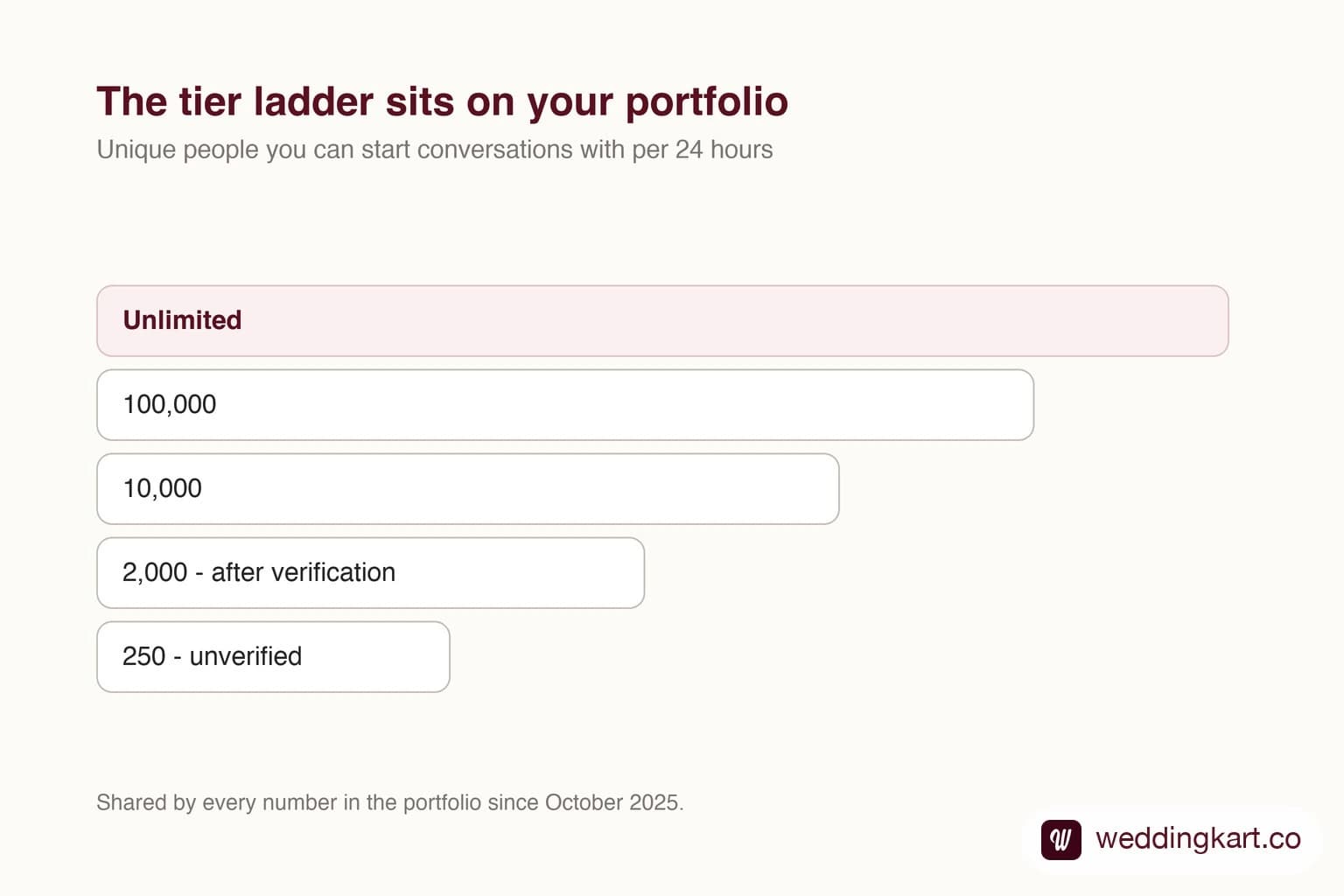
Almost everyone who runs into a WhatsApp sending ceiling assumes they have hit one limit. There are two, they are unrelated, and mistaking one for the other sends you debugging the wrong thing entirely.
One governs how many people you may talk to. The other governs how fast. You can be comfortably inside one and slammed against the other.
Limit one: how many people per day
Your messaging limit is the number of unique recipients you can start a conversation with in a rolling 24-hour window. Not messages - people. Sending the same person four messages costs one slot; sending four people one message each costs four.
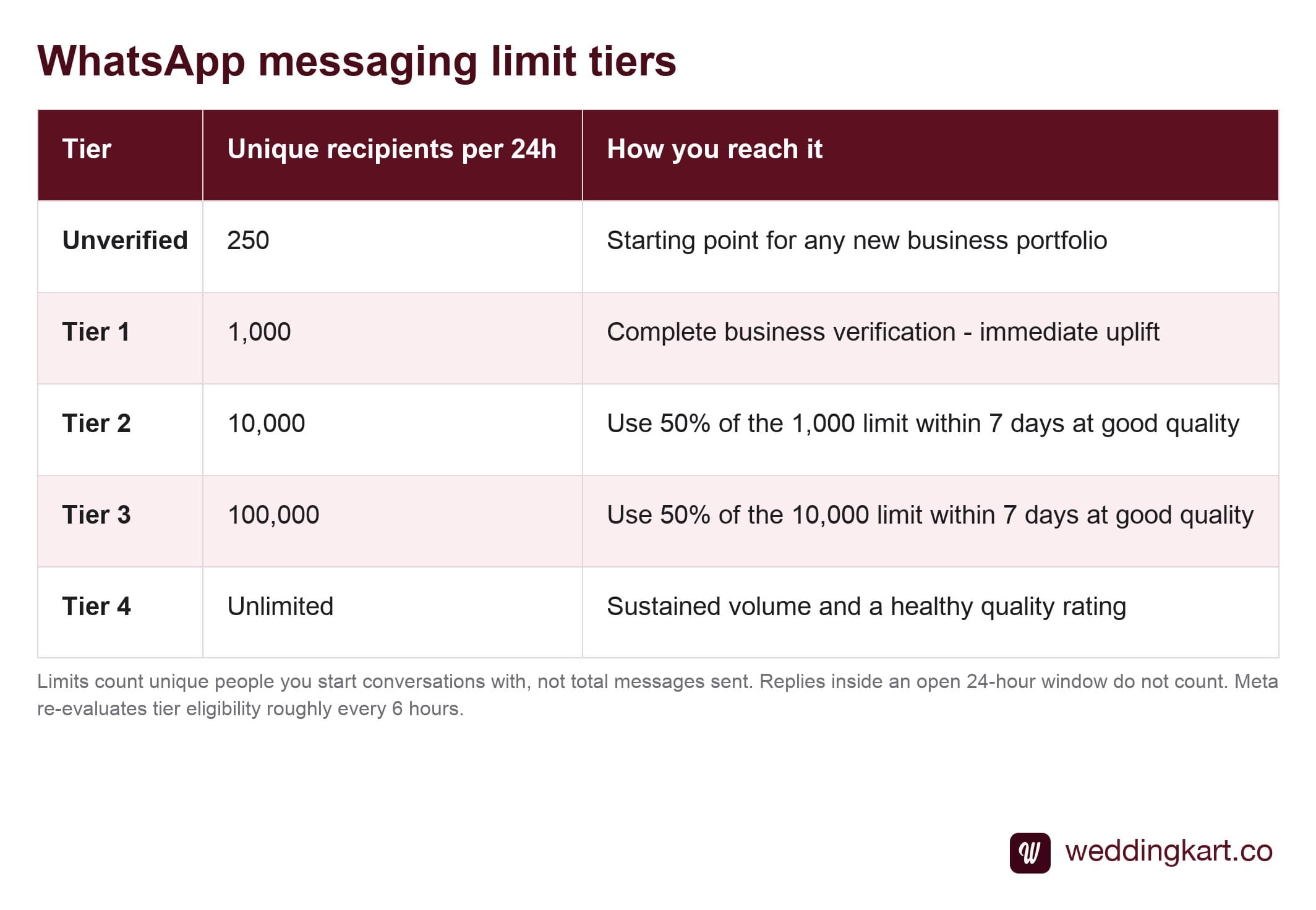
The jump that matters most is the first one, and it is the only one you can simply go and do: business verification takes you from 250 towards 2,000. Everything above that has to be earned.
How you climb
Meta will not raise your tier because you asked. The rule is usage plus behaviour: use at least 50% of your current limit within a 7-day window while keeping your quality rating healthy. Meta re-evaluates roughly every six hours and upgrades automatically.
There is a trap in that rule for anyone whose sending is event-shaped rather than continuous. To climb from 2,000 to 10,000 you must actually send to 1,000 people in a week - at good quality. If your business sends in bursts months apart, you may never satisfy the usage half of the test, and you will sit at a tier that feels arbitrary. The tier system is designed for businesses that message steadily.
Limit two: how fast
Throughput is a completely separate ceiling, measured in messages per second. Cloud API numbers default to 80 messages per second, and Meta automatically raises eligible numbers to 1,000 per second based on quality and phone number status.
Exceed it and you get error 130429. The correct response is exponential backoff - start at one second, double each retry, cap at sixty. The incorrect and very common response is a tight retry loop, which keeps you pinned against the limit and turns a brief throttle into a sustained one.
For most businesses 80 per second is far more headroom than it sounds. Eighty per second is 4,800 a minute. If you are sending to 500 people, throughput is not your problem and never was.
Which one is actually biting you
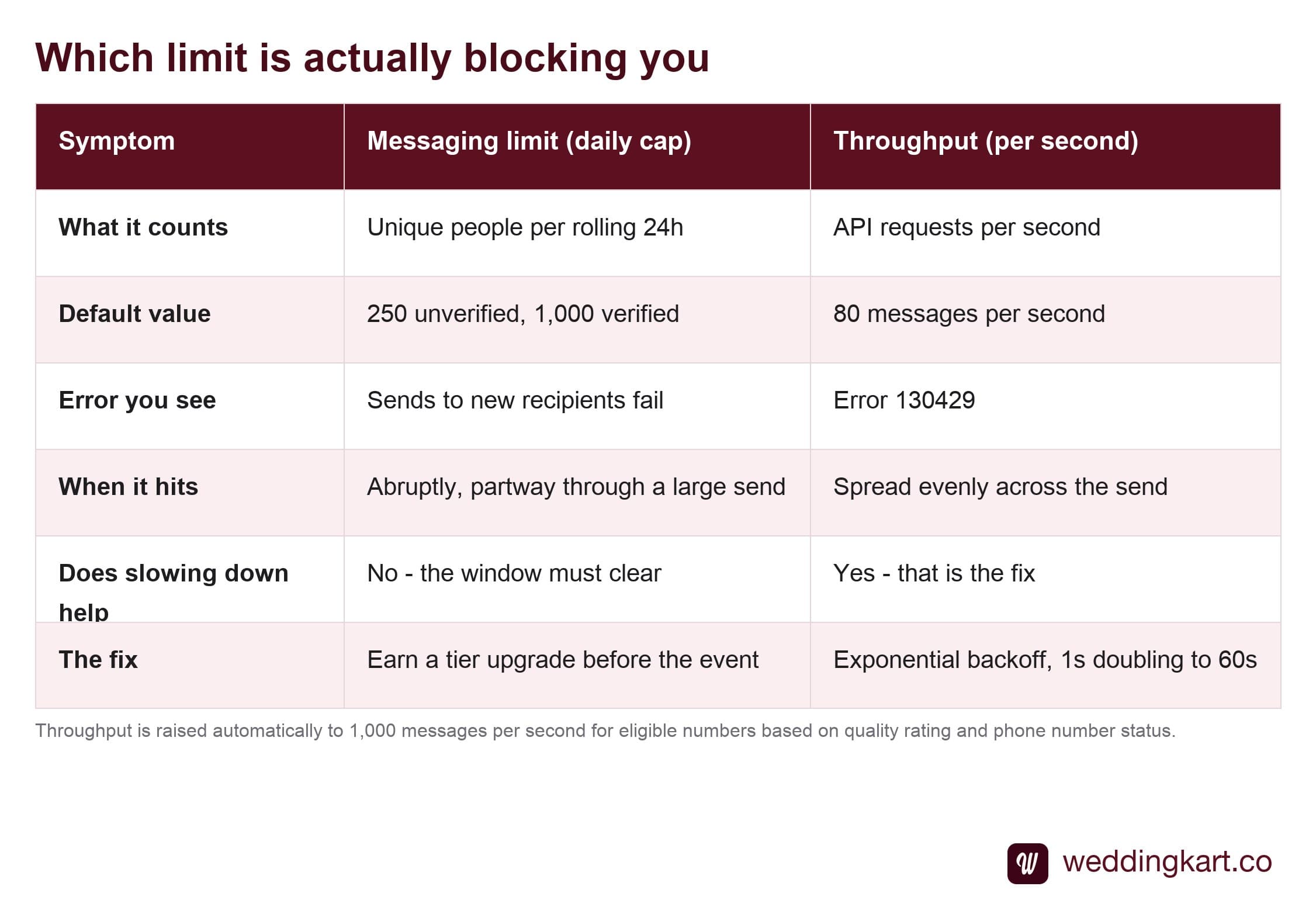
The quickest tell: if failures are spread evenly across your send and clear up when you slow down, it is throughput. If failures start abruptly partway through and do not clear until the next day, it is the daily cap.
The event-shaped sending problem
Everything above is written for businesses that message continuously. Weddings, conferences, ticketed events and product launches are the opposite: a cold number, then 500 people in one evening, then nothing for a month.
That pattern collides with the tier system in a specific and avoidable way. A portfolio that has never sent anything sits at 250, and every number inside it shares that cap. Someone plans a 500-guest invitation blast for Friday. Half of it fails, and the diagnosis is always “the software broke” when in fact the platform did exactly what it said it would.
Three habits fix it, and all three have to happen before the week of the event. Complete business verification early - it is the free 8× and it takes days, not minutes. Warm the number up with real, wanted messages so the tier has a reason to rise. And split large sends across days rather than discovering the ceiling live.
None of this is exotic. It is just scheduling, and it has to be someone’s job weeks in advance. The platform will not warn you on the day.
Tools referenced in this post
Try Weddingkart for your wedding
Guest lists, WhatsApp invites, RSVPs, countdowns and more - the AI layer for Indian weddings.
Related reading
Frequently Asked Questions
What is the difference between messaging limits and rate limits on WhatsApp?
They constrain different things. The messaging limit is a daily cap on how many unique people you can start a conversation with - 250, 2,000, 10,000, 100,000 or unlimited in a rolling 24-hour window, shared across every number in the portfolio. The rate limit, or throughput, is how many API requests per second you can make, defaulting to 80 messages per second. You can hit throughput while nowhere near your daily cap, and vice versa. The fixes are different too: throughput needs backoff in your code, the daily cap needs a tier upgrade.
How do I increase my WhatsApp messaging limit?
Complete business verification first - that alone makes you eligible to scale from 250 to 2,000. After that the upgrades are earned, not requested: use at least 50% of your current limit within a 7-day period while keeping your quality rating healthy. Meta evaluates eligibility roughly every 6 hours and raises the tier automatically. There is no form to fill in and no support ticket that speeds it up.
Does replying to a customer count against my messaging limit?
No. The limit counts business-initiated conversations - the ones where you message someone first. Replies inside an open 24-hour customer service window do not consume the quota, because the customer started that conversation. This is why support-heavy businesses rarely bump into the cap while campaign-heavy ones do.
What happens if I exceed my WhatsApp messaging limit?
Sends to new recipients start failing until the rolling window clears. You are not banned and nothing is permanently damaged - it is a throttle, not a penalty. But if it happens during a time-sensitive send, those people simply do not get the message on time, which is why you plan the tier before the event rather than discovering the ceiling during it.
Why did my brand new WhatsApp number cap at 250?
Because business verification has not completed on the portfolio that owns it. 250 recipients per 24 hours is the starting point for unverified portfolios. It is deliberately low - it is Meta limiting the blast radius of an account nobody has vouched for yet. Completing verification makes you eligible to scale to 2,000.
Was this article helpful?
Share
By Weddingkart TeamLast updated