
Quick Answer
Why do some of my wedding invites fail when I send to hundreds of guests on WhatsApp?
Because WhatsApp has several separate limits and each one fails differently. Sending too fast returns error 130429 (Cloud API numbers default to up to 80 messages per second, and a number shared between the WhatsApp Business app and the API is fixed at 20). Sending to too many new people in 24 hours stops at your messaging limit, which starts at 250 for a new business portfolio. Messaging one person too often returns 131056, and Meta's per-person marketing cap returns 131049. Rate-limited guests are on WhatsApp and nothing is wrong with their number: pause, then resend more slowly.
Last updated:
WhatsApp Sending Limits for Wedding Invites
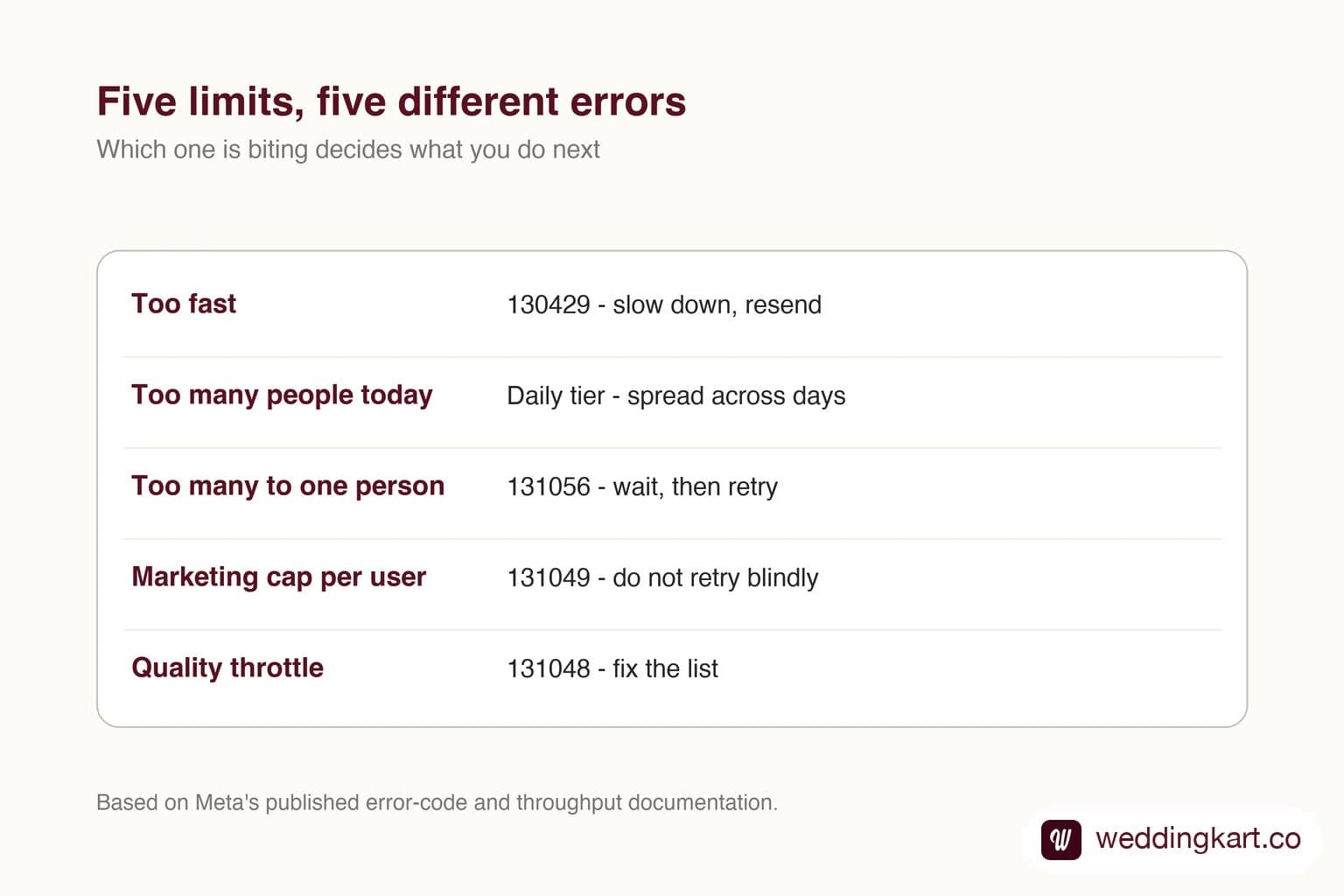
The invite went out on Friday evening. By Saturday morning most guests had it, a few dozen did not, and the delivery report said “failed” with a code nobody on the planning team recognised. The reflex is to assume those numbers are wrong, or that WhatsApp is flaky. Often neither is true.
WhatsApp does not have one sending limit. It has at least six, they are measured differently, and each one produces a different error. This guide takes them one at a time, using Meta’s own documentation (linked throughout), and ends with a checklist for sending to 500 or more guests. It is written for couples and planners using the WhatsApp Business Platform, including from their own number through the WhatsApp Business app (the “coexistence” setup).
What are the WhatsApp sending limits, in one table?
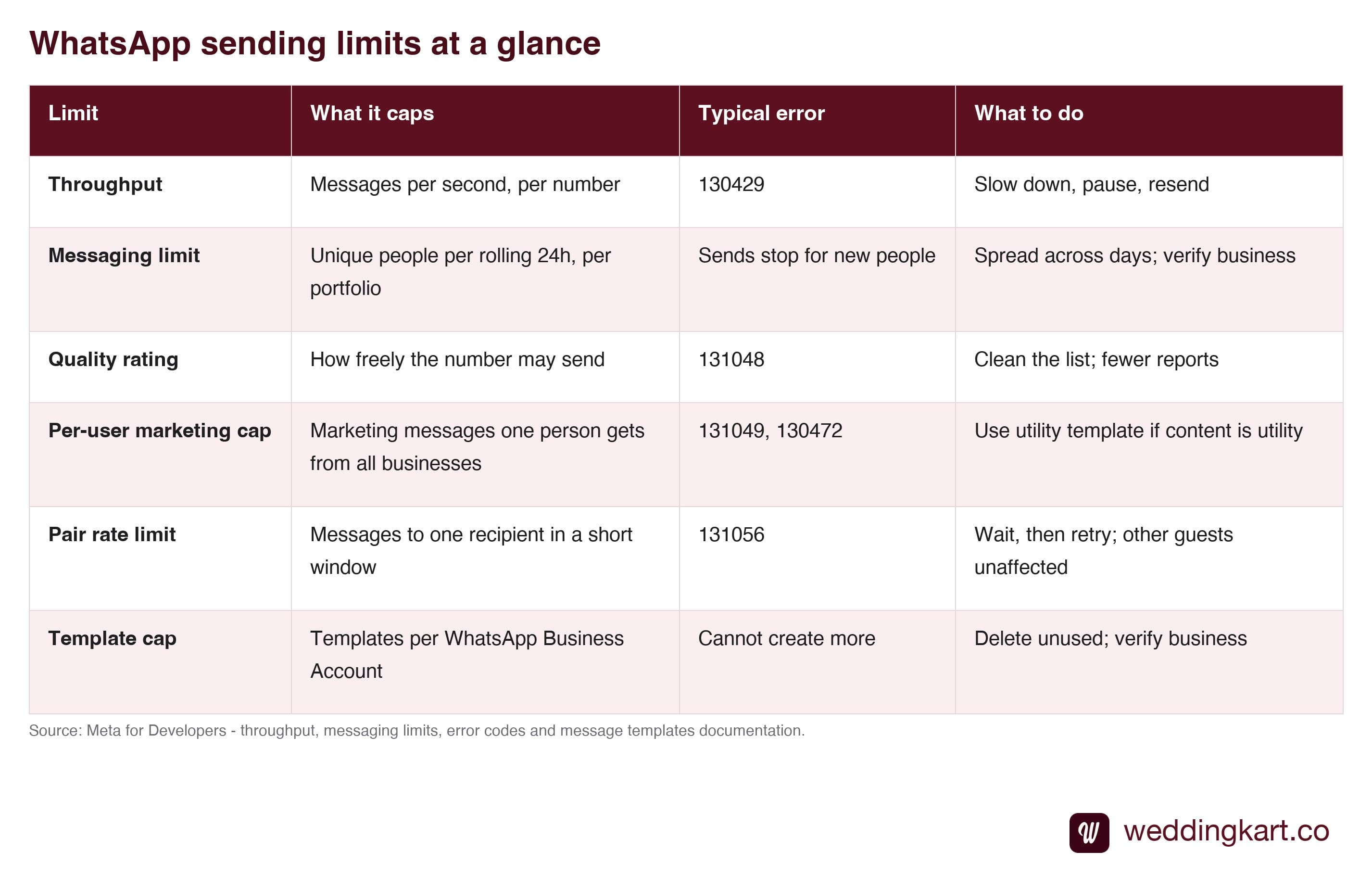
| Limit | What it caps | Typical error | What to do |
|---|---|---|---|
| Throughput | Messages per second, per number | 130429 | Slow down, pause, resend |
| Messaging limit | Unique people per rolling 24 hours, per portfolio | Sends to new people stop | Spread across days; verify the business |
| Quality rating | How freely the number may send | 131048 | Clean the list; reduce blocks and reports |
| Per-user marketing cap | Marketing messages one person receives from all businesses | 131049, 130472 | Use a utility template if the content is utility |
| Pair rate limit | Messages to one recipient in a short window | 131056 | Wait, then retry; other guests are unaffected |
| Template cap | Templates per WhatsApp Business Account | Cannot create more | Delete unused templates; verify the business |
How fast can I send WhatsApp messages?
Per Meta’s throughput documentation, each business phone number on the Cloud API can send up to 80 messages per second by default, with an automatic upgrade to 1,000 per second. Two details matter for weddings. First, the count covers inbound and outbound messages of every type, so guests replying while you send eats into the same budget. Second, Meta’s page lists the conditions for the 1,000 tier: an unlimited messaging limit, at least 100,000 unique recipients in a rolling 24 hours outside customer service windows, and a quality score of Medium or higher. A wedding sender is very unlikely to meet that, so plan around the default.
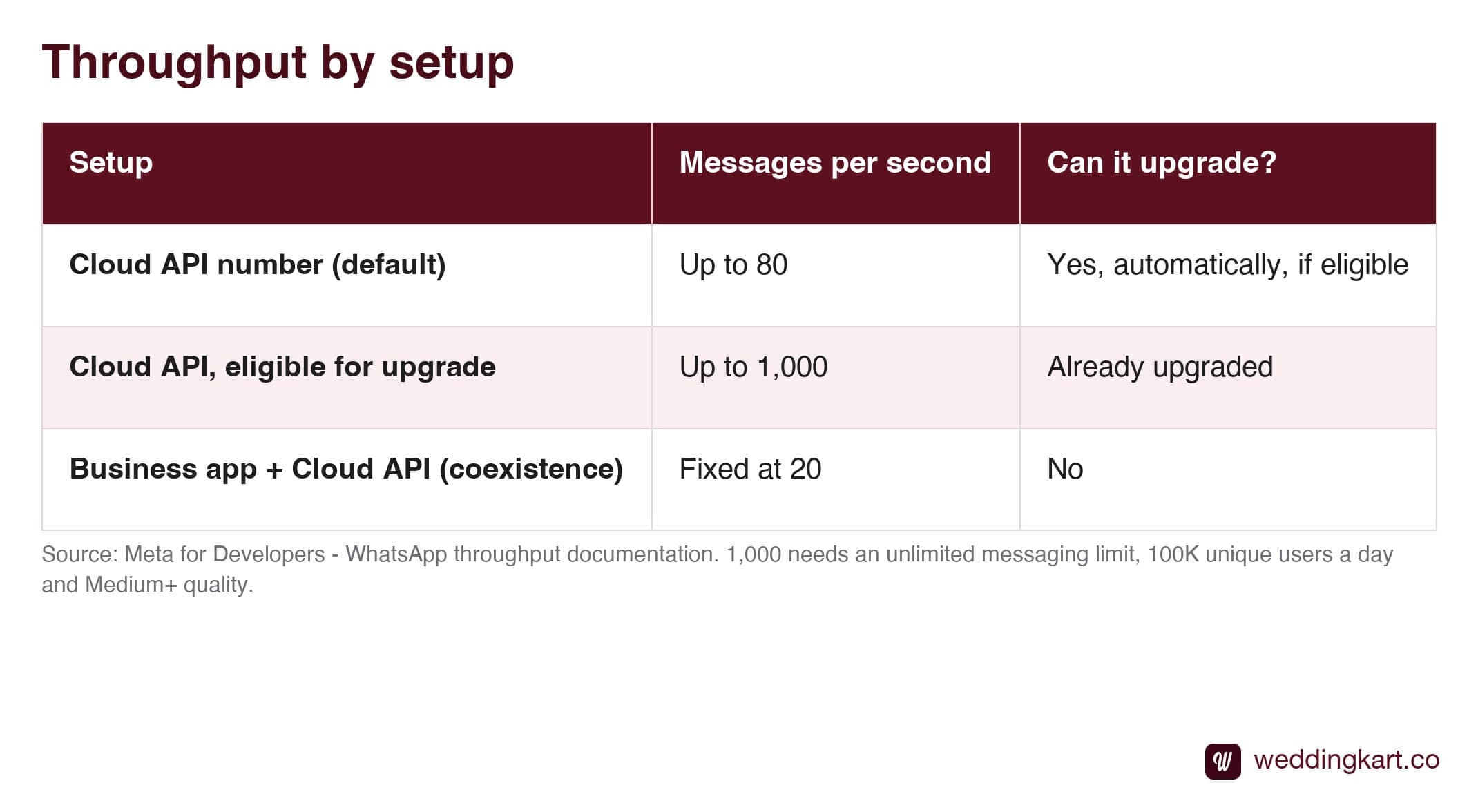
| Setup | Messages per second | Can it upgrade? |
|---|---|---|
| Cloud API number (default) | Up to 80 | Yes, automatically, if eligible |
| Cloud API, eligible for upgrade | Up to 1,000 | Already upgraded |
| Business app + Cloud API (coexistence) | Fixed at 20 | No |
The row that surprises people is the last one. If you connected your own number so that you can keep replying from the WhatsApp Business app, Meta fixes that number at 20 messages per second, and it never upgrades. That is still plenty in theory, but software that sends in fast bursts can cross it. Our own earlier guide on coexistence covers what that setup preserves; this is the cost.
What does error 130429 mean, and are those guests really on WhatsApp?
Error 130429 (“Rate limit hit”) means Cloud API message throughput was reached. Meta’s error-code page says to try again later or reduce how often you send.
Here is the field observation that catches planners out: Meta can accept a send, hand back a message ID as though all is well, and report the 130429 failure afterwards in a status update, roughly 30 to 60 seconds later. So a dashboard that said “sent” a minute ago can flip to “failed” with no action on your part. Failures of this kind cluster together in the middle of a big send, which is the giveaway.
The important consequence: those guests are on WhatsApp. This is not the “number not on WhatsApp” problem described under error 131026 in our guide to undelivered wedding invites. Do not delete them or chase them for a new number. Wait a few minutes and resend that group at a slower pace.
How many guests can I message in one day?
That is the messaging limit: unique people you can start conversations with in a rolling 24 hours. Meta lists the tiers as 250, 2,000, 10,000, 100,000 and unlimited, and says new business portfolios start at 250. Since October 2025 the limit is set per business portfolio and shared by every phone number in it, so adding another number to the same portfolio buys you nothing. A second portfolio is a different story, but not a shortcut worth taking: it needs its own verification and starts cold.
How you climb is where sources differ. Meta’s page describes verification (yours or a partner’s), or sending 2,000 delivered messages to unique numbers in 30 days with high-quality templates, to reach 2,000. Above that, automatic scaling needs high-quality sends and use of at least half the current limit within seven days. Vendor guides quote slightly different triggers, so treat any single blog’s numbers, ours included, as a summary and check Meta’s page. Our messaging limits guide goes deeper on the climb.
The practical wedding point: a 600-guest list on a fresh, unverified portfolio cannot go out in one evening. Verify early, or split the list across two or three days by family or by event.
Why did Meta not deliver some of my marketing-style invites (131049)?
Error 131049 says the message was “not delivered to maintain healthy ecosystem engagement”. In plain terms, Meta limits how many marketing-category template messages one person receives, across all businesses, and withheld yours. Error 130472 says the recipient was part of a Meta experiment and the message was not sent.
Slowing down does nothing here; the cap is per person, not per second. Meta’s advice for 131049 is to wait at least 24 hours before resending, and retrying sooner will likely fail again. The lasting fix is category. If a message is truly utility, for example a venue change, a shuttle time or a schedule update for guests who already confirmed, submit it as a utility template. If it is a promotional blast, expect some guests to be skipped and do not fight it. Never relabel marketing content as utility; Meta reviews that. See why templates get rejected.
What is the pair rate limit (131056)?
Error 131056 means too many messages went from your number to the same recipient in a short period. Meta says you can still message other people without waiting, and can retry that person after a pause. Secondary sources put the pace at roughly one message per six seconds per sender-recipient pair; Meta does not publish a figure, so treat that as approximate. It bites when invites go out as several quick messages in a row (card, video, schedule, map) to the same guest. Space them out, or combine them.
How do quality ratings and blocks limit sending (131048)?
When recipients block or report your messages, quality drops, and Meta may restrict how many messages the number can send. Error 131048 is that restriction showing up: Meta tells you to check your quality status in WhatsApp Manager and to review your template limits and template quality. A wedding list is mostly people who know the couple, which helps, but cousins added from a forwarded spreadsheet do not. Our quality rating guide and guest list cleaning guide cover the green, yellow and red states and how to avoid the slide.
Is there a limit on message templates?
Yes, but it rarely bites a single wedding. Meta documents 250 templates per WhatsApp Business Account when the parent business is unverified, and up to 6,000 when the portfolio is verified and has a phone number with an approved display name. You can also create at most 100 templates per account per hour. Planners who run many weddings through one account should prune old templates.
What should a planner do before sending to 500+ guests?
- Send at a steady pace under your number’s throughput. Much lower if the number is shared with the Business app: think of 20 per second as a hard wall, not a target.
- Send in batches and watch the status updates for a few minutes. A 130429 can appear 30 to 60 seconds after a send was accepted.
- Retry rate-limited failures after a pause, at a slower pace. Do not retry in a tight loop, which keeps you pinned at the limit.
- Keep the list clean. Remove duplicates, fix country codes and only message people who expect you. This protects quality and avoids 131048.
- Use utility templates for utility content and accept that marketing-style messages may be skipped (131049).
- Do not fire several messages at one guest in quick succession (131056).
- Verify the business portfolio early, so the daily cap and template cap are not the surprise on the day.
A last, honest note on tooling. Whichever product you use, ask whether it paces sends for your number type and whether it retries rate-limited failures, because many do not. Weddingkart sends invites through the official WhatsApp Business Platform and shows per-guest delivery status and failure reasons, so you can see which guests need a resend (see delivery tracking and WhatsApp announcements), but the resend itself is still a decision you make, at a pace that suits your number.
Sources
- Meta for Developers: WhatsApp throughput
- Meta for Developers: Messaging limits
- Meta for Developers: Error codes
- Meta for Developers: Message templates
- DoubleTick: pair rate limit explainer (secondary source, source of the approximate pacing figure)
Limits and eligibility rules are set by Meta and change. Figures here were checked against Meta’s pages on 16 October 2026; confirm on the linked pages before a large send.
Tools referenced in this post
Try Weddingkart for your wedding
Guest lists, WhatsApp invites, RSVPs, countdowns and more - the AI layer for Indian weddings.
Related reading
Frequently Asked Questions
What is the WhatsApp message sending speed limit?
Per Meta, each business phone number on the Cloud API gets up to 80 messages per second by default, and eligible numbers are upgraded automatically to 1,000. Numbers used with both the WhatsApp Business app and the Cloud API (coexistence) are fixed at 20 messages per second and are not upgraded. The count includes inbound and outbound messages of every type. Exceeding it returns error 130429.
What does WhatsApp error 130429 (rate limit hit) mean?
It means Cloud API message throughput was reached: you sent faster than your number allows. Meta says to try again later or reduce how often you send. The guests affected are normal WhatsApp users, so the fix is to resend more slowly rather than to check their numbers. In practice Meta can accept the send first and report 130429 in a status update 30 to 60 seconds later, so a message that looked accepted can still fail.
How many wedding invites can I send on WhatsApp in a day?
That depends on your messaging limit, which counts unique people you start conversations with in a rolling 24 hours. Meta lists the tiers as 250, 2,000, 10,000, 100,000 and unlimited, and newly created business portfolios start at 250. Since the limit is set at the business portfolio level, every number in the portfolio shares it. Business verification is one of the documented ways to reach 2,000.
Does adding more phone numbers raise my WhatsApp sending limit?
Not for the daily messaging limit. Meta sets it at the business portfolio level and shares it across every phone number in that portfolio, so a second number does not add capacity. Throughput is different: it is per phone number, though a number that is shared with the WhatsApp Business app is fixed at 20 messages per second.
What do errors 131049 and 130472 mean?
Error 131049 reads "not delivered to maintain healthy ecosystem engagement": Meta chose not to deliver a marketing-category template to that person, apparently to limit how many marketing messages one person receives across all businesses. Meta says to wait at least 24 hours before resending if you suspect a limit. Error 130472 means the message was not sent as part of a Meta experiment. Neither is fixed by sending slower. If the message is genuinely a utility message, such as a venue or timing update for a guest who already RSVPed, submit it as a utility template rather than a marketing one.
What is the WhatsApp pair rate limit (error 131056)?
It fires when too many messages go from your number to the same recipient in a short period. Meta says you can retry that recipient after waiting, and that messages to other people are not blocked. Secondary sources suggest roughly one message every six seconds per pair, but Meta does not publish an exact figure, so treat that number as approximate.
How many message templates can a WhatsApp Business Account have?
Meta documents 250 templates per WhatsApp Business Account when the parent business portfolio is unverified, and up to 6,000 when it is verified and has a phone number with an approved display name. Separately, you can create at most 100 templates per hour in one account.
Will a low quality rating stop my wedding invites?
It can. Meta ties sending freedom to quality: lots of blocks and reports can restrict a number, and error 131048 says there are restrictions on how many messages can be sent from the number, often because earlier messages were blocked or flagged as spam. Meta points you to the quality status in WhatsApp Manager. Sending only to guests who expect your invite is the best protection.
Was this article helpful?
Share
By Mayank JaiswalLast updated