
Quick Answer
How do you send images and documents on the WhatsApp API?
Two ways. You can upload the file to Meta first, receiving a media ID you then reference when sending, or you can pass a public HTTPS link and let Meta fetch it. Uploading is more reliable and lets you reuse one ID across many sends; links avoid storing anything but depend on your host staying up. Size limits are 5 MB for images, 16 MB for video and audio, 100 MB for documents, and 100 KB for static stickers. Media IDs expire after 30 days, which is the single most common cause of a media send that worked last month and fails today.
Last updated:
Sending Media on the WhatsApp API
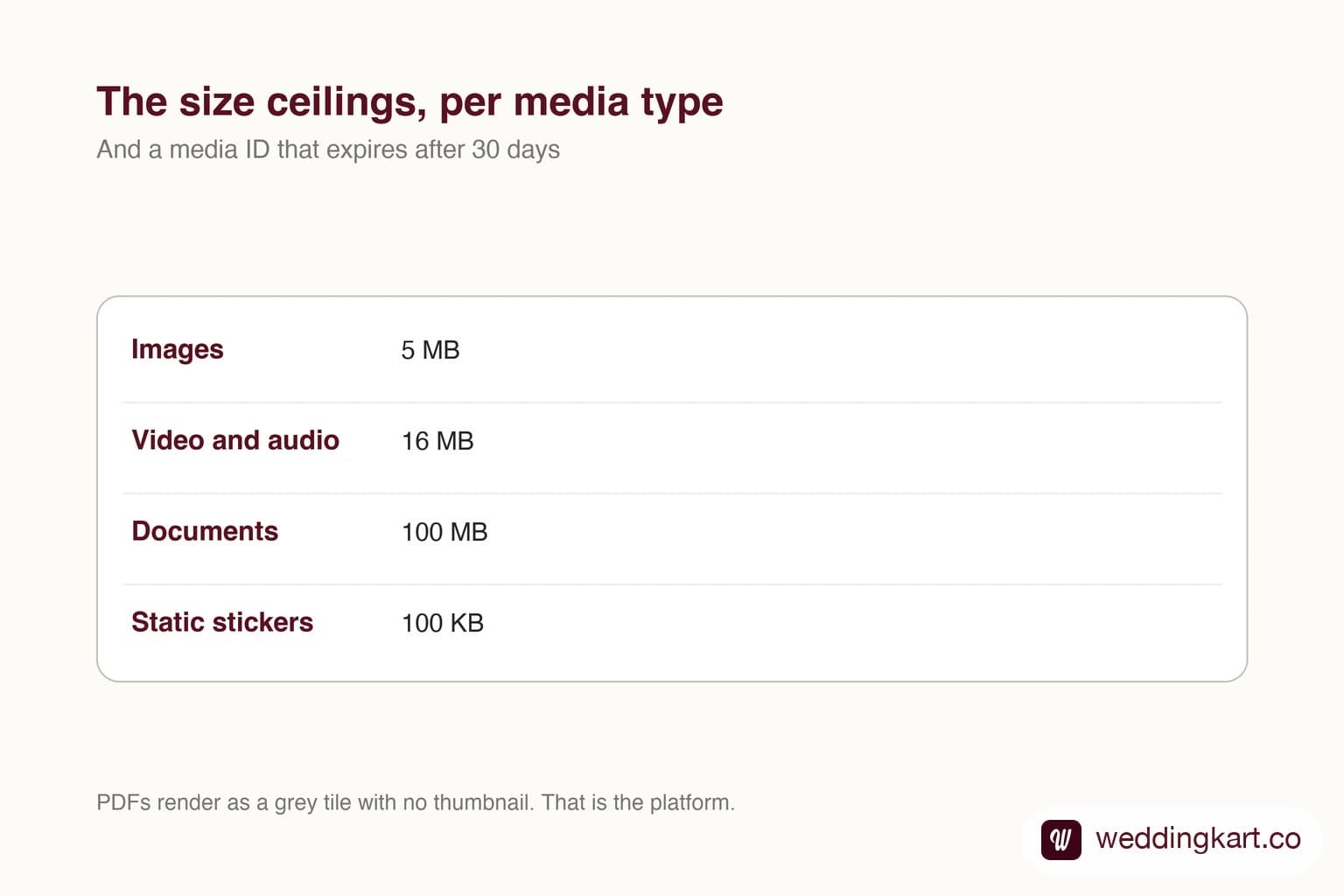
Sending a picture is the most ordinary thing anyone does on WhatsApp, which is exactly why the API version of it catches people out. There is an upload step, an identifier with an expiry date, a set of size ceilings that differ per type, and a rendering behaviour for documents that no amount of effort will change.
The limits
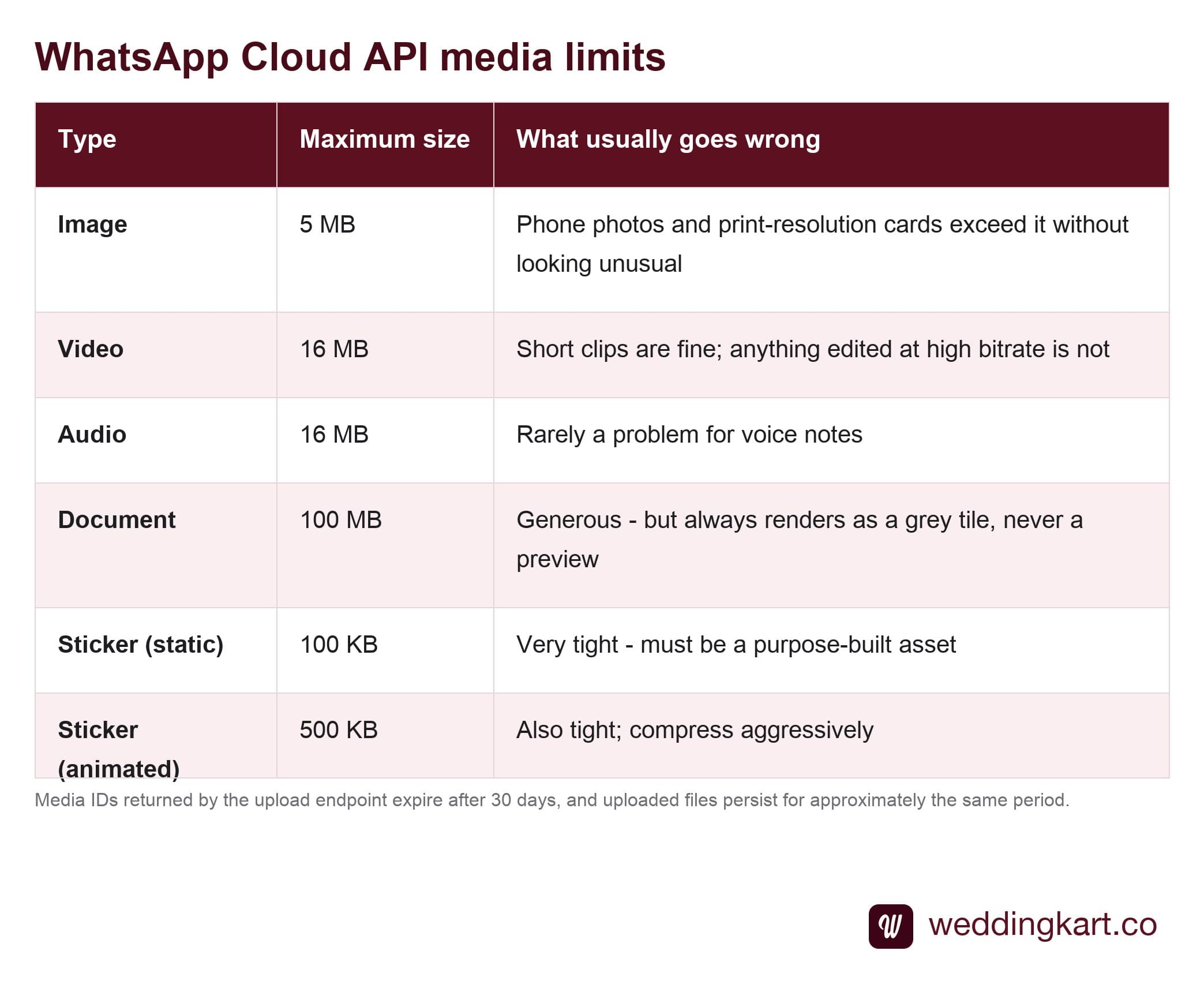
The 5 MB image ceiling is the one worth designing around. A photo straight off a modern phone, or a designed card exported at print resolution, will clear it comfortably — and nothing about the file looks wrong until the send fails. Compress on the way in, not on the way out.
Upload, or link
You have two routes to attaching a file, and they fail in different places.
Upload posts the file to Meta and returns a media ID. You then reference that ID when sending. One upload, unlimited sends, no dependency on your own infrastructure during the campaign — which matters more than it sounds when you are sending to a few hundred people at once.
Link passes a public HTTPS URL and lets Meta fetch the file at send time. Nothing to store, but now your host is in the critical path of every message. A slow response or a moment of downtime turns into failed sends.
The rule of thumb: same file to many people, upload it. Unique file per person, link it.
The 30-day expiry that breaks working code
Media IDs expire after 30 days. Uploaded files are stored encrypted and persist for roughly the same period.
This produces one of the more disorienting failures on the platform, because nothing you control has changed. Same code, same file, same template — and sends that worked in April fail in June. It is especially common in event-driven work, where assets get prepared far in advance and the send happens much later.
The fix is a habit rather than a feature: treat a media ID as a short-lived cache entry, not a permanent reference. Re-upload close to the send, store the fresh ID, and never assume an ID from last month is still good. If you persist media IDs in a database, store the upload timestamp beside them so the staleness is visible.
Documents always look like documents
A PDF sent over WhatsApp renders as a plain grey tile with a filename and a download control. No thumbnail, no first-page preview, no styling. This is platform behaviour and it applies regardless of how the PDF was produced.
Two practical consequences. First, the filename is your entire pitch — it is the only content the recipient sees before deciding to tap. Sangeet-Schedule.pdf gets opened; doc_final_v3.pdf does not. Second, if the content genuinely needs to be seen rather than opened, it should not be a PDF. Send it as an image, and accept the 5 MB ceiling as the price of being visible in the chat.
Media in templates
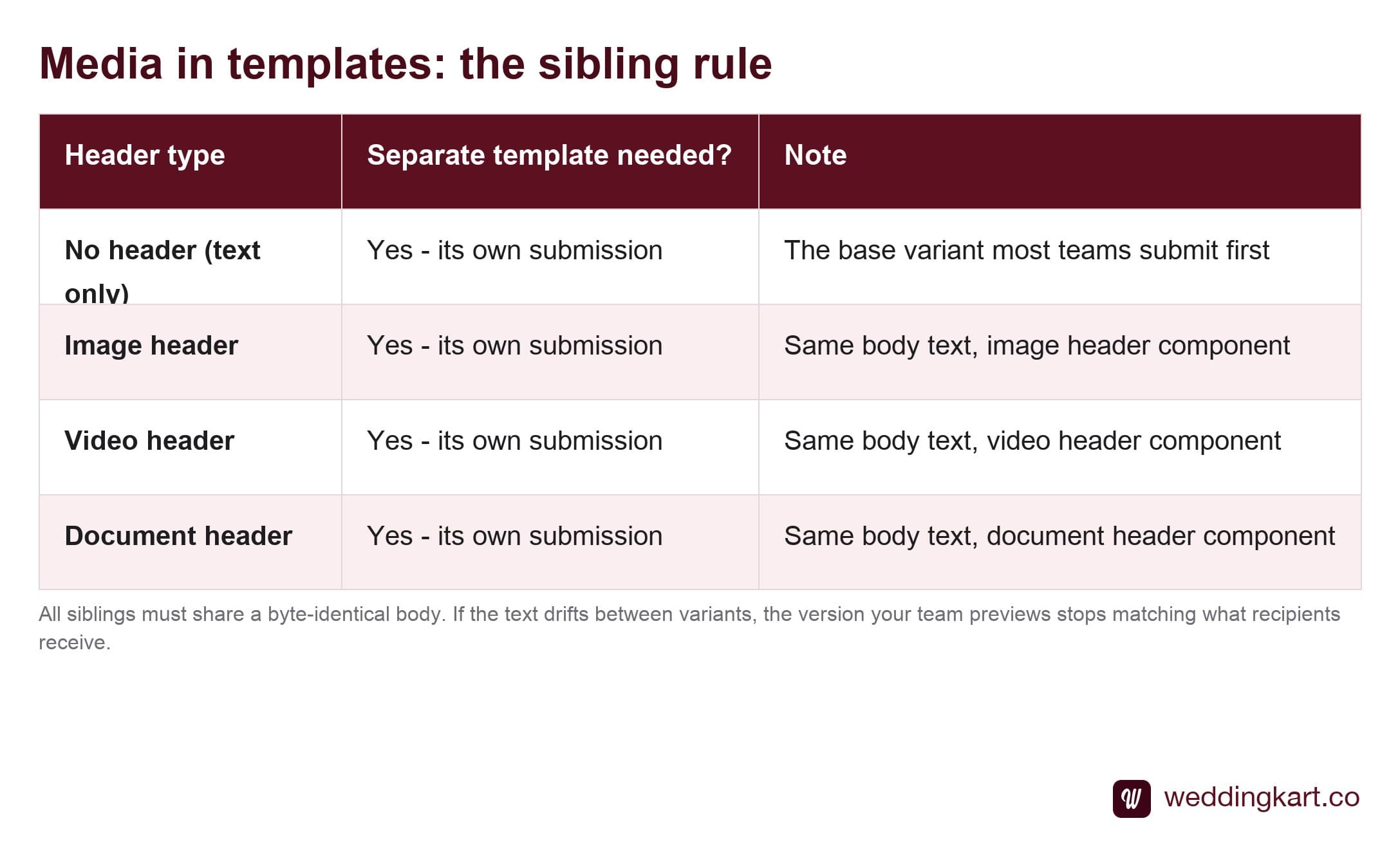
The sibling rule surprises nearly everyone the first time. Because Meta requires a separate approved template per attachment type, one logical message — say a ceremony announcement — becomes up to four submissions that differ only in their header.
Keep the body byte-identical across all of them. If the text drifts between the image variant and the text variant, whatever preview your team looks at will stop matching what guests actually receive, and that is a very hard bug to notice from the inside. More on this in the template guide.
Tools referenced in this post
Try Weddingkart for your wedding
Guest lists, WhatsApp invites, RSVPs, countdowns and more - the AI layer for Indian weddings.
Related reading
Frequently Asked Questions
What are the media size limits on the WhatsApp Cloud API?
Images cap at 5 MB, video and audio at 16 MB each, documents at 100 MB, and stickers at 100 KB for static or 500 KB for animated. The image limit is the one that bites most often, because a modern phone photo or a designed invitation card at print resolution will exceed 5 MB without looking unusual. Compress before you send rather than discovering the ceiling in production.
Should I upload media or send a link?
Upload if you are sending the same file to many people - one upload gives you a media ID you reuse across every send, which is faster and removes any dependency on your own hosting staying up during a large campaign. Use a link when the file is unique per recipient or changes often, so you are not uploading thousands of one-off assets. The tradeoff is control: with a link, Meta has to reach your host at send time, and a slow or unavailable URL becomes a failed message.
Why did my WhatsApp media stop working after a month?
Because media IDs expire after 30 days. This produces a particularly confusing failure: code that has not changed, a file that still exists, and sends that suddenly fail. It is common in seasonal or event-driven businesses that upload assets well in advance. If you upload early, re-upload close to the send and refresh the stored ID rather than trusting one from weeks ago.
Why does my PDF show as a grey box instead of a preview?
That is how WhatsApp renders documents, and there is nothing you can do to your file to change it. Documents appear as a generic tile with a filename rather than a visual preview. The practical consequence is that the filename is doing all the persuasion, so name files meaningfully - "Sangeet-Schedule.pdf" rather than "doc_final_v3.pdf". If the content really needs to be seen without a tap, send it as an image instead.
Can I send media in a template message?
Yes - templates can carry a media header for an image, video or document, and it is approved as part of the template. One thing that surprises people is that WhatsApp requires a separate approved template per attachment type, so one logical message becomes several sibling templates that differ only in header. All siblings should share an identical body, or the version you preview and the version you send will drift apart.
Was this article helpful?
Share
By Weddingkart TeamLast updated