
Quick Answer
What is the WhatsApp INR billing deadline for Indian businesses?
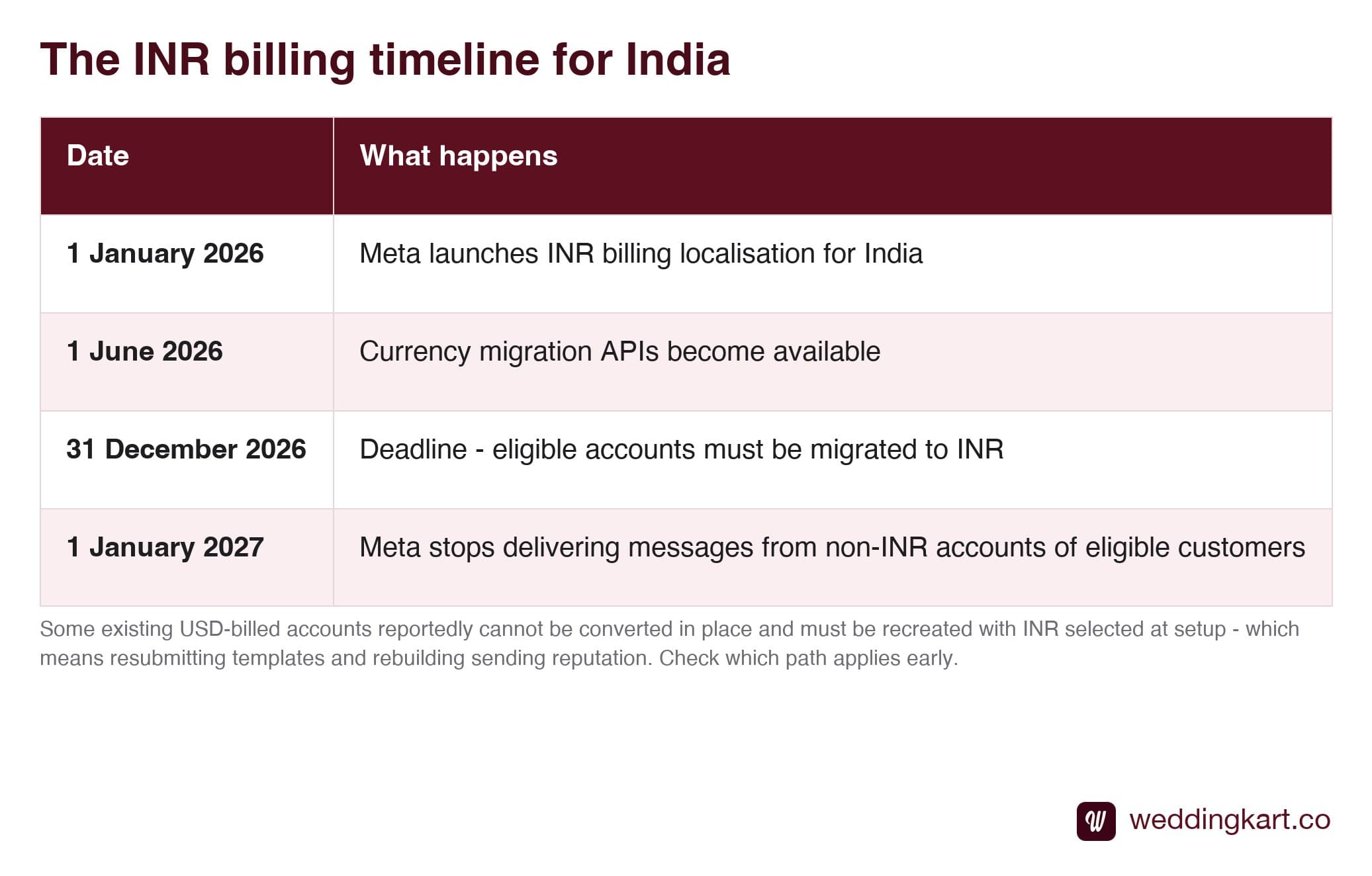
Meta launched INR billing localisation for India on 1 January 2026, so accounts whose sold-to country is India are quoted and settled in rupees. Eligible customers must have all their WhatsApp Business Accounts migrated to INR by 31 December 2026 - and from 1 January 2027 Meta will no longer deliver messages from non-INR accounts belonging to those customers. That makes it a delivery deadline rather than a billing inconvenience. Meta provides a Currency Migration API for the move, but there are reports that some existing USD-billed accounts cannot be converted in place and must be recreated, so it is worth checking which path applies to you well before December.
Last updated:
WhatsApp INR Billing: The Deadline
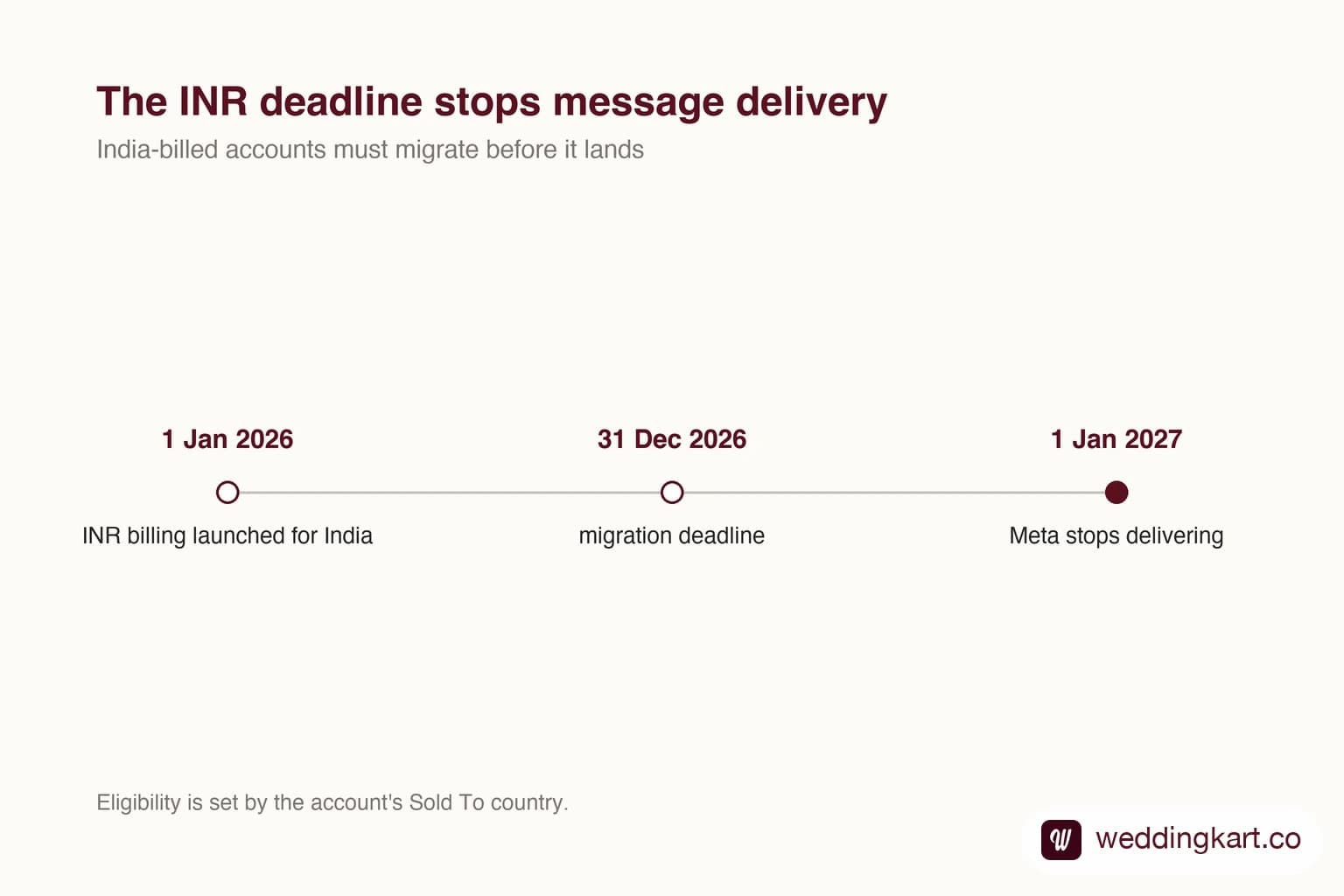
This is the least-discussed deadline on the WhatsApp Business Platform, and it has a consequence sharper than almost anything else in this area: messages stop being delivered.
What Meta changed
On 1 January 2026, Meta launched INR billing localisation for India. Accounts whose sold-to country is India are now quoted and settled in rupees against an India rate card, rather than being billed in dollars.
Sensible enough on its own. The part that matters is the enforcement attached to it.
Why this is not a billing story
Most currency changes are an accounting nuisance. This one is different, because the stated consequence is that Meta will no longer deliver the messages of non-INR accounts belonging to eligible customers from 1 January 2027.
Read in the context of an Indian wedding business, that timing is unkind. January is not a quiet month. A business that misses this does not get a warning invoice - it gets invitations that do not arrive, during the season it earns in.
The complication worth checking early
Meta published currency migration APIs from 1 June 2026, so for many accounts this is a supported, straightforward move.
But there are reports that some existing USD-billed accounts cannot be converted in place and instead require a new account created with INR selected at setup. If that turns out to be your situation, it is a much bigger job than a settings change: a new account means resubmitting your template library and starting your sending reputation from zero - back to the lowest messaging tier and climbing again.
That is precisely why this is worth an hour of attention now rather than in December. The difference between the two paths is days versus weeks.
What to do this month
- Check which currency your WhatsApp messaging is billed in - portfolio billing settings or a recent invoice.
- If it is already INR, you are done.
- If it is USD and the Sold To country is India, find out which migration path applies to your account.
- If a provider handles billing for you, ask them directly - and if your account sits in their portfolio, this is their action to take. See whose portfolio is it in.
None of this is difficult. It is simply easy to miss, because nothing breaks until the day it does - and by then the fix is no longer quick.
Tools referenced in this post
Try Weddingkart for your wedding
Guest lists, WhatsApp invites, RSVPs, countdowns and more - the AI layer for Indian weddings.
Related reading
Frequently Asked Questions
What exactly happens on 1 January 2027?
Meta has stated that from that date it will no longer deliver the messages of non-INR WhatsApp Business Accounts belonging to eligible customers. That is the part worth reading twice - it is not a billing inconvenience or a late fee, it is message delivery stopping. For a business running weddings in January, that lands in the middle of the season.
How do I check which currency my account bills in?
Look at your Meta Business Portfolio billing settings, or at any recent invoice for WhatsApp messaging. If amounts are shown in USD and the account’s Sold To country is India, you are in the group that needs to migrate. If they are already in rupees, you were either set up after the localisation or have already been moved.
Can an existing USD account just be switched to INR?
Meta published currency migration APIs from 1 June 2026 to support the move, so for many accounts it is a supported process. However there are reports that some existing USD-billed accounts cannot be converted in place and instead need a new account created with INR selected at setup. If that applies to you it is significant, because a new account means resubmitting templates and starting the sending reputation again - so find out which path is yours early.
Does this affect what messages cost?
It changes the currency you are quoted and settled in rather than the underlying rate structure. India has its own rate card, and rates are set by the recipient's country in any case. The practical effect for most Indian businesses is simpler invoicing and no foreign-exchange spread, rather than a change in the per-message price itself.
What should I do if my provider handles billing for me?
Ask them directly which currency your WhatsApp Business Account is billed in and whether it needs migrating. If your account sits in their business portfolio rather than yours, this is their action rather than something you can do - but it is still your messages that stop if it is missed, so it is a fair thing to get a straight answer on before December.
Was this article helpful?
Share
By Weddingkart TeamLast updated