
Quick Answer
How do you set up WhatsApp Business API in India?
Three things have to exist before you can message guests at scale: a Meta Business Portfolio (your company's account with Meta), a WhatsApp Business Account created inside it, and a phone number attached to that account. Meta needs a business registration document - a GST certificate is easiest - plus an email on your own website domain and a live website, so it can confirm a real company is behind the messages. Setup is free and handled directly with Meta, and usually takes one to three working days. The most common reason it fails is not paperwork but typing: your business name and address must match your document character for character.
Last updated:
Setting Up WhatsApp Business API in India
If you run an event company and you want to send invitations, RSVP requests and day-of updates to hundreds of guests on WhatsApp, you cannot do it from the app on your phone. Not because it is against a rule nobody enforces - because the number gets banned, usually right when you need it most.
Meta has an official channel for exactly this. Getting on it is more involved than installing an app, and this page explains every step in plain language: what you need, why Meta asks for it, and roughly how long each part takes.
First, the three WhatsApps
Most of the confusion in this whole subject comes from not telling these apart.
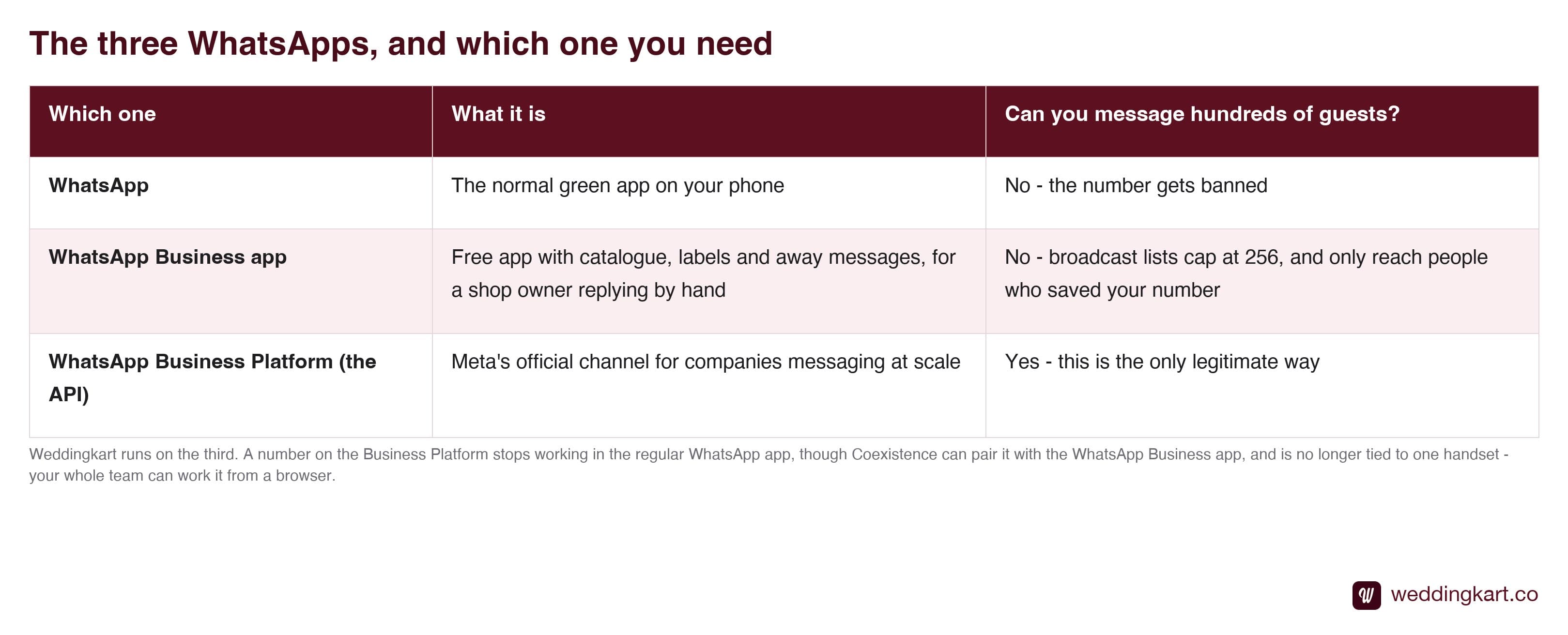
Weddingkart, and every other proper guest-messaging platform, runs on the third one. That is why setup asks more of you than downloading an app - Meta wants to know which real company is behind the messages before it lets them through. We go deeper on the differences in the Business app versus the API.
One useful side effect of being on the official platform: the number stops being tied to a single handset. Your whole team can work it from a browser, and every conversation is logged rather than living on one person’s phone.
The three pieces you need
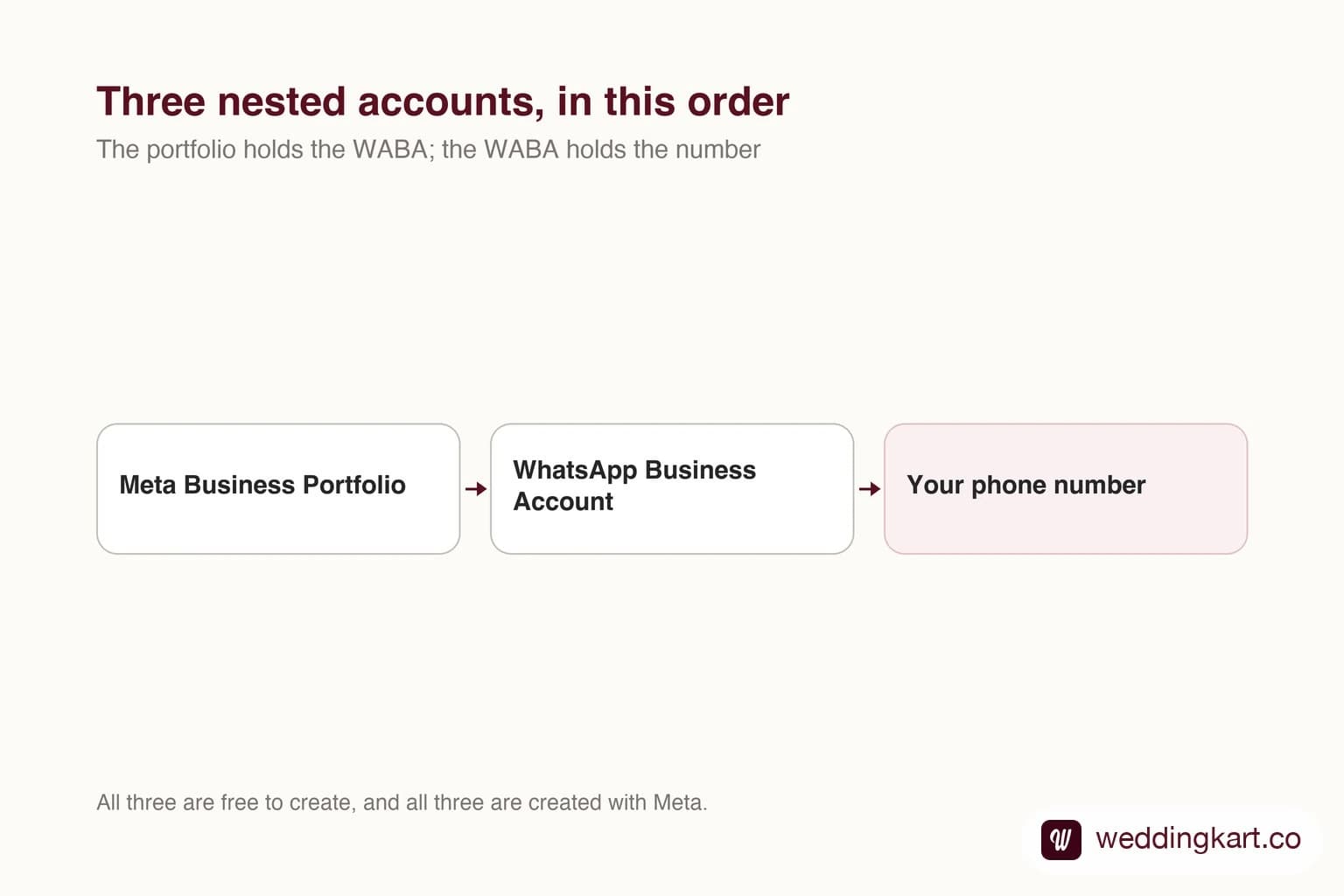
Think of it as a set of nested containers, each one sitting inside the last.
A Meta Business Portfolio is your company’s account with Meta, at business.facebook.com. It holds your Facebook page, your Instagram account, your ad account and your WhatsApp account under one roof. You may still see it called Business Manager - same thing, renamed. Meta will not hand a business messaging channel to an anonymous phone number, and the portfolio is what ties that number to an identified company.
A WhatsApp Business Account, usually shortened to WABA, is created inside that portfolio. It holds your phone numbers, your display name, your message templates and your quality score. This is the thing that actually sends messages - everything else exists to bring it into being.
A phone number attaches to the WABA and becomes the identity your guests see. Meta confirms you control it by sending a code, so use a number someone can answer during setup. There is one hard rule worth knowing before you choose: the number cannot already be active on WhatsApp or WhatsApp Business. More on that in reusing your number versus buying a new SIM.
What Meta asks for, and why
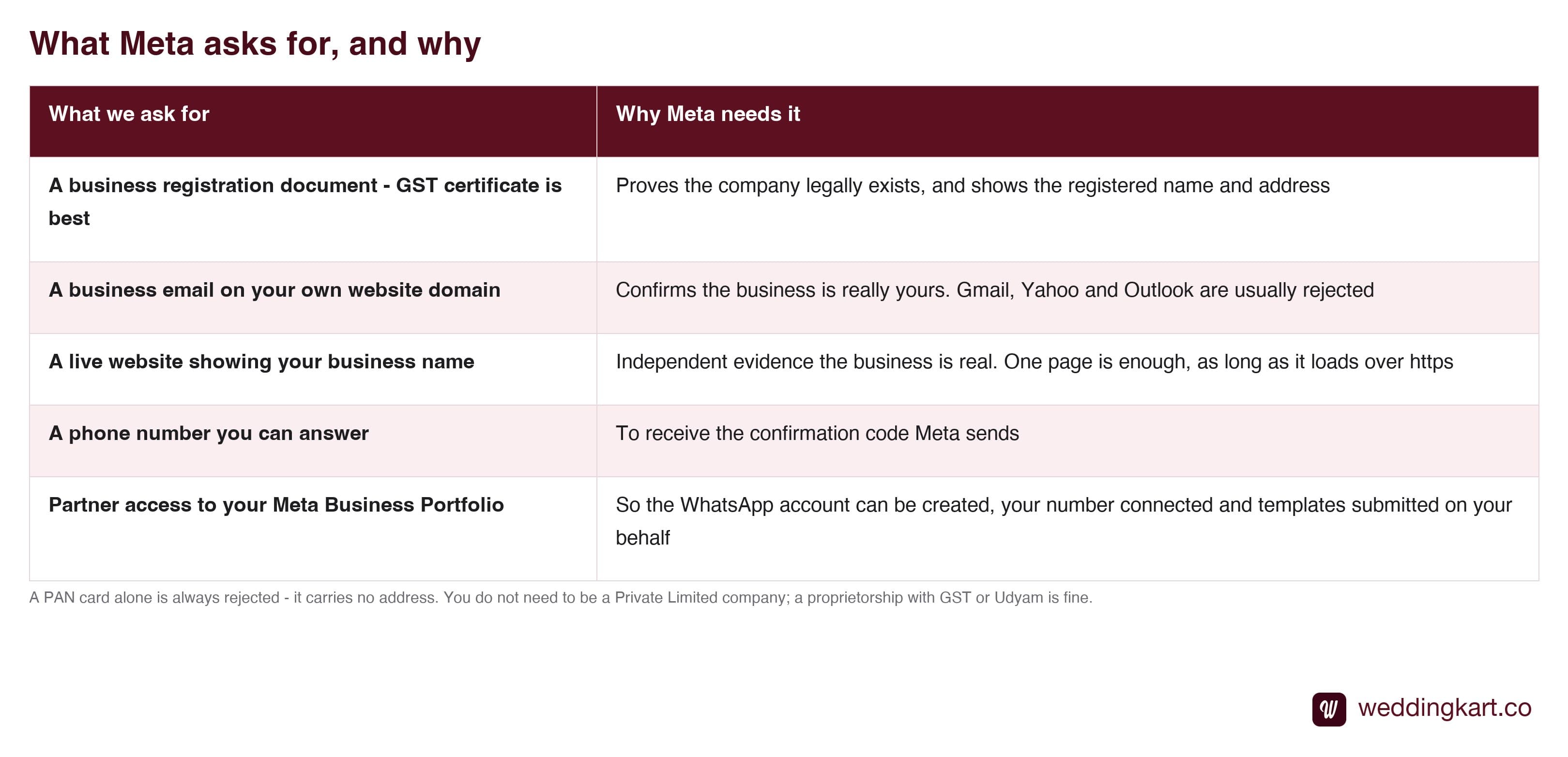
None of this is arbitrary. Every item is Meta answering one question: is there a real, contactable company behind this number? The full breakdown, including which documents work best and which get rejected, is in documents needed for WhatsApp API.
The single biggest cause of rejection
It is not the document. It is the typing.
Whatever you enter - business name, address, phone number - has to match your document character for character. “Shop No. 12” typed as “Shop 12” can fail. “Road” shortened to “Rd.” can fail. “&” typed as “and” is a rejection.
Resubmissions are limited before you have to open a support ticket with Meta, which turns a two-day job into a two-week one. Put the document on the desk in front of you and copy from it. Do not do it from memory, and do not let someone else do it from memory either. We wrote up the common mismatches in why verification gets rejected.
About the access request
At some point your provider will ask to be added as a partner on your Meta Business Portfolio. Owners are rightly cautious about this, so it is worth being precise about what it does and does not allow.
Partner access lets them create your WhatsApp Business Account, connect your number, set your display name and submit message templates. It does not give access to your personal Facebook profile, your chats, your friends or your photos. It does not allow posting as you. And it never requires your password - if anyone asks for that, including us, the answer is no.
It is a standard Meta feature built for exactly this, it is visible in your settings, and you can revoke it in two clicks without affecting your number or your data. Full detail in is partner access safe.
Verification is not the blue tick
These two get confused constantly, and the confusion costs people real money.
Business Verification is free. It is Meta confirming your company exists, and it raises how many people you can message per day. Meta Verified is a paid monthly subscription that puts a badge next to your name. It looks nice and does nothing for your sending limits.
The difference matters more than it sounds. An unverified number can message only 250 unique people in 24 hours. For a 500-guest wedding, that alone breaks the job. Verification makes you eligible to scale to 2,000, and the ceiling then climbs on its own - 10,000, then 100,000, then unlimited - as long as guests are not blocking or reporting you. That is covered in messaging limits explained.
How long each step takes
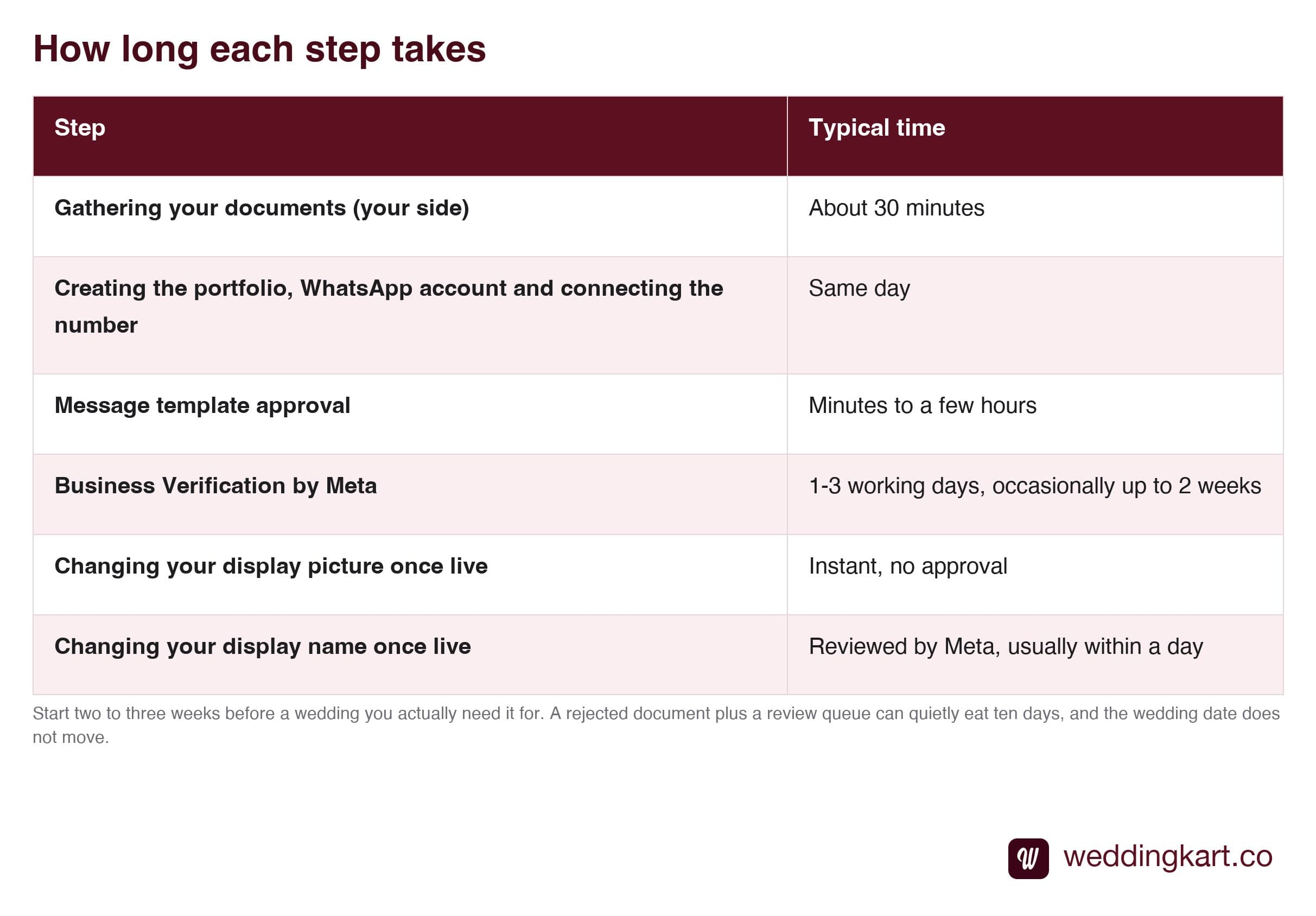
The practical advice that comes out of this: start the setup two to three weeks before a wedding you actually need it for, not the week of. Nothing here is slow in itself, but a rejected document plus a Meta review queue plus template approval can quietly eat ten days, and the wedding date does not move.
Your checklist
- Decide whether you are sending from a shared number or your own
- Business document ready - GST preferred, clear and not expired
- Business email on your own domain, not Gmail
- A live website showing your business name
- A phone number someone can answer for the confirmation code
- Business name and address copied exactly from the document
That is genuinely all of it. The process has a reputation for being painful, and it earns that reputation almost entirely through one avoidable mistake - retyping an address from memory. Get the document in front of you and the rest is waiting.
Tools referenced in this post
Try Weddingkart for your wedding
Guest lists, WhatsApp invites, RSVPs, countdowns and more - the AI layer for Indian weddings.
Related reading
Frequently Asked Questions
Does setting up WhatsApp Business API cost anything?
No. The Meta Business Portfolio, the WhatsApp Business Account and Business Verification are all free, and all handled directly with Meta. You pay only for the messages you send, and for whatever software you use to send them. If someone is charging you a setup fee to create these accounts, they are charging you for something Meta gives away.
How long does the whole setup take?
Usually one to three working days end to end. Gathering your documents takes about half an hour on your side. Creating the portfolio, the WhatsApp account and connecting the number can be done the same day. Message templates are approved in minutes to a few hours. Business Verification by Meta is the slow step - normally one to three working days, occasionally up to two weeks if they ask for more information.
Can I use my existing WhatsApp number?
Yes. The usual route is to remove it from the WhatsApp or WhatsApp Business app first, after which it stops working there - though deregistering it from the API later releases the number back. Meta’s Coexistence feature is the other route: an eligible WhatsApp Business app number can run on the app and the platform at the same time, with history synced. Most event companies still prefer a fresh SIM so the number their team chats on day to day is left untouched.
Do I need to be a Private Limited company?
No. A proprietorship works perfectly well as long as you have a GST certificate, a Udyam or MSME certificate, or a Shop and Establishment licence. Meta is checking that a real, identifiable business exists - not what structure it takes. LLPs and Private Limited companies can use their incorporation certificate, though GST usually approves faster because it carries the name and the address on a single page.
What if I do not have a website or a business email?
Neither should stop you, and both are quick to fix. Meta wants a live website showing your business name - a single page is enough, as long as it loads over https. The email needs to be on that same domain, something like yourname@yourcompany.com, because free Gmail, Yahoo and Outlook addresses are usually rejected. If you are missing either, most providers will help you set them up rather than turn you away.
Was this article helpful?
Share
By Weddingkart TeamLast updated