
Quick Answer
Why does Meta business verification keep getting rejected?
Usually it is not your business or your document - it is that what you typed does not match the document exactly. Verification checks your details against registry records, so small differences matter: 'Shop No. 12' entered as 'Shop 12', 'Road' shortened to 'Rd.', or '&' typed as 'and' can all fail even though a human would read them as identical. Other common causes are a PAN card submitted alone, which carries no address, and a website or business email that cannot be reached. Resubmissions are limited before you need to raise a support ticket with Meta, so fix the mismatch before resubmitting rather than guessing.
Last updated:
Why Meta Rejects Business Verification
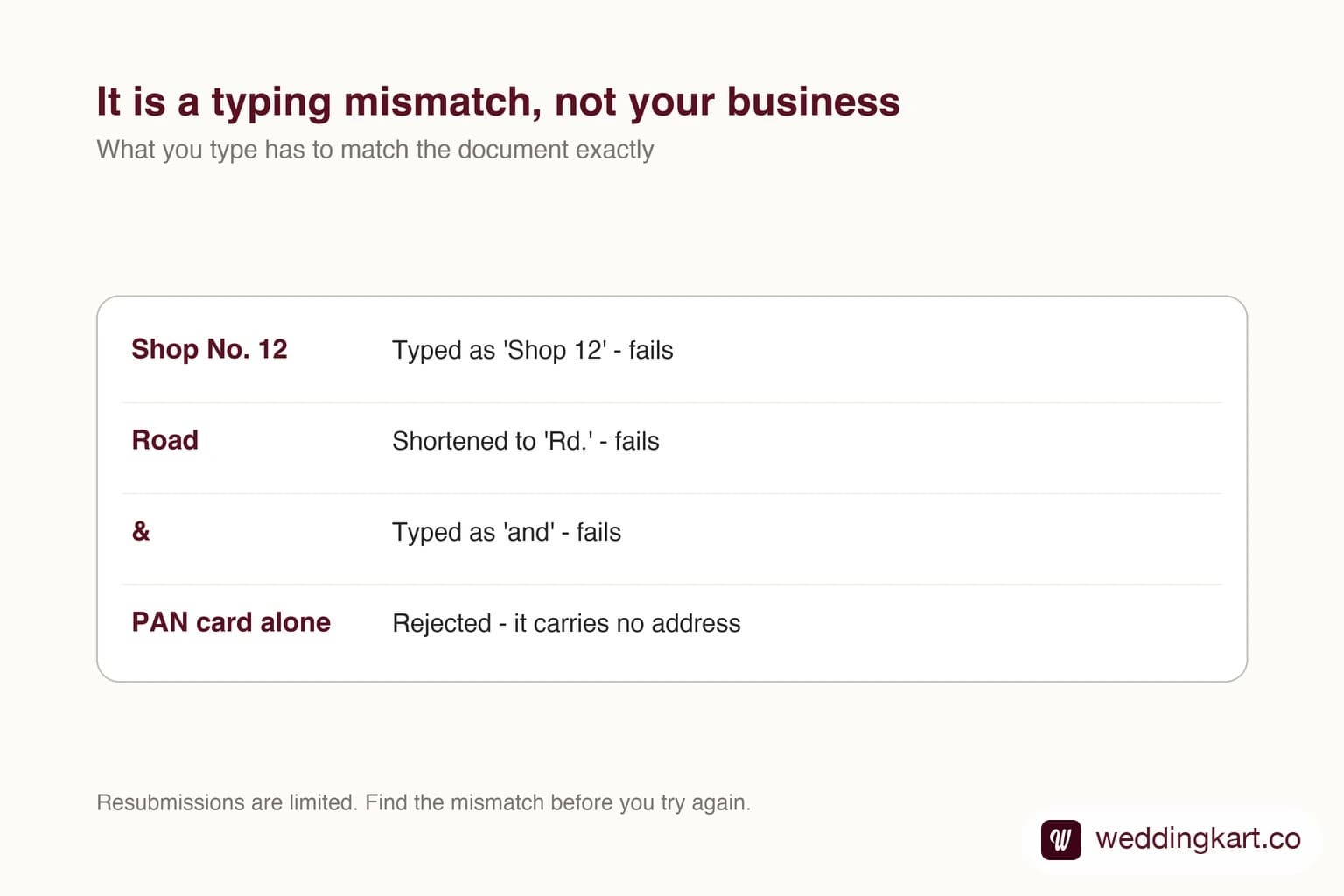
A verification rejection reads like Meta has looked at your company and decided something is wrong with it. That is almost never what happened.
What usually happened is that you typed your address slightly differently from how it appears on your certificate, and the two did not match. Your business is fine. Your document is probably fine. The form is the problem.
Why this happens so often
The check is not as forgiving as a person would be. What matters is whether the details you entered match the characters on the document you uploaded. A human reading “Shop No. 12, M.G. Road” and “Shop 12, MG Rd” sees the same place. The check does not.
And because your own brain silently corrects these differences when you proofread, the mismatch is genuinely hard to spot on your own address. You know what it is supposed to say, so that is what you see.
The mismatches that cause it
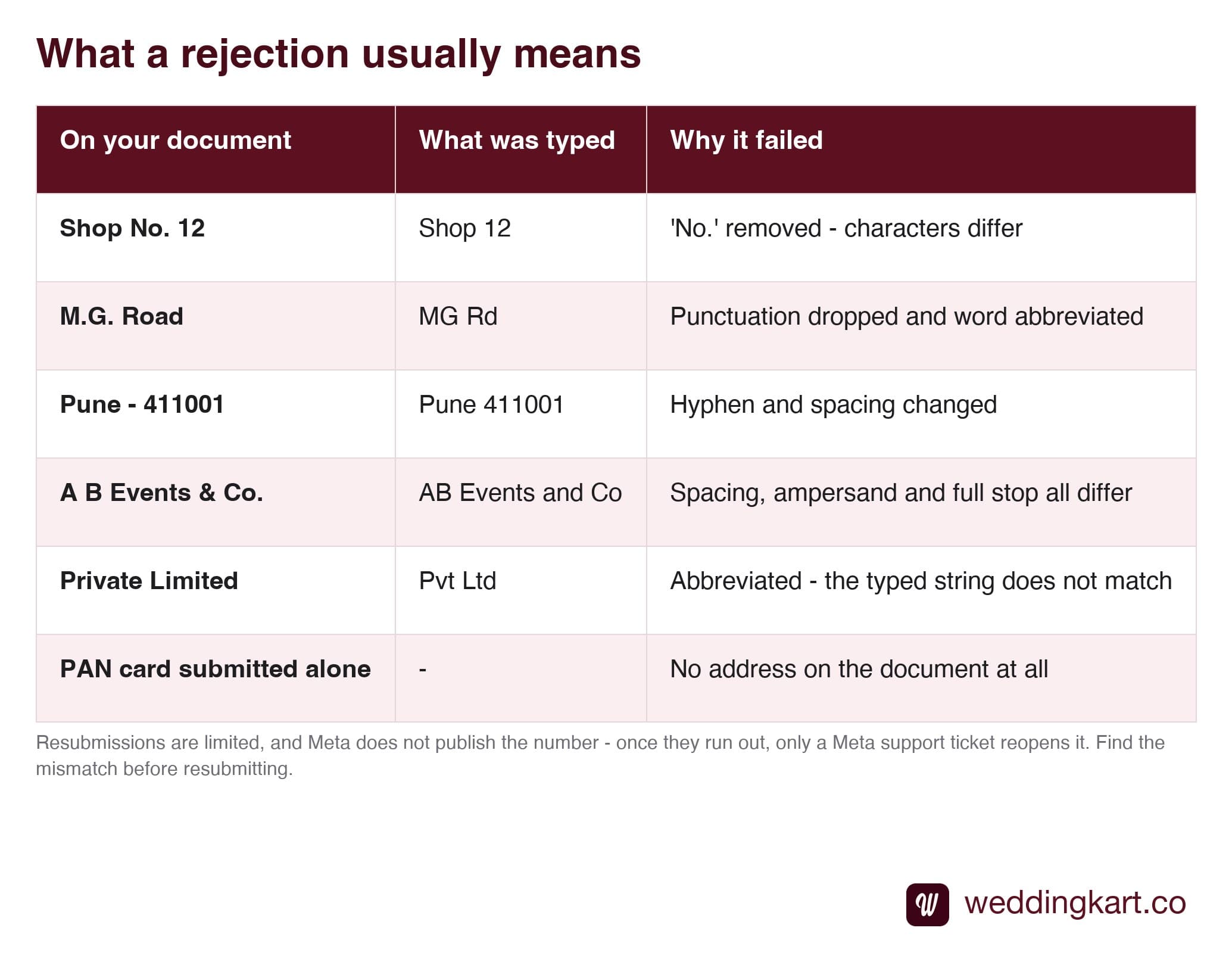
Most often it is in the address line, and most often it is an abbreviation - the one thing everybody shortens without thinking.
The other three causes
If the typing genuinely matches, check these in order.
A PAN card submitted alone. It has no address on it, so it can never satisfy the check. Meta is verifying the name and the location together. Include PAN as support if you want, but never as the only document.
A free email address. Gmail, Yahoo and Outlook addresses are usually rejected. Meta wants an email on the same domain as your website, because anyone can create a free address claiming to be any business.
A website that is not live. It needs to load, over https, and show your business name. A parked domain or a site that is still “coming soon” will not do it. One real page is enough. Full detail on all three in documents needed for WhatsApp API.
Your resubmissions are limited
This is the part that turns a small problem into a big one.
After a few rejected submissions - Meta does not publish the exact number - it stops accepting new attempts and you have to open a support ticket to get verification reopened. That path works, but it adds days - and it is entirely avoidable.
So do not resubmit hopefully. Find the mismatch first, even if it takes twenty minutes of character-by-character comparison, because twenty minutes is cheaper than a support queue. If you are already out of attempts, the process is in how to raise a Meta support ticket.
How to find it reliably
- Open the document at full size next to the form - not from memory, not from a different copy.
- Compare the business name first, including suffixes like Pvt Ltd, LLP, & Co.
- Then the address, one segment at a time: building, street, area, city, pincode. Check punctuation and spacing, not just words.
- Check abbreviations specifically - Road, Street, Number, Opposite, Near.
- Check “and” versus “&” in the business name.
- Then submit.
The good news in all of this: a rejection costs you nothing except time. It does not penalise your account, does not affect your number, and does not touch your existing messages. Your daily limit simply stays at 250 unique recipients until it clears - which matters enormously for a large wedding, and is explained in messaging limits.
Tools referenced in this post
Try Weddingkart for your wedding
Guest lists, WhatsApp invites, RSVPs, countdowns and more - the AI layer for Indian weddings.
Related reading
Frequently Asked Questions
How many times can I retry business verification?
Meta limits resubmissions, and once they run out you have to raise a support ticket through Business Support Home to get the case reopened. Meta does not publish the exact number, and in our experience it is only a handful. That is why guessing is expensive - a job that should take days becomes one that takes weeks. Treat each attempt as if it were your only one, and check the name and address character by character against the document before you submit.
Meta did not tell me what was wrong. How do I find it?
Put the document and the form side by side and compare them field by field, character by character - do not read for meaning, because your brain will silently correct differences. Check punctuation, abbreviations, spacing around hyphens, the word "and" versus an ampersand, and whether the pincode is formatted the same way. The mismatch is nearly always in the address line.
Can I change the document instead of the typing?
Yes, and sometimes that is the better move. If your GST certificate and your incorporation certificate show slightly different address formats, pick the one that matches what you actually want to type and submit that. What you cannot do is submit a document that does not show both the business name and the address - which is why a PAN card fails no matter how carefully you type.
Does a rejection hurt my account?
No. A rejected verification is not a penalty and it does not affect your WhatsApp number, your templates or your ability to send messages within your current limits. The only real cost is time, plus the attempt itself. Your daily sending limit simply stays at the unverified level of 250 unique recipients until verification succeeds.
What if I have run out of attempts?
Raise a support ticket through Meta Business Support Home, explain that you need verification reopened, and attach the correct document. It is slower than a clean submission but it is a normal path and people go through it every day. Have the corrected details ready before you open the ticket so you are not waiting twice.
Was this article helpful?
Share
By Weddingkart TeamLast updated