
Quick Answer
Who owns the WhatsApp number and guest data - you or your provider?
Two separate questions, and they have different answers. The Meta assets - the number, the approved templates, the sending reputation - belong to whoever owns the Meta Business Portfolio the WhatsApp Business Account was created under. Your guest list and RSVP data are not Meta assets at all: they live in your software provider's database, and what you can export is set by your contract with them, not by Meta. Both arrangements look completely identical while everything is working, so ask two explicit questions before onboarding - whose portfolio is this account in, and what can I export if I leave.
Last updated:
Who Owns Your WhatsApp Number and Data?
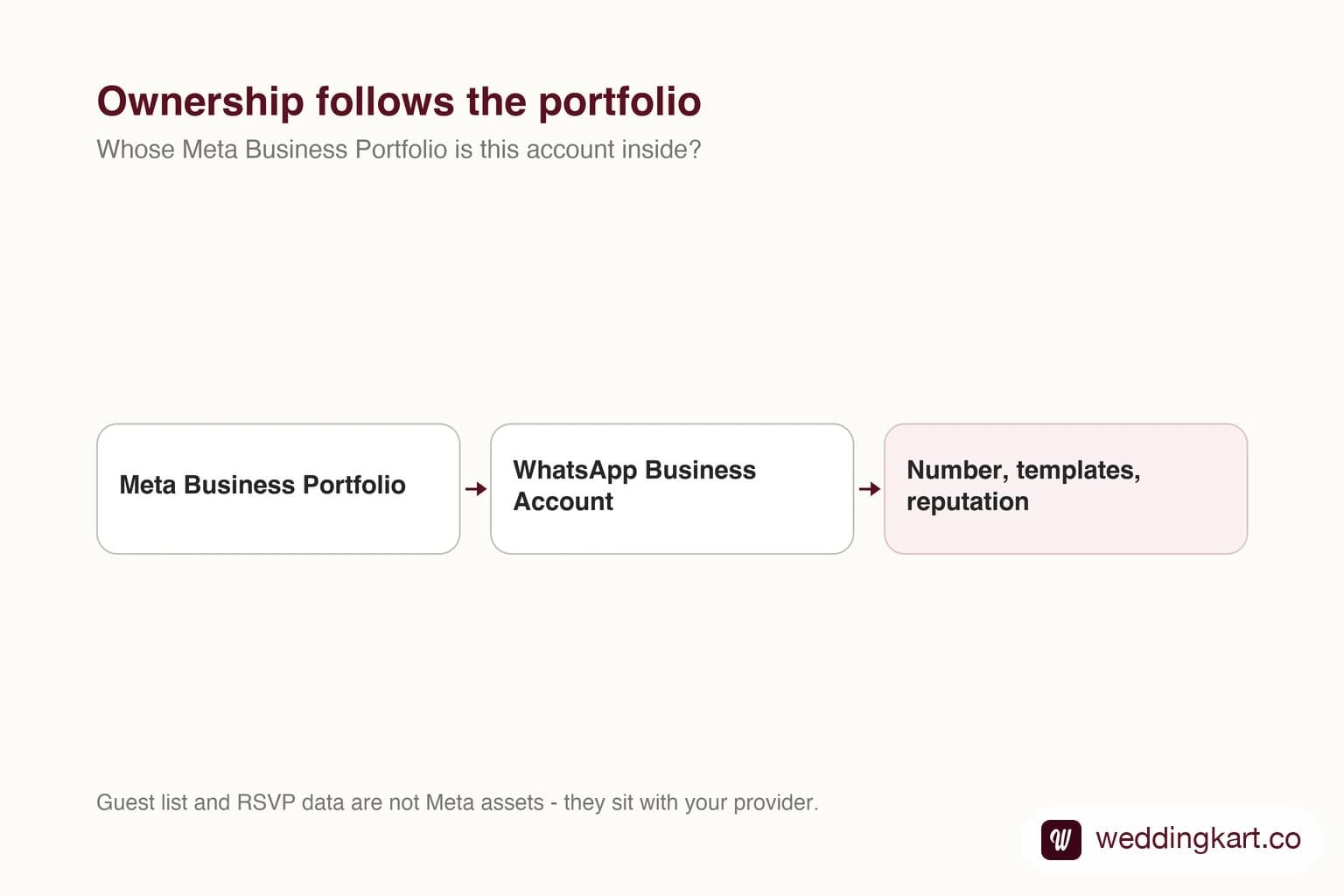
There is one question worth asking during WhatsApp onboarding that almost nobody asks, and it determines what happens if you ever want to leave.
Whose Meta Business Portfolio is my WhatsApp account being created inside?
Why it decides everything
The portfolio is the container. Inside it sits your WhatsApp Business Account, and inside that sit your phone number, your approved templates and the sending reputation the number has built up over every wedding you have run.
Whoever owns the container owns what is in it. That is the whole mechanism - there is no separate ownership document, no clause that overrides it.
The reason nobody notices
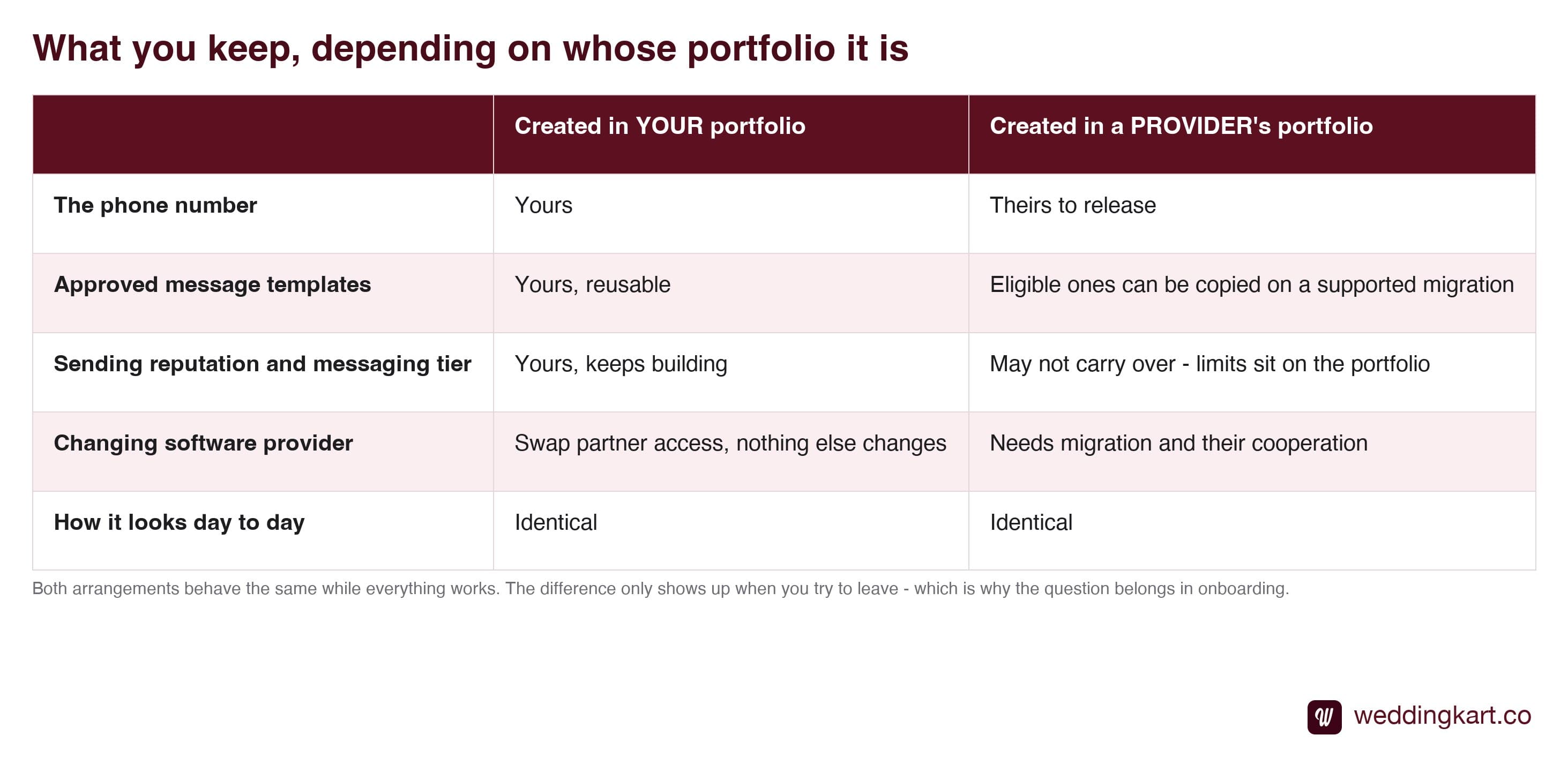
Both arrangements are completely identical while things are working.
Messages send the same way. The dashboard looks the same. Your name is on the sender either way. There is no day-to-day symptom of the account sitting in someone else’s portfolio - which is exactly why it goes unasked, and why people discover it at the worst possible moment, halfway through switching tools.
What you actually lose
If the account is not yours and you move on, the immediate problem is not the number itself - it is the sending history.
A number that has messaged thousands of guests cleanly has earned a quality rating and a messaging tier. Start a fresh portfolio and you are back at the bottom: 250 recipients a day until verification, then climbing the tiers again. For a business heading into wedding season, that is a genuine operational problem rather than an inconvenience. The mechanics are in messaging limits explained.
How to check, in two minutes
Log in to business.facebook.com with your own Meta account. Open business portfolio settings. Look for your WhatsApp Business Account.
Check which business is listed as the owner of the asset, not merely whether you can see it - shared access makes a provider-owned account visible to you, and a missing permission can hide one you actually own. If the owning business is yours, you are fine.
What to ask, and when
Ask during onboarding, not after. One sentence: “Will the WhatsApp Business Account be created under my Meta Business Portfolio or yours?”
A provider creating it in yours will say so immediately, because it is the answer they would rather give. One creating it in theirs is not necessarily doing anything wrong - it genuinely simplifies onboarding for businesses with no existing portfolio - but they should tell you plainly and move it on request.
Then ask the data version of the same question: can you export your full guest list and message history whenever you want, and what happens to it if you stop paying. Both questions are fair, both are quick to answer, and how they are answered tells you a lot. The access side of this is covered in is partner access safe.
Tools referenced in this post
Try Weddingkart for your wedding
Guest lists, WhatsApp invites, RSVPs, countdowns and more - the AI layer for Indian weddings.
Related reading
Frequently Asked Questions
How do I check whose portfolio my WhatsApp account is in?
Log in to business.facebook.com with your own Meta account and look at your business portfolio settings. If your WhatsApp Business Account is listed there under your business, it is yours. If you cannot see it at all, or you can only reach it through a login your provider gave you, then it is almost certainly sitting in their portfolio with you as a guest.
What happens to my number if I change providers?
If the account is in your portfolio, you remove the old provider's partner access, add the new one, and the number, templates and sending history carry on untouched. If it is in their portfolio, the number has to be migrated out - which is a deliberate process needing their cooperation, and the new account starts without the quality rating and messaging tier the old one had earned.
Who owns the guest phone numbers and RSVP data?
That is a separate question from the WhatsApp account and it comes down to your provider's terms rather than Meta's structure. Ask two things explicitly: can you export the full guest list and message history at any time, and what happens to that data if you stop paying. A provider confident in its answer will tell you plainly.
Is it a red flag if a provider creates the WABA in their own portfolio?
Not automatically - some genuinely do it to simplify onboarding, especially for customers who do not already have a Meta portfolio. What matters is whether they tell you up front and whether they will move it to yours on request. It becomes a red flag when the answer is vague, or when moving it later turns out to be difficult.
Does revoking partner access take my number away?
No. If the account lives in your portfolio, removing a partner simply removes their access. The WhatsApp Business Account, the phone number, the approved templates and the message history all stay exactly where they are, because they belong to the portfolio rather than to the partner who set them up.
Was this article helpful?
Share
By Weddingkart TeamLast updated